Add/Edit...System-Wide...Order System Lists...Custom 1-20
Order System Lists...Custom 1-20 is available for any additional information that may need to be included in the Work Order System. See System Wide Prefs. - User Defined Labels for more information about customizing them.
Add/Edit Custom 1 - 20 Lists
To add to or manage the Order System Lists Custom 1 - 20, in the IndySoft header, click Add/Edit and select System-Wide...Order System Lists...Custom # from the drop-down menu.
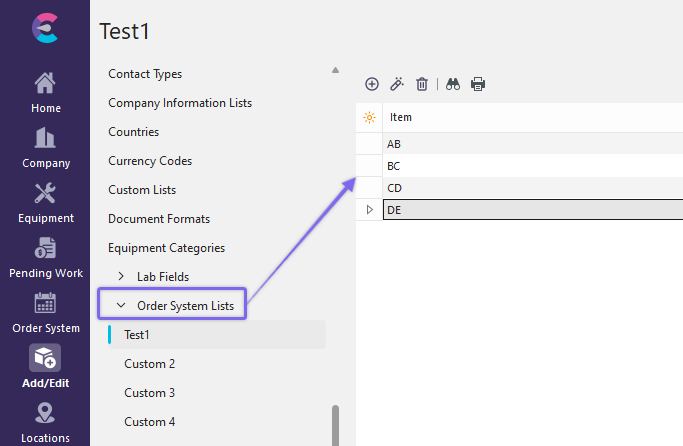
Add/Edit Custom 1 (aka Sales Rep in this example)
Click  'New Item' to add a new Item or
  to 'View/Edit Item.'
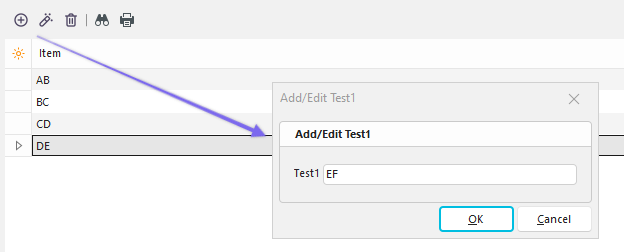
Add/New Item to Custom List
Click 'OK' and repeat as necessary. The information added to these lists will be found in the drop-down menus in the IndySoft...Order System...Additional Info. Tab.
Using Order System Lists...Custom 1-20
System Wide...Order System Lists...Custom 1-20 are used in the Work Order System:

View from Work Order System Window
Click the drop-down menu to display the list created in the previous steps.
Note: In the above screenshot, Custom 1 has been changed (customized) to 'Sales Rep' as described in System Wide Prefs. - User Defined Labels.
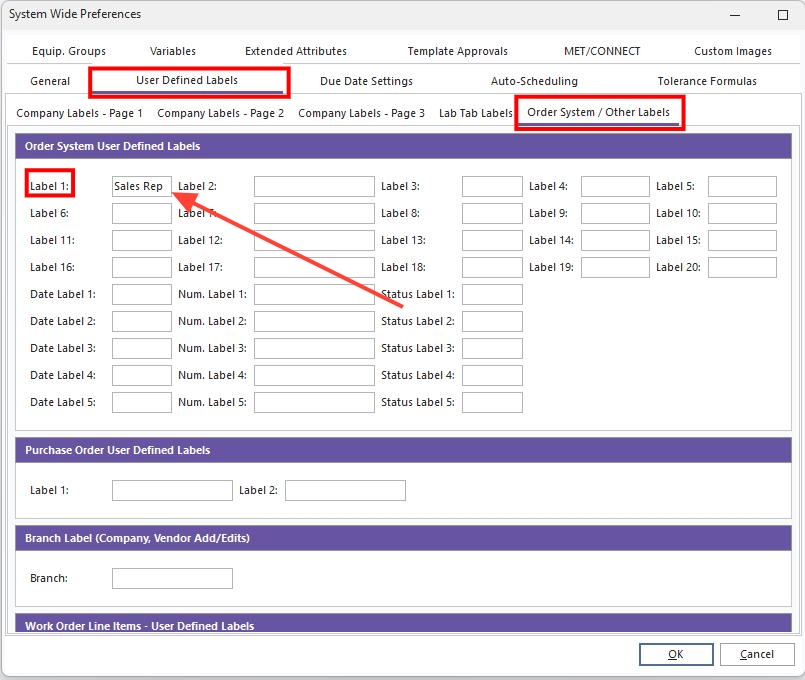
System Wide Preferences...User Defined Labels...Order System Labels...Example |