Configuration
Two new events come with the Read Only Default Configuration. Feel free to customize them or create additional events of your choice.
Request Onsite Service
The Request Onsite Service event can be used however you choose. Typically this event is set up to allow customers to select the equipment they wish to send in for calibration or onsite calibration. This event can be configured to generate a report that gets emailed to a respective group or individual.
Request Pick-up
The Request Pick-up event can be used however you choose. Typically this event is set up to allow customers to select the equipment they wish to have picked up for calibration or once their equipment is ready to be picked up. This event can be configured to generate a report that gets emailed to a respective group or individual.
Modifying Events for Read Only
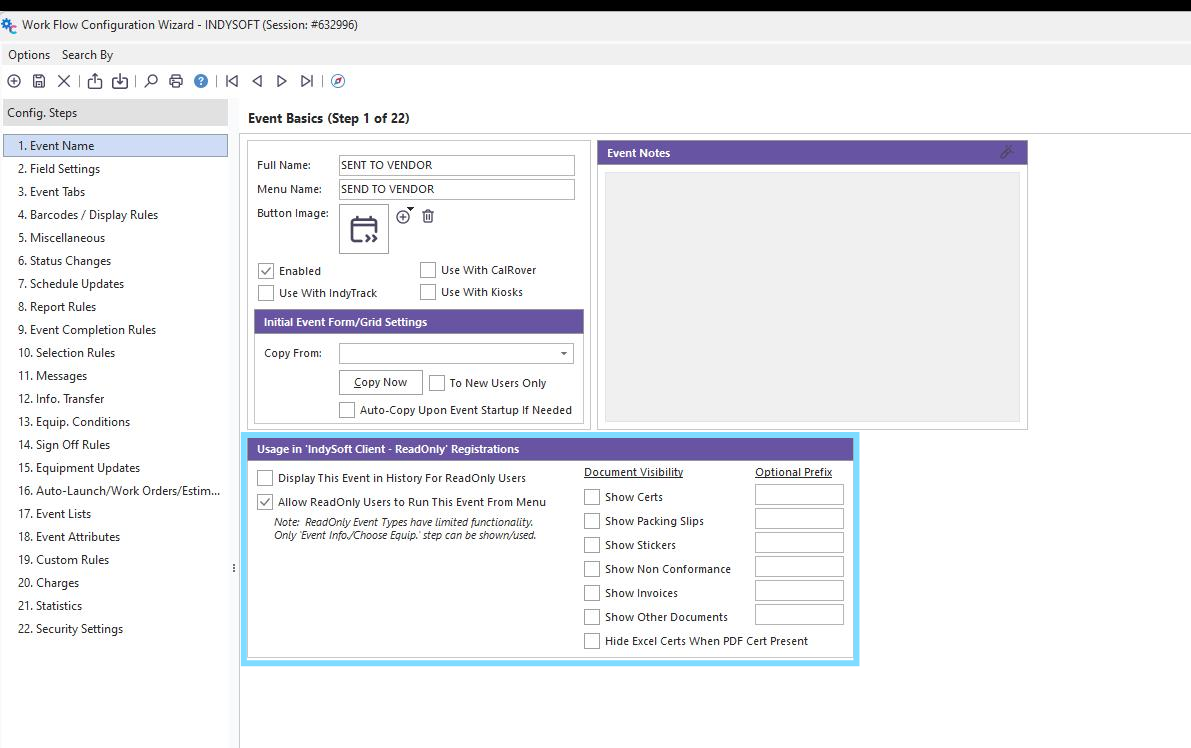
Display This Event in History For ReadOnly Users
When you check this box, it will allow Read-Only users to see the event history in the Equipment View Tab.
Allow ReadOnly Users to Run this Event from Menu
Events are blocked from Read Only users by default. You must check this box to allow Read Only users to run the selected event.
Show Certs
Checking this box on the calibration event will allow the Read Only users to view certificates in the history grid.
Showing Packing Slips
This box will allow the Read Only users to view Packing Slips in the history grid.
Show Stickers
This box will allow the Read Only users to view Stickers in the history grid.
Show Non-Conformance
This box will allow the Read Only users to view Non-Conformance documents in the history grid.
Show Invoices
This box will allow the Read Only users to view Invoices in the history grid.
Show Other Documents
This box will allow the Read Only users to view event documents in the history grid.
Hide Excel Certs when PDF cert Present
Checking this box will hide Excel certificates when PDF certificates are used in the history grid. |