Performing Events - Equip. Out to Employee
Equipment Out To Employee Option
An optional section can be added to IndySoft events that will display a grid hugging the bottom of the events wizard. This grid will show the selected Employee all the currently checked-out equipment. Note: This optional section should not be used in events that do not have an Employee drop-down. When an employee is selected, the grid contents will be filtered to show all equipment this Employee has checked out using IndySoft. Note: For this purpose, equipment is designated as being 'out' as long as the last Event performed upon that equipment was not a 'Storage Event.' Suppose an event type is not marked as a 'Storage Event' in the Event Configuration Wizard - Event Steps section for more details). In that case, IndySoft marks this equipment as being out until a 'Storage Event' is performed. This 'in' or 'out' status differs from the Tracking Status that can be set per piece of equipment. Customers will often utilize the tracking status to specify multiple equipment statuses, and in this case, the 'Equip. Out to Employee' grid might become less useful. This grid can be helpful if you have your event types set up correctly as Storage and non-Storage events.
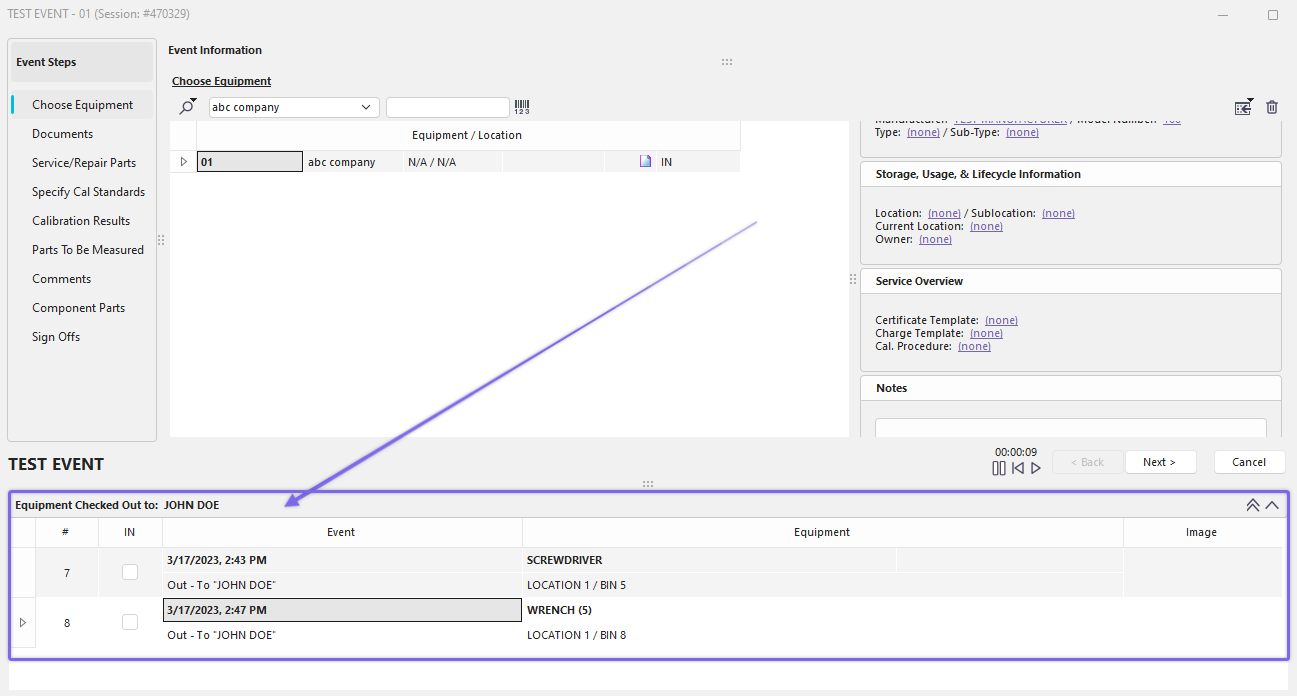
Event Steps with Equipment Checked Out to Employee
Beyond being simply a convenient visual report, you can also click and drag equipment from this grid into the 'Choose Equipment' grid, found in the 'Choose Equipment' event step (see the Event steps - Choose Equipment section for more details). When selected from this grid, the equipment will become checked in the 'IN' field. Two buttons also appear above the grid:
·Add All Equipment Below to This Event Pressing this button will add all of the equipment to the 'Equip. Out to Employee' grid to the current Event.
·Add Selected Equipment to this Event Pressing this button will add the currently selected equipment in the 'Equip. Out to Employee' grid to the current Event. |