Installation
To install the RP1 events, select Options: Preferences: Work Flow Config. (Event Configuration)... from the menu.
Select Import Event Configuration and navigate to RP1.IXP.
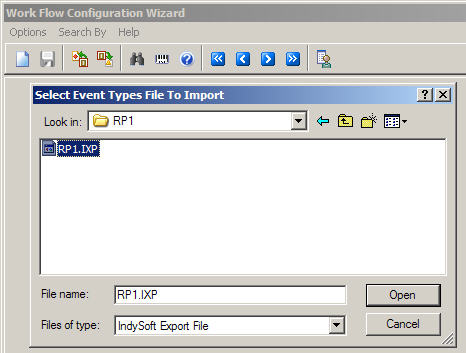
This will install the following events with no security settings:
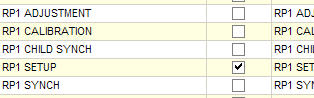
RP1 Setup is enabled by default in order to make sure the Global Variables are set up properly before you start using RP1 Calibration. RP1 Adjustment, Child Synch, and Synch are utility and logging events that should never be enabled.
Exit Work Flow Config and press Ctrl-Shift-Alt-F5 to refresh the event list.
Run event 'Rp1 Setup' from the Events menu. You will see the following dialogs:

Please read this document first. In particular, be sure you understand what the dialogs below are asking for.

Selecting yes will bypass the dialogs for MTEA through MTEE and WEIGHT1 through WEIGHT3 and use the defaults in Simplified Calibration Interval Analysis.

MTEA - MTEE default to 1.0, 0.8, 0.6, 0.4, and 0.3.

WEIGHT1 - WEIGHT3 default to 0.8, 0.2, and 0.1.

When computing how far out of tolerance a calibration event's As Found data is, you can use the Average, Maximum, or Minimum levels, where the level for a testpoint is how many multiples of the tolerance distance the As Found data was.

RP1 calculations can be performed based only on the RP1 Calibration event, or based on all calibration results.

Determines whether you will start using the RP1 calculations immediately.

For the dialogs below, you have a choice between using extended attributes to store gage-specific RP1 data or using standard gage fields. If you choose to use gage fields, you will need to use the database field name. It is recommended that you use extended attributes.

This is the Field/Attribute name for storing the maximum frequency a gage can have. There is also a maximum interval, minimum frequency, and minimum interval.

If the extended attribute name is being used, you have a choice to clear it or select a different name.

Child equipment that are to be synchronized use this flag to determine if they are ready to have their intervals synchronized.

Gages with child equipment use this flag to determine if the children should be synchronized. Do not give a child more than one parent, or synchronizations may not work correctly.

Gages can be individually set to use the RP1 calibration interval adjustment.
If, at any time, you press Cancel, you will be asked to confirm aborting the event.

Once the RP1 Setup event finishes running, press Ctrl-Alt-Shift-F5 again to refresh the events. Rp1 Calibration will now be available to run instead of Rp1 Setup.
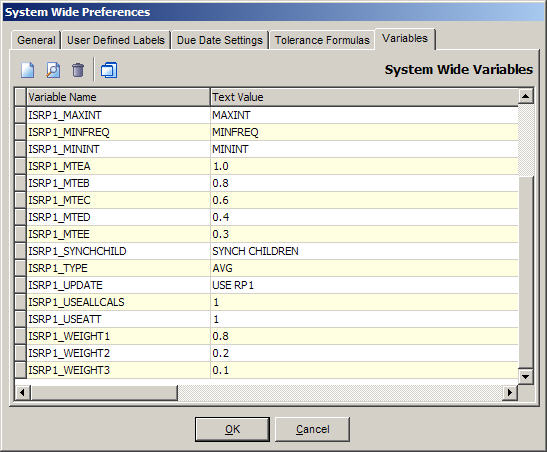
At this point, you will have several System-Wide variables added to the System Wide Preferences, Variables tab.
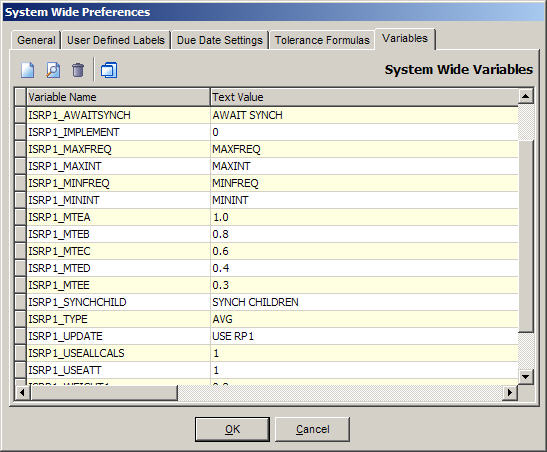
ISRP1_AWAITSYNCH: stores the field/attribute to store whether the gage is waiting to be synchronized with fellow children
ISRP1_IMPLEMENT: stores whether or not to use RP1 calculations in the system
ISRP1_MAXFREQ: stores the field/attribute to store the gage's maximum frequency. This will be numeric.
ISRP1_MAXINT: stores the field/attribute to store the gage's maximum interval. This will be DAYS, WEEKS, MONTHS, or YEARS.
ISRP1_MINFREQ: stores the field/attribute to store the gage's minimum frequency. This will be numeric.
ISRP1_MININT: stores the field/attribute to store the gage's minimum interval. This will be DAYS, WEEKS, MONTHS, or YEARS.
ISRP1_MTEA: stores MTEA
ISRP1_MTEB: stores MTEB
ISRP1_MTEC: stores MTEC
ISRP1_MTED: stores MTED
ISRP1_MTEE: stores MTEE
ISRP1_SYNCHCHILD: stores the field/attribute to store whether the gage's children should be synchronized
ISRP1_TYPE: stores the calculation type. This will be AVG, MAX, or MIN
ISRP1_UPDATE: stores the field/attribute to store whether the gage should use RP1 calculations
ISRP1_USEALLCALS: stores whether or not to use all calibration events in RP1 calculations
ISRP1_USEATT: stores whether or not to use extended attributes to store gage-specific data
ISRP1_WEIGHT1: stores WEIGHT1
ISRP1_WEIGHT2: stores WEIGHT2
ISRP1_WEIGHT3: stores WEIGHT3
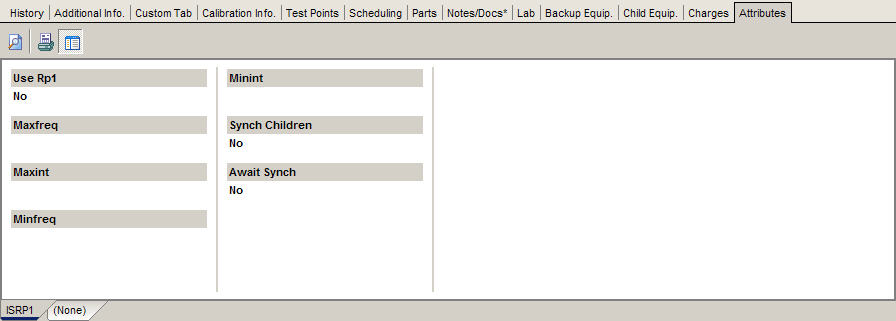
If using extended attributes, they will be placed in a tab called ISRP1. By default, the gages are set to not use RP1. Use RP1 should not be turned on for a gage until the maximum and minimum intervals have been set, or the calibration schedule will get set to 0 DAYS. |