Output - Report
The reports dialog allows you to include an IndySoft report for the resulting equipment.
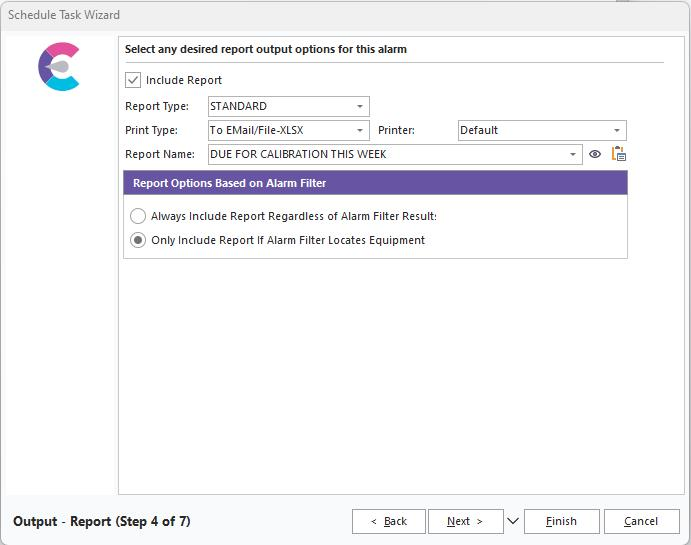
IndySoft Alarm System - Output Report
Include Report
Checking this box enables the alarm system to generate a standard or custom IndySoft report.
Report Type
There are three options:
·Alarms - allows you to send custom-designed alarm reports designed in PrintBuilder. This option is great for based equipment listings for which you want to send out notifications.
·Standard - will generate a standard IndySoft report (reports found on the IndySoft Reports Menu and designed in Profile Manager).
·Custom - will generate a custom report created in PrintBuilder. This is the most flexible solution and is good for more complicated reports.
Schedule Type
Choose the schedule type related to the alarm report that will be generated.
Print Type
Choose how you want the report to be sent with the alarm. Note: if you are selecting a specific output type (like XLS, XLSX, etc.) and then in Step 5, you are also setting a specific output file name, be sure to use a consistent file extension. Also, if selecting a STANDARD report type, ensure the standard report's Layout Type is consistent with the output setup in the alarm. For example, a 'Grid' layout type in a STANDARD report outputs to Excel (XLS or XLSX) but the 'Design,' 'Columns,' and 'Field Sets' layout types output to PDF.
Printer
If sending to a printer, specify Default printer or one of the five printer types (specified in User/Location Settings)
Report Name
Choose the report name you want to send.
Report Options Based on Alarm Filter
·Always Include Report Regardless of Alarm Filter Results
Selecting this option will always include a custom report, even if the custom report's filter returns no equipment. It will also ignore the alarm filter specified earlier.
·Only Include Report if Alarm Filter Locates Equipment
This option will include the report only if the filter specified earlier returns equipment. Because the alarm system can't pre-determine if a report will return equipment or not, this option is commonly used to mirror the filter of the custom report, allowing the alarm system to detect if the report will return any equipment or not. |