RCM Service
The RCM Service utility is a Windows Service that can be installed through the RCM Setup Utility's Configuration page:
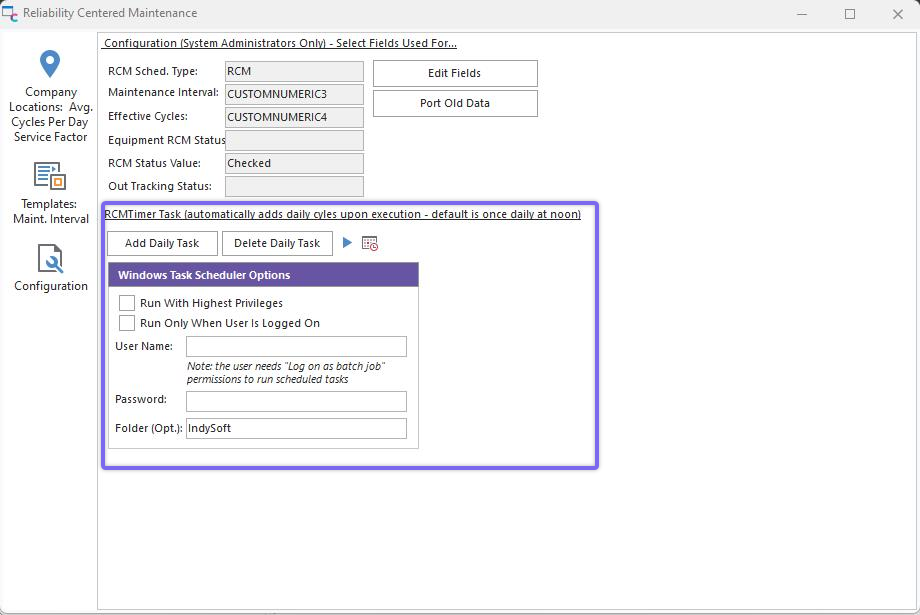
Install RCM Service - Windows Service
Note: This service only needs to be installed on one workstation.
This service executes at noon of each day, finds all assets in the 'Out Tracking Status' tracking status (that optionally have the 'Equipment RCM Status' flag ON), notes their Current Location...looks up the Line # associated with this location (as setup on the 'Company Locations' tab of the RCM Setup Utility)...finds the Avg. # of Cycles per day...multiplies it by the Service Factor for that line...then adds that daily amount of cycles to the asset.
Each asset with its schedule type updated by the RCM Service daily will see an 'RCM LOG' event created or updated with the daily changes. Since updates are made daily, only one of these events exists per asset. A new line is appended to the event's comments to reflect each daily update. So this 'RCM LOG' event could be reviewed to note (as an example) that the asset was used for two months on Line #2 at Location 'RIG234B' at 235 Effective Cycles per day, then moved to Line #3 at Location 'RIG234C' which has 252 Effective Cycles per day, etc.
The start/top buttons on the bottom of the RCM Setup's Configuration tab can quickly start/stop the RCM Service. The current run status is also shown to the right of the start/stop buttons. |