Setup Default Item Captions
To access work order information, double-click on it in the grid (see Grid View). Use this dialog to configure the item captions and item memo text for scheduled Work Order items and scheduled Work Order Line Items. These two values for each linked calendar item are noted below:
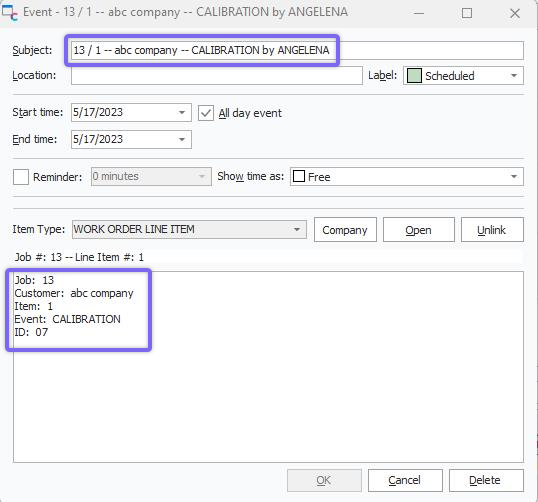
Work Scheduling - Item Captions (Subject & Message)
The setup of Default Item Captions depends upon security items in Profile Manager: IndySoft Calendar...Block Setup Default Item Captions. You can also access this dialog from the Work Scheduling module  Options Icon.
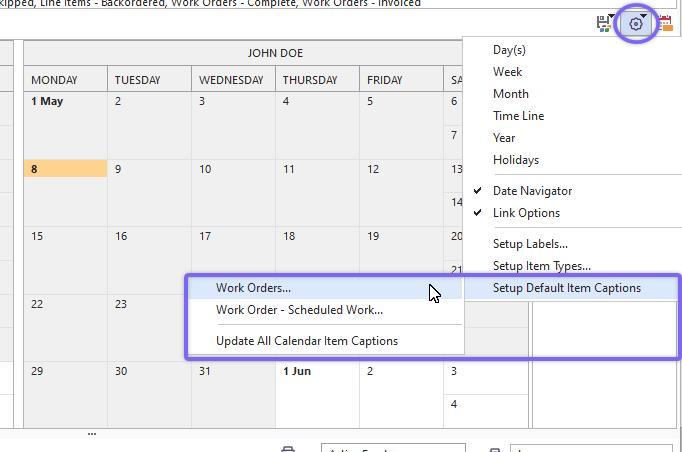
Work Scheduling Module - Options
Note: There are setup dialogs for both 'Work Orders' and 'Work Orders - Scheduled Work' (Line items). The interface is the same:
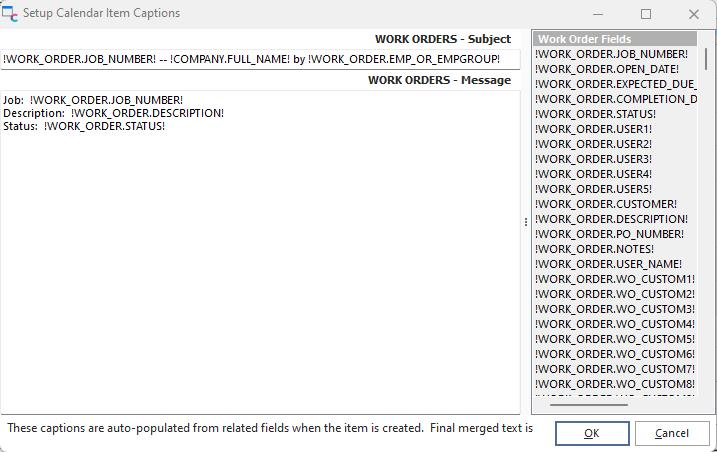
Setup Calendar Item Captions
To apply the new settings to all previous work items, click 'Update All Calendar Item Captions' under Options.
To configure the subject or message, input the text. A group of mail merge possibilities are shown to the right - you can drag/drop these values into either text area. Work Order captions allow mail-merge on 'Work Order Fields' and 'Company Fields'. Work Order Scheduled Work captions allow mail merge on 'Work Order Fields,' 'Company Fields', and 'Scheduled Work' fields (line-item level fields). The input of these mail-merge sections is similar to the setup of email subject/body from within Workflow Configuration...Report Rules. The mail-merge items (text fields that begin/end with '!') will be automatically replaced whenever the item is first scheduled or whenever the item is modified. For instance, when the item is originally scheduled (drag/drop from the lower right of the main Work Scheduling dialog onto the calendar already filtered for 'JOHN DOE'), the calendar item caption might automatically become:

Captions After Initial Schedule
Then later, the item might be re-assigned to a different user by dragging/dropping from an employee in the lower-right of the Work Scheduling Module, now assigning to TOM JOHNSON. Note that the captions are automatically updated:

Captions After Re-Assignment |