Options
The import options tab allows finer control over the data types brought into the IndySoft Event.
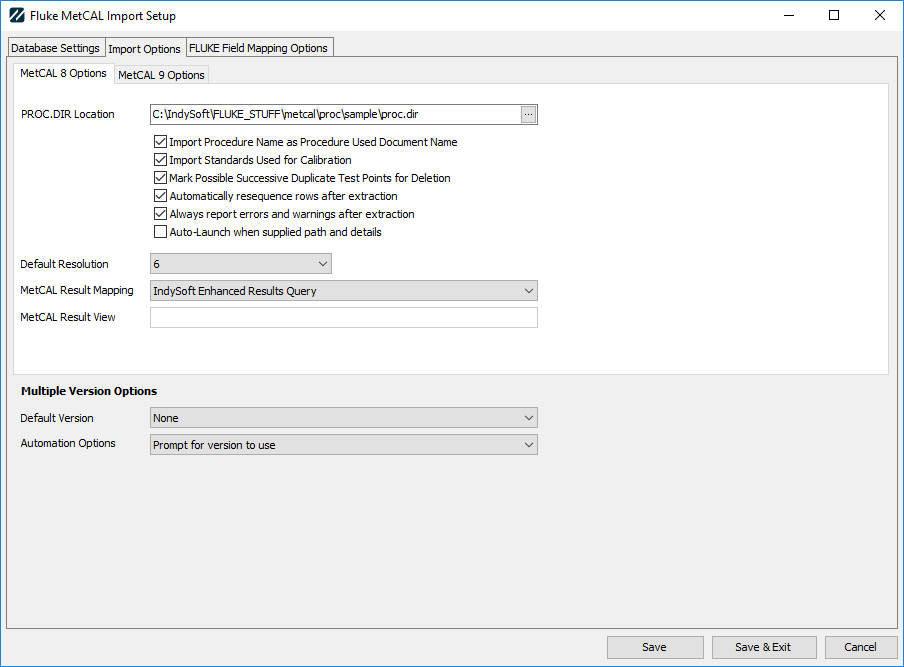
MetCAL 8 Options
PROC.DIR Location
Enter the path to your PROD.DIR file. This will fill the procedures list for selection in the importer.
Import Procedure Name as Procedure Used Document Name
When enabled, the procedure's name will be pulled from the MetCAL database and placed into the calibration event.
Import Standards Used for Calibration
When enabled, the name(s) of any standard(s) used in the MetCAL procedure will be added to the calibration event. Please Note: your assets MUST ALREADY EXIST in the IndySoft Database. If they do not, you cannot complete the event until the issue is corrected.
Mark Possible Successive Duplicate Test Points for Deletion
Any duplicate rows (i.e., descriptive rows with no test point collection) will be marked for a pending deletion when enabled.
Automatically resequence rows after extraction
When enabled, the importer will automatically make a one-pass at the final results to remove any sequence gaps in your results.
Always report errors and warnings after extraction
If any conversion errors occur, they will be logged in the Review/Error window. When enabled, this option will notify you errors have occurred and prompt you to view the log.
Auto-Launch when supplied path and details
When enabled and your path and credentials are set, IndySoft will launch into Fluke MetCAL automatically when the module initializes, targeting the asset passed by IndySoft.
Default Resolution
When resolution cannot be determined in an import, this option will define the default to be used instead.
MetCAL Result Mapping/View
Two options currently exist for this function. The first is Standard Results which will read the MetCAL 8 Results table for test point results. Selecting the second option, Custom View will enable the secondary text box in which you can supply the name of a view used in the MetCAL8 database for your results. Selecting this option will require a complete build-up of your custom mapping columns and should only be used by skilled MetCAL/IndySoft users.
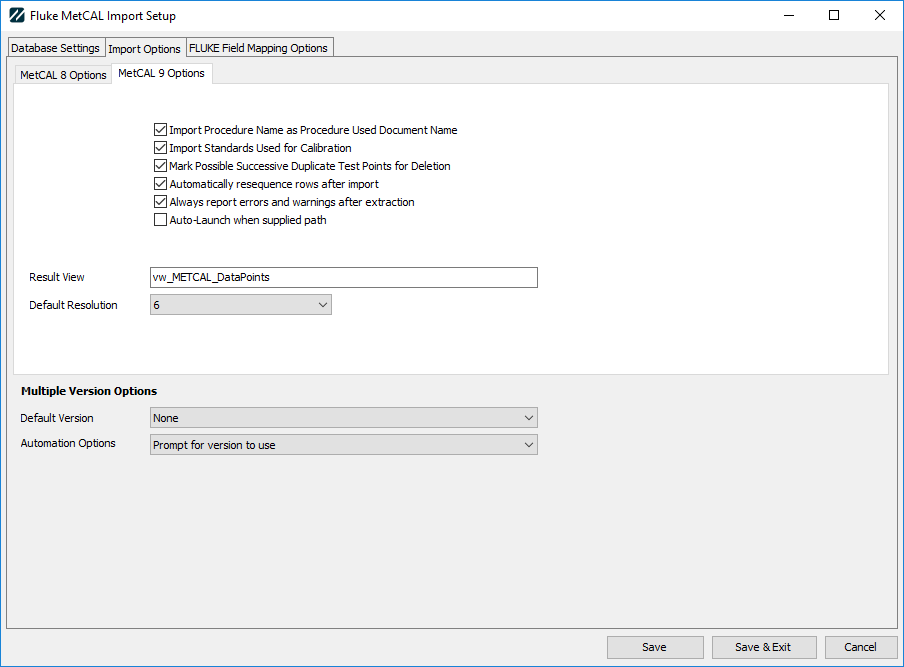
MetCAL 9 Options
Import Procedure Name as Procedure Used Document Name
When enabled, the procedure's name will be pulled from the MetCAL database and placed into the calibration event.
Import Standards Used for Calibration
When enabled, the name(s) of any standard(s) used in the MetCAL procedure will be added to the calibration event. Please Note: your assets MUST ALREADY EXIST in the IndySoft Database. If they do not, you cannot complete the event until the issue is corrected.
Mark Possible Successive Duplicate Test Points for Deletion
Any duplicate rows (i.e., descriptive rows with no test point collection) will be marked for a pending deletion when enabled.
Automatically resequence rows after extraction
When enabled, the importer will automatically make a one-pass at the final results to remove any sequence gaps in your results.
Always report errors and warnings after extraction
If any conversion errors occur, they will be logged in the Review/Error window. When enabled, this option will notify you errors have occurred and prompt you to view the log.
Auto-Launch when supplied path and details
When enabled and your path and credentials are set, IndySoft will launch into Fluke MetCAL automatically when the module initializes, targeting the asset passed by IndySoft.
MetCAL Result View
For use with MetTEAM, IndySoft defaults to the METCAL datapoints view. Changing this option will require a complete build-up of your custom mapping columns and should only be used by skilled MetCAL/IndySoft users.
Default Resolution
When resolution cannot be determined in an import, this option will define the default to be used instead.
Multiple Version Options
Default Version
If both MetCAL8 and MetCAL9 have been installed, you can define which version is default/preferred.
Automation Options
If both MetCAL8 and MetCAL9 have been installed, these options allow you to control which version launches for automation efforts. |