Test Point Grid Setup
The first two steps of setting up a pipette's test points is to set the Setup Grid and Results Grid to PIPETTE. Additionally, you need to choose one of the Pipette options as the Tolerance Type.
Because pipettes are defined by a nominal value, along with an accuracy and/or precision, the test points grid will look a little non-standard.
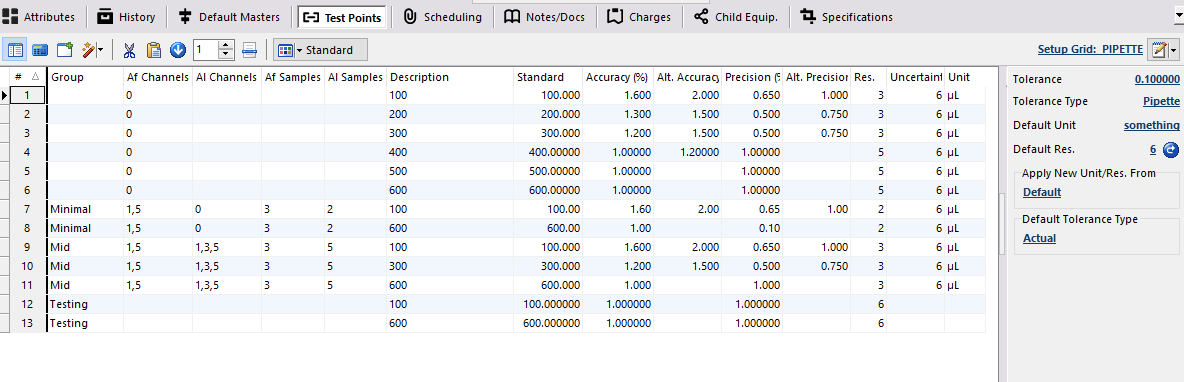
Depending on the Tolerance Type selected, the tolerances will be interpreted differently:
Pipette: This is the legacy tolerance from 12.1 and earlier. It is treated as Pipette % Value (below).
Pipette % Range: Accuracy and Precision will be interpreted as a percentage of the maximum nominal value for that group
Pipette % Value: Accuracy and Precision will be interpreted as a percentage of the current test point.
Pipette microL: Accuracy and Precision will be interpreted as the limit in microliters.
The columns in the test point grid are defined below:
Group (Custom 1) allows you to have several predefined sets of test points that you can choose from when you calibrate the pipette.
Af Channels (Custom 2) allows you to specify a subset of the channels to test in as found, by default. This value should be the same for all items in a given group. Blank will default to all channels. 0 indicates As Found data is not to be collected for this test point in this group.
Al Channels (Custom 3) allows you to specify a subset of the channels to test in as found, but default. This value should be the same for all items in a given group. Blank will default to all channels. 0 indicates As Left data is not to be collected for this test point in this group.
Af Samples (Custom 4) allows you to specify a subset of the channels to test in as found, but default. This value should be the same for all items in a given group. Blank will default to the value selected in Pipette Method Setup.
Al Samples (Custom 5) allows you to specify a subset of the channels to test in as found, but default. This value should be the same for all items in a given group. Blank will default to the value selected in Pipette Method Setup.
Description should be a good description of the line.
Standard should always be the target in microliters.
Accuracy (Extra Num 1) should be the desired percent accuracy (between 0 and 100%)
Alt. Accuracy (Extra Num 3) is an optional value for reminding the technician of an alternate accuracy. For example, if you calibrate pipettes to manufacturer spec, with ISO 8655 as a backup, you would list the ISO 8655 spec as "Alt. Accuracy".
Precision (Extra Num 2) should be the desired percent precision (between 0 and 100%)
Alt. Precision (Extra Num 4) is an optional value for reminding the technician of an alternate precision. For example, if you calibrate pipettes to manufacturer spec, with ISO 8655 as a backup, you would list the ISO 8655 spec as "Alt. Precision".
Res. and Uncertainty Res. should be the desired resolutions.
Unit: Regardless of the unit put here, all pipette calculations use microliters as the unit. Putting a different unit will generally cause confusion.
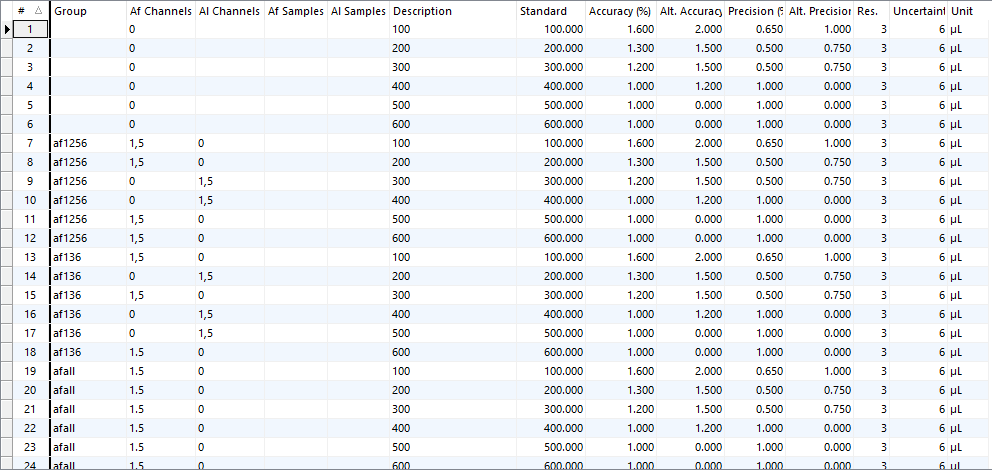
Special care needs to be taken if you want only certain as found/as left test points in a group. in the screen shot above, the group "af1256" will use test points 1-2,5-6 for as found, and 3-4 for as left. Similarly, "af136" will use 1,3,6 for as found, and 2,4-5 for as left.
Also, be sure to use a Pipette Tolerance Type to ensure the dual-tolerancing works properly.
When the pipette data is complete, the results grid will be similar to the one below: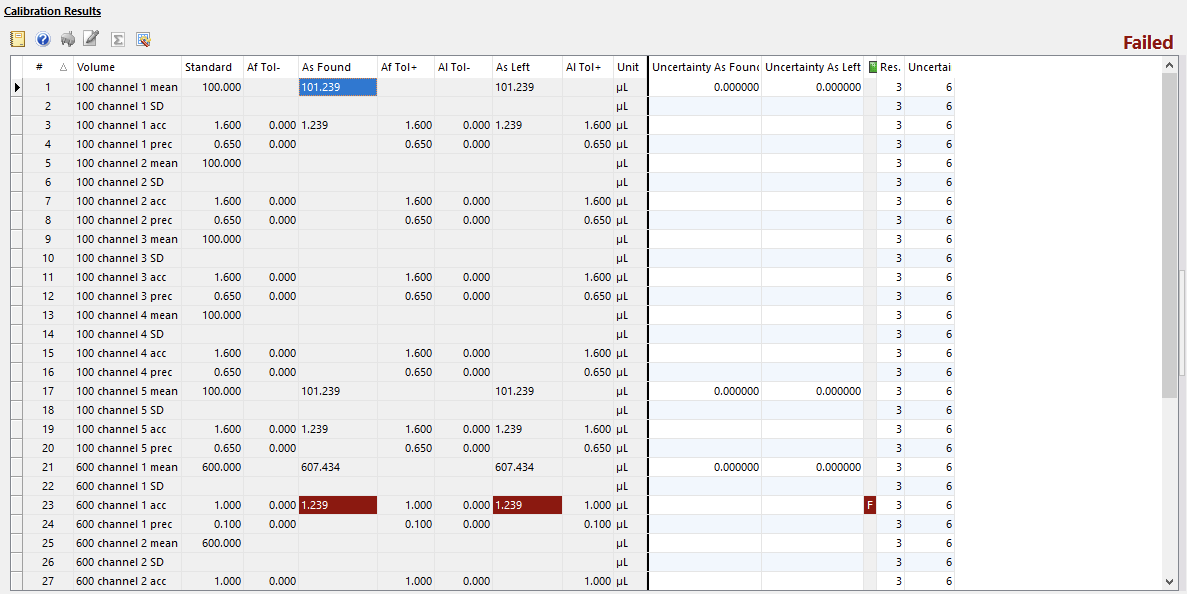
Each default test point generates 4 test points per channel. So a 4-channel pipette with 5 testpoints will have 4x5x4 = 80 test points in the resulting calibration.
As Found/As Left readings are stored as either a 1 (in tolerance) or 0 (out of tolerance) for the purposes of determining the overall calibration result.
As Found and As Left environmental data is saved in (AL instead of AF for as left)
ENV_AF_BP: Barometric Pressure
ENV_AF_BP_TYPE: Barometric Pressure Units
ENV_AF_RH: Relative humidity
ENV_AF_TEMP: Temperature
ENV_AF_TEMP_TYPE: Temperature Units
AF_EXTRANUM1: Z*Y Factor
AF_EXTRANUM2: Air density
AF_EXTRANUM3: Cubic Expansion
AF_EXTRANUM4: Y-Factor |