Event Script Trigger Actions - Adding Equipment
As Equipment Is Added
When equipment is added (either through the barcode, a menu, or automatically) the following actions take place. Where triggers exist within this process, they are noted in****blue text**.**
Any flowchart step with an orange background is one where you can invoke AbortAction to abort execution.
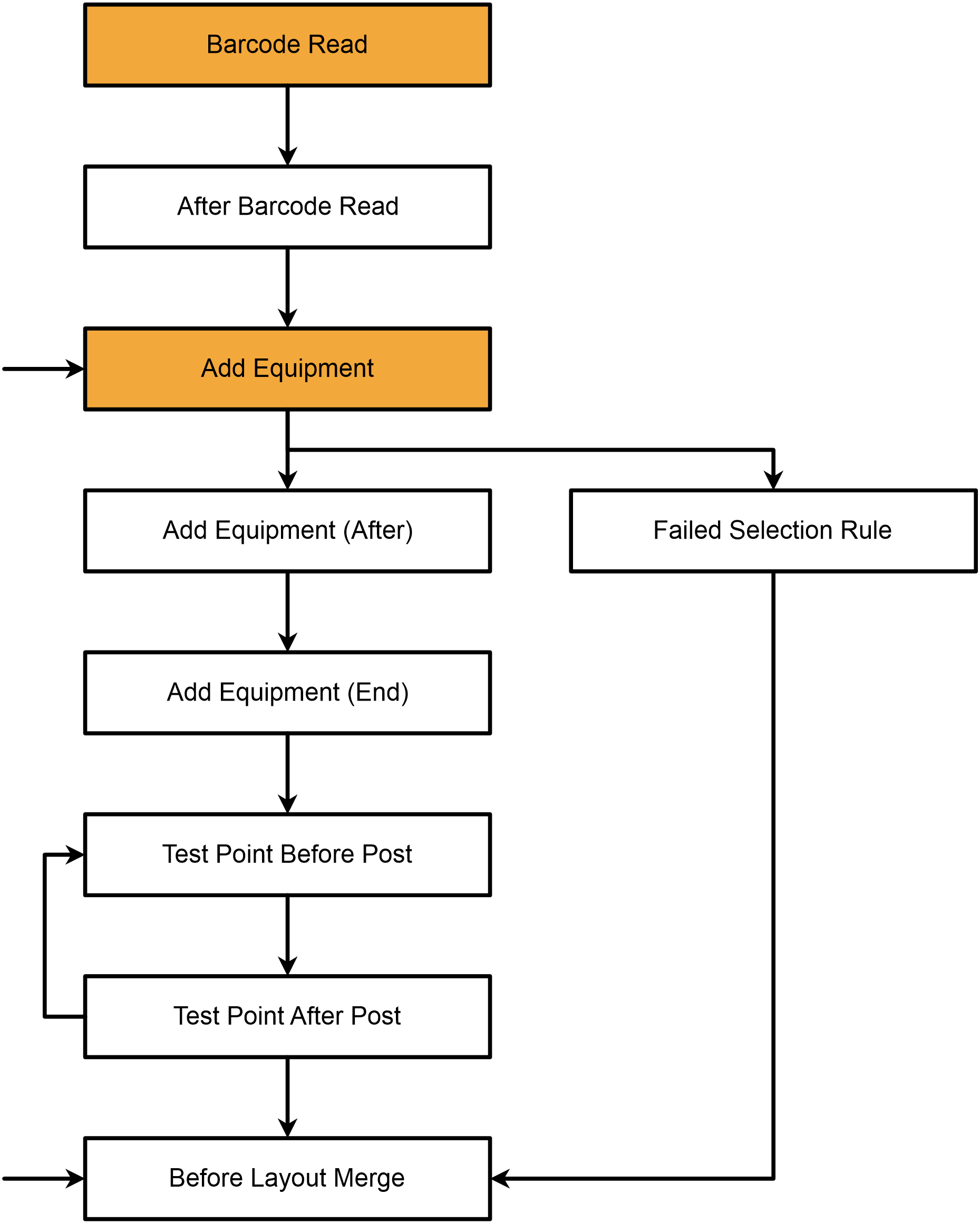
- Barcode Read
- After Barcode Read
- barcode settings will be checked to determine what the barcode value matches. Assuming it's an asset, the following execute.
- equipment locking is checked
- security profile settings checked
- Add Equipment
- equipment is locked (if appropriate)
- if inventory controlled item (Tool IndySoft), appropriate crib/bin is determined (possible user interaction), gaging items always proceed
- Selection Rules from Workflow Configuration are enforced
- Backup equipment is suggested (if appropriate)
- Messages from Workflow Configuration are shown (if needed)
- record is added to 'Choose Equipment' grid, noting crib/bin if appropriate (Tool IndySoft)
- Add Equipment (After)
- Equipment Attributes are created
- schedule-related documents are added into the event documents
- work order detail lines are auto-added, if appropriate
- default charges are added to the event (related to selected asset)
- Add Equipment (End)
- default test points are now cycled through
- Test Point Before Post
- Test Point After Post
- Failed Selection Rule (only if a selection rule fails)
- The layout is redrawn after Before Layout Merge
Note: in the section above, you will note that several lines have been indented. This is to note that in certain scenarios, only these items are called, and all other 'Equipment Is Added' sections and trigger actions are omitted. This is true when selecting an asset+crib+bin combination in Tool IndySoft from the bottom 'out inventory' grid. So, Tool IndySoft implementations should be careful to always use 'Add Equipment (After)' instead of 'Add Equipment (End)'. For gaging customers, it is almost always best to use 'Add Equipment (End)', since 'Add Equipment (After)' occurs before equipment attribute creation, documents, charges, etc.
Barcode Read and After Barcode Read only fire if the equipment is being added by the barcode field. Barcode Read, in particular, can access eBarcode.Text to manipulate the barcoded value for handling special circumstances. If equipment is added by other methods, the Barcode Read steps are skipped. |