Audit Trails - Admin Log Events
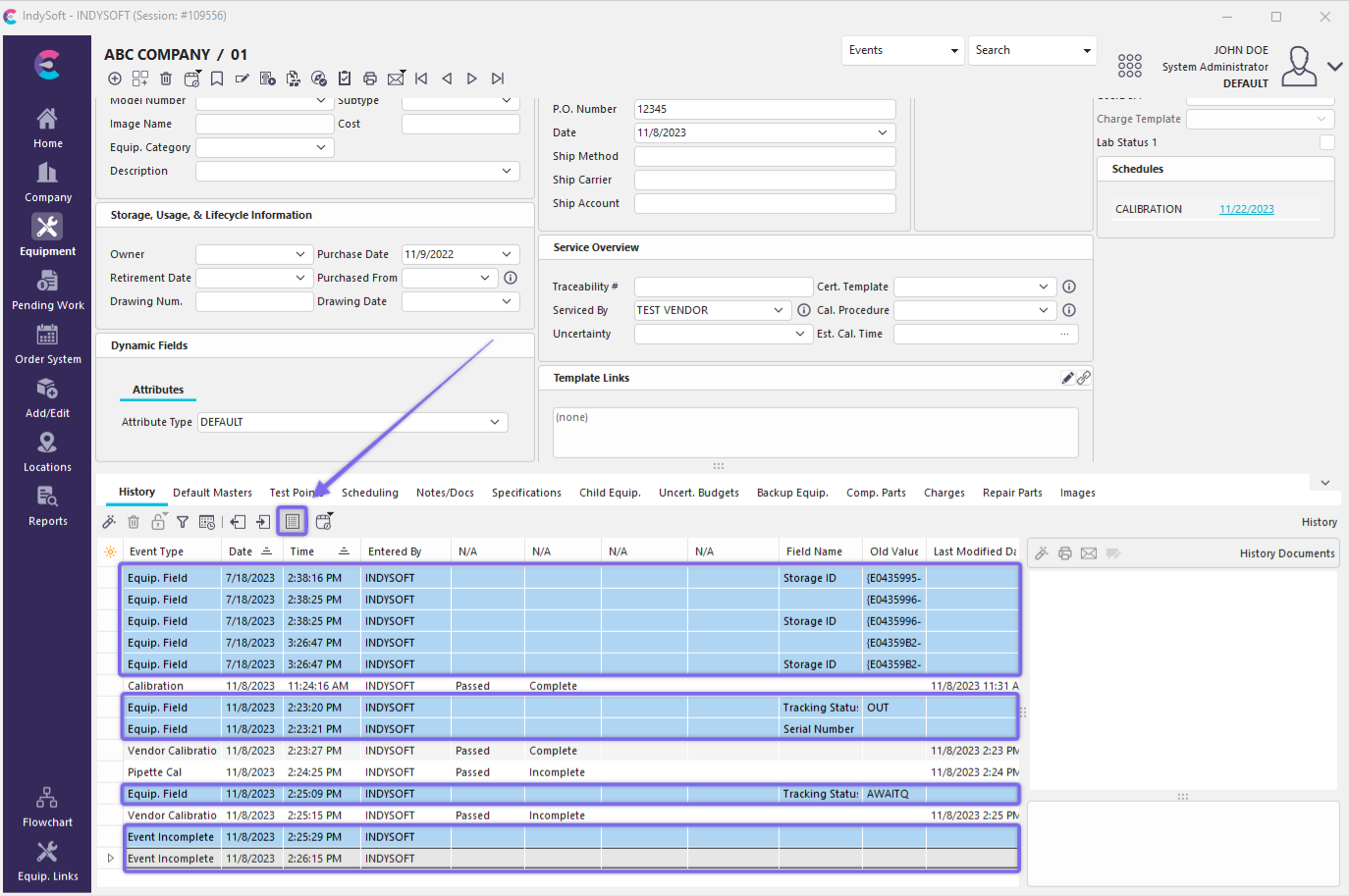
Whenever an equipment-level field is modified from the Dashboard main screen, IndySoft logs an audit trail event to that asset's History. These events are hidden from the History grid by default. The visibility of these events can be turned on through a toggle above the History grid - 'Show Admin. Log Events':
Admin. Log Events
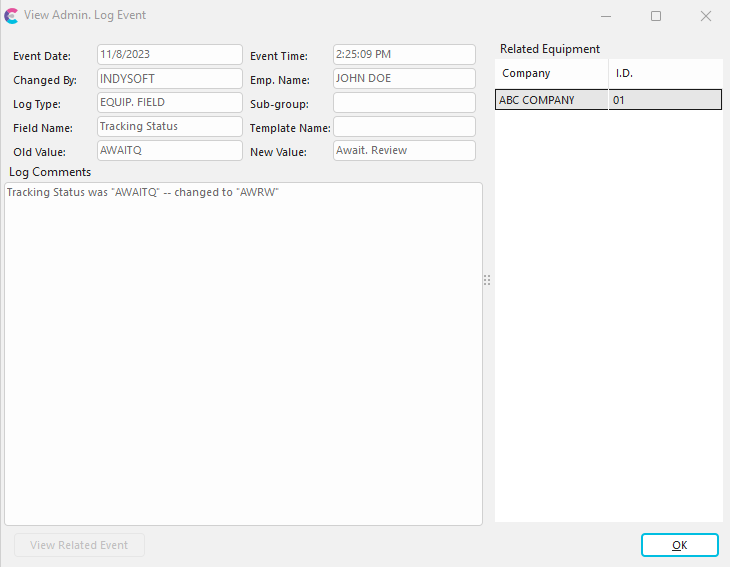
You will note that Admin. Log events, when mixed into the History events, have a blue highlight so they are easy to spot. In the above example, the "INDYSOFT" user modified the Tracking Status field on 11/8 at 2:25 PM by directly editing the Equipment View - this automatically created an event in the History. When Admin. Log Events are double-clicked from within the history grid a preview dialog will appear - which is simpler/different than a standard event dialog:
View Admin. Log Event
Several fields are displayed:
·Event Date - the date the change was made
·Event Time - the time the change was made
·Changed By - IndySoft user name (user logged in) that made the change
·Employee Name - employee name that matches the 'Changed By' login
·Log Type - the type of change (i.e., 'EQUIP. FIELD', etc.)
·Sub-group - sub-group of change (if applicable)
·Field Name - field that was changed
·Template Name - the template that was changed (if applicable)
·Old Value - field value before the change
·New Value - field value after the change
·Log Comments - summary of the change. Note: this summary can be previewed from the History grid by previewing the Event Comments (right-mouse click option from the History grid).
·Related Equipment - this change might have affected one or more assets (if it is equipment-related). All assets will be listed here.
 Important: Admin. Log events do NOT necessarily have to be equipment-related. If you have used IndySoft before version 9x, you might remember Sys. Admin. Log events as a dialog within the Profile Manager (see Profile Manager - System Admin. Log History). These are the same type of events - version 9x introduces the ability to associate equipment (one or more assets) with these logged events, and the events are now automatically created in many more places in the software...and most notably upon every manual edit of an equipment field. So...to review all Admin. Log events that are not equipment-related (along with all equipment-related Admin. Log events) go to Profile Manager - System Admin. Log History.
When Admin. Log Events Are Created
Admin. Log events are automatically created in several places within IndySoft:
- Within custom scripts (event, equipment, template, etc.) through CreateAdminLog and CreateAdminLogOneEquip procedures.
- When equipment is deleted from within an event (only if the event has already been previously saved)
- Global Equipment Change events (use of the 'Global Modifications' event step)
- Equipment Condition update within an event (only if the event has already been previously saved)
- Test Point changed within an event (only if the event has already been previously saved)
- Masters changed within an event (only if the event has already been previously saved)
- Repair Parts changed within an event (only if the event has already been previously saved)
- Charges changed within an event (only if the event has already been previously saved)
- Parts to be Measured changed within an event (only if the event has already been previously saved)
- Document added/deleted within an event (equipment, event, cert) (only if the event has already been previously saved)
- Component Parts changed within an event (only if the event has already been previously saved)
- Attributes changed within an event (only if the event has already been previously saved)
- Task(s) changed within an event (Preventive Maintenance version only) (only if the event has already been previously saved)
- Cloning Wizard used to clone an asset
- Equipment Field Change from Dashboard main screen
- New asset created
- New template created
- Equipment Group modified (only applicable to Tooling Management version)
- Schedule type edited
- Schedule type Accumulation of Time fields cleared
- New Schedule Type
- Deleted Schedule Type
- New asset created based upon template
- Template field edit