Auto-Update Settings
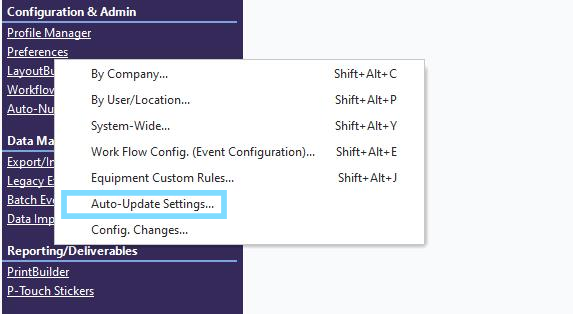
The Automatic Updates option is used to specify if you want to use Automatic Updates with IndySoft. By using this function, Administrators can automatically push out IndySoft software updates by distributing CAB files provided by IndySoft. Updates can be pushed to the update file using HTTP or UNC paths. To modify the Automatic Update settings, go to Home View, click Preferences hyperlink (under Config & Admin), and then select 'Auto-Update Settings...' as below:
 ../Storage/indysoft-help-publication/99607863.png
Launching Auto-Update Settings

Automatic Updates
Disable Automatic Update
This is the default setting. No update checks will occur if this is selected.
Enable Web Update - HTTP
If this option is used, you should specify the HTTP location of your IndySoft update file.
Enable File Update - UNC path
If this option is used, you should specify the UNC path to the location of your IndySoft update file.
 Save Settings as Default
Click on the cogwheel icon to save your current settings as the default settings for new software installations. The following dialog will pop up:

Save Settings Confirmation
New Feature: Auto-Update ALL installations
 Note: This feature is specific IndySoft version 12.1.0 and on.
Previously, we had the option to save auto-update settings for new installations of IndySoft. If you are using version 12.1.0 and on, you will see new options in a drop-down when you click on the cogwheel.
Note: you will only see these options if you have system administrator rights.

·Save These Settings as Defaults for New Installations Only
This option will save your current settings as the default settings for new software installations.
·Save These Settings as Defaults for ALL Installations
This option will save your current default settings for ALL software installations. In other words, push updates to all user workstations locally (that are connected to the database)
·Clear Previously Saved Defaults for New Installations Only
This option will delete any previously saved settings in place for new installations of the software.
·Clear Previously Saved defaults for ALL Installations
This option will delete any previously saved settings for ALL software installations.
Automatic Single-User Configuration Updates
 Note: this feature only applies to the Single-User version of IndySoft.
Single-User systems will note a second section to this setup step for 'Automatic Single-User Configuration Updates:
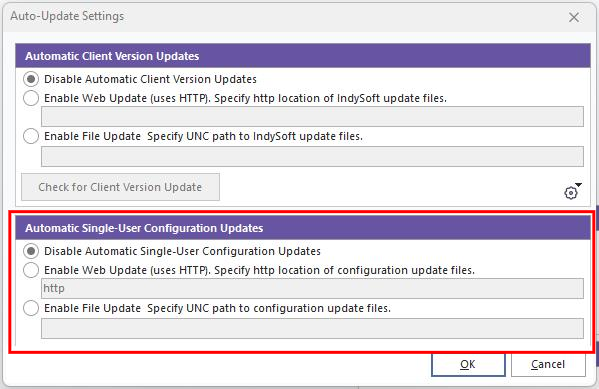
Automatic Single-User Configuration Updates
This functionality works just like automatic updates for the client but is related instead to the automatic update of database configuration (i.e., workflow settings, custom layouts, etc.). The single-user configuration export used for this process is created from the Export/Import Module in the Single-User version. See Single-User Auto Configuration Updates - Summary for more details.
Disable Automatic Single-User Configuration Update
This is the default setting. No single-user configuration checks will occur if this is selected.
Enable Web Update (uses HTTP)
If this option is used, you should specify the HTTP location of your single-user configuration file.
Enable File Update - UNC path
If this option is used, you should specify the UNC path to the location of your single-user configuration file. |