Date Entry
Date controls in IndySoft have a standard interface for date entry. If you click on the drop-down for a date control, you will see the interface below:
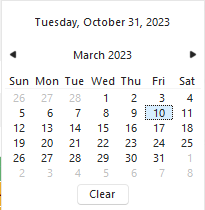
Use the two buttons in the upper left and right corners to quickly move forward and backward through months. Once the desired month is selected, single-click on the desired day to select the date. To quickly move to a specific month, single-click the month text on the top ('March' in the above example). To quickly move to a particular year, single-click on the year text on the top ('2023' in the above example). Note: to select today's date, click on the 'Today' text at the top of the dialog ('Tuesday, October 31, 2023' in the above example).
Dates can also be input manually by adjusting the text inside the date control. Note that once the keyboard focus has been placed into the date control, there are three distinct sections (you can see these sections by navigating with your left and right arrows on your keyboard). In the example below, these sections are '3' (month), '10' (date), and '2023' (year):

When highlighted, you can type directly to overwrite (numbers only) or use the up/down arrow keys on your keyboard to increase/decrease. |