Grid Settings
You will notice that nearly all grids have a right-mouse click option for 'Grid Settings':
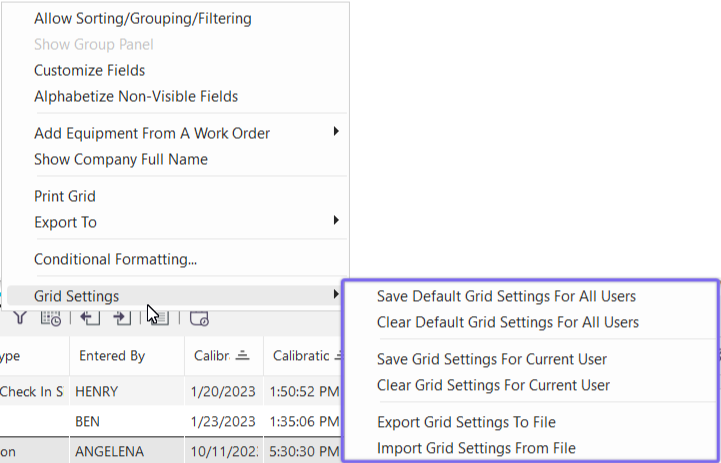
Grid Settings Sub-Menu - Available for Grids
Use these options to take a snapshot of the current grid configuration and save it for future recall. This concept differs slightly in version 9, as compared to version 8 and prior. In earlier versions, the appearance of some grids (widths of fields, positions of fields, etc.) was saved to the Windows registry upon each form close. This was nice in that it was automatic - but it did not help standardize the look/feel of grids across users. So in version 9, the saving of grid configuration is an 'on demand' action - so you control when the snapshot is taken.
Save Default Grid Settings For All Users
If you have access through Profile Manager, you may save this grid configuration for all users. When saving, you will be asked if you would like to give users the option of saving their own custom configurations in the future (so your saved configuration is just a starting point). If you answer 'no' then this configuration will be standard on all users/workstations until overwritten/cleared. The security item related to this setting is in Profile Manager under 'Blocking Access to Utilities...Block User From Globally Saving Grid Settings'.
Clear Default Grid Settings For All Users
Clears any grid configuration saved from 'Save Default Grid Settings For All Users' for the current grid. The security item related to this setting is in Profile Manager under 'Blocking Access to Utilities...Block User From Globally Saving Grid Settings'.
Save Grid Settings For Current User
Allows a user to take a snapshot of the current grid configuration and make it their new standard 'look'. This will apply only to their user login. The security item related to this setting is in Profile Manager under 'Blocking Access to Utilities...Block User From Saving Grid Settings'.
Clear Grid Settings For Current User
Clears any grid configuration saved from 'Save Grid Settings For Current User' for the current grid and current user. The security item related to this setting is in Profile Manager under 'Blocking Access to Utilities...Block User From Saving Grid Settings'.
Export Grid Settings To File
Exports and saves the current grid settings to a .txt file which can be imported using the 'Import Grid Settings From File' option.
Import Grid Settings From File
Allows the user to import saved grid settings from a .txt file. |