Print Worksheet
The Print Worksheet dialog can be used for quickly printing worksheets related to the current equipment. To launch this option from the Dashboard interface Equipment View use the 'PRINTWORKSHEETS' hyperlink. This can also be launched from a button added within the equipment view header  :
:

Print Worksheet Dialog
Print Worksheet Options
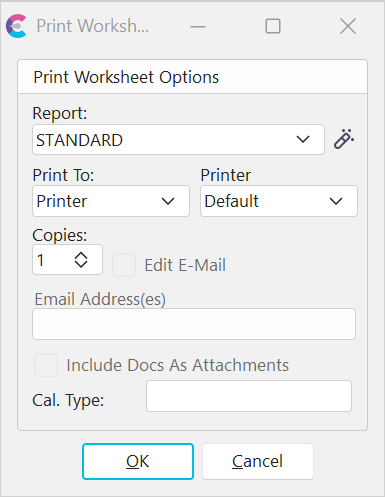
Print Worksheet Dialog
- Report: This option allows you to select what report you wish to print. Press the button to edit the report.
- Print To: Choose from E-mail, Printer, or Screen.
- Printer: Choose from Default or Printer 1-5, if Printing to Printer.
- Email Address(es): Type the email address, if Printing to E-mail.
Worksheets can contain a broad range of data: equipment info., company info., scheduling info., default test points, default masters, equip. docs, child equip., backup equip., component parts, service/repair parts, machines, and user defined 6 items.
Go to Worksheets for more information about designing worksheets.
 Productivity Tip
You can also print worksheets from the Navigator and EquipmentFinder dialog.