Clone PIPETTE CAL event
The IndySoft Pipette Module includes a base PIPETTE CAL event. If this is your initial setup, the first thing you should do is clone the PIPETTE CAL event. That clone will be your actual production event ready for you to customize by adding: selection rules, completions rules, security settings, etc.
If you are upgrading your existing Pipette Module, then be advised that the upgrade will completely overwrite the event called PIPETTE CAL. This is why IndySoft advises not using the PIPETTE CAL as a production level custom event. The PIPETTE CAL event should be thought of as the placehodler for new Pipette type event upgrades, whereas your custom named event is your production event that you would absolutely not want wiped out in an upgrade.
After upgrades, you can review the differences between the official event and your customized events, as needed.
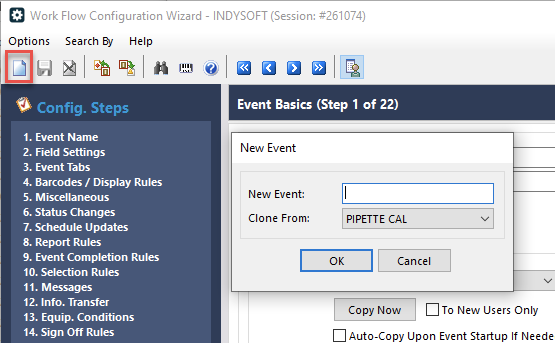
To clone the event, simply open Workflow Configuration, click the New Event Configuration button in the upper left, and make sure you are cloning from PIPETTE CAL.
On step 2, it's worth noting that there are several items that should never be changed, as they are used by the COLLECT PIPETTE DATA event project script.
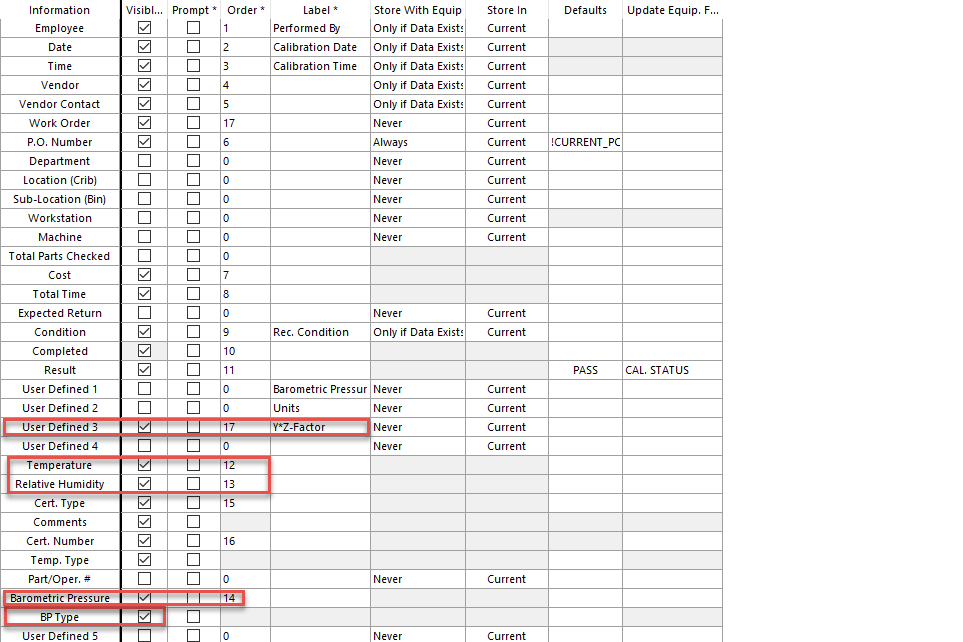
Also, the Y*Z-Factor was referred to as the Z-Factor in 12.1 and earlier versions. This verbiage change was added to be more technically correct with ISO 8655. The Y-factor is independently logged with individual test points, for reporting purposes.