Data Exchange Module - Sending Uncertainty Info.
Users can sync uncertainty budgets, attributes, and budget associations from a multi-user database into a Single User database using the Data Exchange Module. To sync Uncertainty Budgets, select the appropriate 'Update Type' and 'Company' for the 'UNCERTAINTY BUDGETS' table name on the 'Receive Information' tab in the Data Exchange Module, as shown below:
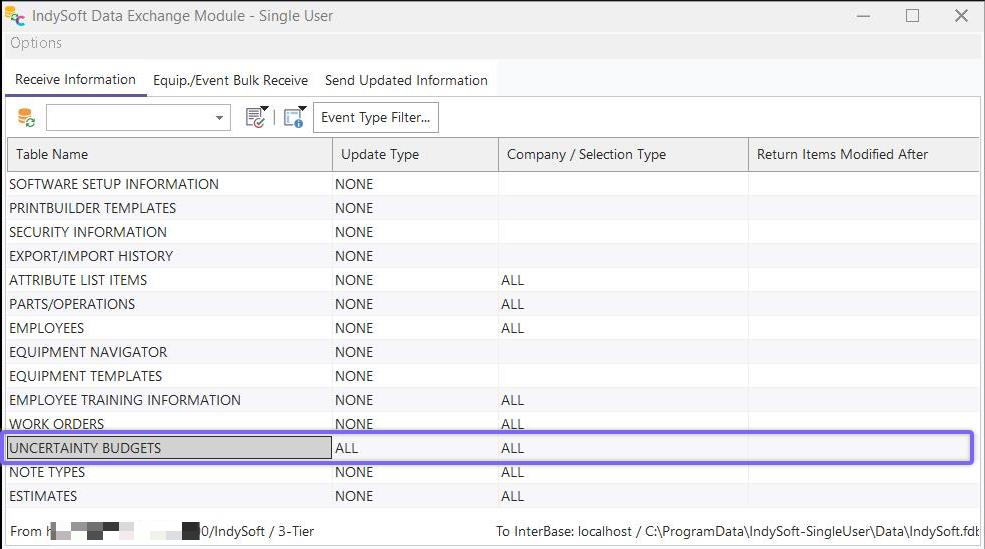
Data Exchange Module - Uncertainty Budgets Sync
This operation will synchronize all appropriate uncertainty budgets, including master rules, contributing items, studies, and correlation formulas. When Equipment is synced through Data Exchange Module (using the 'GAGES' Table Name), the information on the new 'Uncertainty' tab on the IndySoft main screen is also synced - including Uncertainty Attributes and Budget Associations.
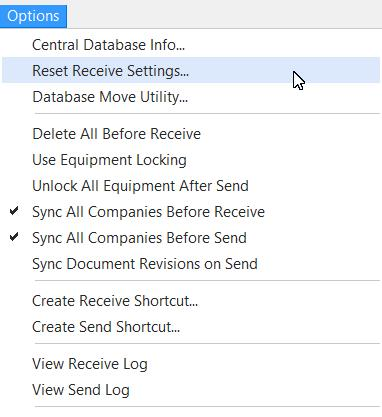
Note: If you do not see the UNCERTAINTY BUDGETS Table Name listed in the 'Receive Information' grid, goto the 'Options' menu in the Data Exchange Module and select 'Reset Receive Settings'. Once you see the UNCERTAINTY BUDGETS item, you might want to save this 'Receive Information Template' under a new name before proceeding.
 |
|