Setting Up Your Data Logger
After installing your data logger, you must specify several options shown below.
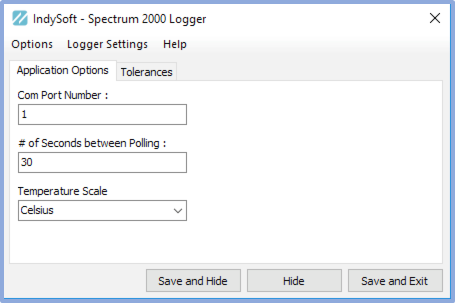
Veriteq/Spectrum Data Logger - Application Options
Com Port Number:
This option allows you to specify the com port where your data logger is connected
Number of Seconds between Polling:
This option allows you to specify how many seconds are between each polling interval. The polling interval means how often the module checks the unit for the last sampled data. This does not relate to how often the unit checks the RH/Temp. directly. See the option below to set this value.
Temperature Scale:
This option allows you to specify Fahrenheit or Celsius as the temperature returned from your data logger device.
Email Logging:
If this item is filled in, the system will automatically send an email to the specified address whenever there is a problem with the device or if the device returns values outside the set tolerance range.
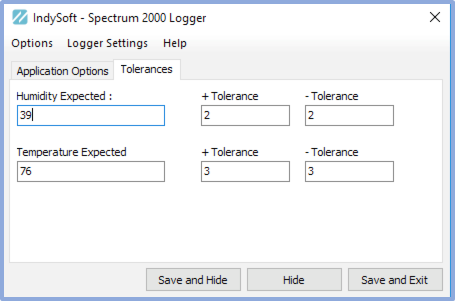
Veriteq/Spectrum Data Logger - Tolerances
These optional settings allow you to set an expected temperature, humidity, and +/- tolerance range. If you set these ranges and the returned data is outside the set limits, a user can be emailed this information (see the Application Options tab for the option to send an email to a user)

Save Settings:
This setting will save your information.
Load Settings:
This setting will re-load your saved information. Note: This function is performed automatically whenever you load this module.
Hide Window:
This option will hide the window, and you can re-access it in your system tray.
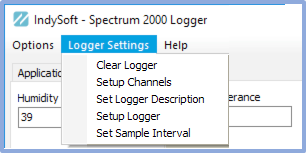
These settings interact directly with your data logger.
Clear Logger
This option will clear your logger's memory of past data collection
Setup Channels
This allows you to turn off/off channels in your Spectrum data logger. See your manual for specifics on this feature.
Set Logger Description
This option allows you to give your Spectrum Logger a name. This same name should be used in your User/Location Settings when specifying a data logger to collect from.
Setup Logger
This option allows you to set all aspects of your data logger. See your manual for specifics on this feature.
Set Sample Interval
This option allows you to set the interval that your data logger samples the temperature/relative humidity. Note: we suggest a minimum of 1 minute here to avoid consuming too much battery power over a long period. |