Keyboard Shortcuts
The Dashboard main screen has dozens of keyboard shortcuts that can speed up many operations. There are three general categories of shortcuts:
1. General Shortcuts correspond to Header menu options, Home View hyperlinks, and Equipment Layout hyperlinks.
2. Event Launch Shortcuts - these are set up per event in Workflow Configuration.
3. Search Menu Shortcuts - these are set up in Profile Manager...Setup Custom Searches / Reports / Layouts (or similar screen as launched from PrintBuilder or LayoutBuilder)
General Shortcuts
Below is a listing of general keyboard shortcuts. The functionality for each is exactly as if the user had clicked on the related hyperlink or selected the menu option. Note that these keyboard shortcuts have reminders next to their related menu items and/or in the related layout fly-over hints:
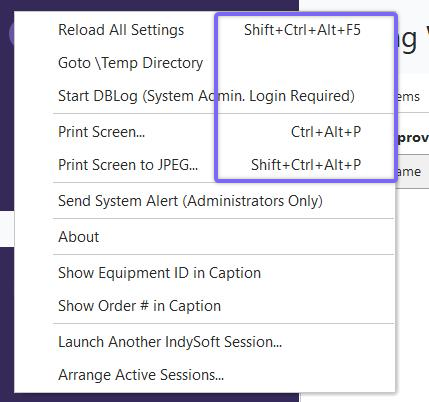
Keyboard Shortcut Reminders - Header Menu Items
| Shortcut Caption | Shortcut | Operation | Allowed If
| New | Ctrl+N | Home Layout or Equipment View...NEWEQUIP link | Home Layout or Equipment View contains NEWEQUIP linkNew (Use Template) | Ctrl+T | Home Layout or Equipment View...NEWEQUIP-TEMPLATE link | Home Layout or Equipment View contains NEWEQUIP-TEMPLATE linkSave As Template | Ctrl+W | Equipment View...SAVEASTEMPLATE link | Equipment View contains SAVEASTEMPLATE linkDelete | Ctrl+D | Equipment View...DELETEEQUIP link | Equipment View contains DELETEEQUIP linkAutoNumber | Ctrl+A | Home Layout or Equipment View...AUTONUMBERINGSETUP link | Home Layout or Equipment View contains AUTONUMBERINGSETUP linkModify Serial Number | Ctrl+U | Equipment View...CHANGEID link | Equipment View contains CHANGEID linkPreferences
By Company | Shift+Alt+C | Home Layout...MODIFYCOMPANYSETTINGS link | Home Layout contains PREFERENCESALL, MODIFYCOMPANYSETTINGS linkPreferences
By User | Shift+Alt+P | Home Layout...USERPREFS link | Home Layout contains PREFERENCESALL, USERPREFS linkPreferences
System-Wide | Shift+Alt+Y | Home Layout...SYSTEMWIDEPREFS link | Home Layout contains PREFERENCESALL, SYSTEMWIDEPREFS linkPreferences
Workflow Configuration | Shift+Alt+E | Home Layout...EVENTCONFIG link | Home Layout contains PREFERENCESALL, EVENTCONFIG linkChange Company | Ctrl+K | Equipment Layout
SELECTCOMPANY link | Always AllowedLog-Out | Ctrl+L | Header
Gear Button
Log-Out | Always AllowedI.D. | Alt+1 | Header
Search By
I.D. | Always AllowedSerial Number | Alt+2 | Header
Search By
Serial Number | Always AllowedDescription | Alt+3 | Header
Search By
Description | Always AllowedType/Sub-Type | Alt+4 | Header
Search By
Type/Sub-Type | Always AllowedCrib Number/ Bin Number | Alt+5 | Header
Search By
Crib Number/ Bin Number | Always AllowedCurrent Location/Sublocation | Alt+6 | Header
Search By
Current Location/Sublocation | Always AllowedManufacturer/Model # | Alt+7 | Header
Search By
Manufacturer/Model # | Always AllowedCertification/Document | Alt+8 | Header
Search By
Certification/Document | Always AllowedPart/Operation | Alt+9 | Header
Search By
Part/Operation | Always AllowedSerial Number (All Companies) | Alt+B | Header
Search By
Serial Number (All Companies) | Always AllowedEquipmentFinder | Alt+F | Header
Search By
EquipmentFinder | Always AllowedEventFinder | Alt+D | Header
Search By
EventFinder | Always AllowedOrder System | Ctrl+Alt+W | Order System Tab Selected | Order System Tab VisibleCloning Wizard | Ctrl+O | Home Layout or Equipment View...CLONINGWIZARD link | Home Layout or Equipment View contains CLONINGWIZARD linkExport / Import History | Ctrl+H | Home Layout...EXPORTIMPORTHISTORY link | Home Layout contains EXPORTIMPORTHISTORY linkPrintBuilder | Ctrl+Q | Home Layout...PRINTBUILDER link | Home Layout contains PRINTBUILDER linkNavigator | Ctrl+G | Header
Gear Button
Navigator | Always AllowedIndySoft Help | F1 | Header
Help Button
IndySoft Help | Always AllowedPrint Screen | Ctrl+Alt+P | Header
Gear Button
Print Screen | Always AllowedPrint Screen To JPEG | Shift+Ctrl+Alt+P | Header
Gear Button
Print Screen To JPEG | Always AllowedTest Point Resync | Shift+Ctrl+F1 | Equipment View Tab
Test Points Tab/Dialog
Test Points Resynced | Test Points Tab/Dialog Is VisibleInsert Master | Ctrl+E | Equipment View Tab
Default Masters Tab/Dialog...Add A Default Master | Default Masters Tab/Dialog Is VisibleInsert Part | Ctrl+F | Equipment View Tab
Parts Tab/Dialog
Add Part To Be Measured | Parts Tab/Dialog Is VisibleAutoNumber | Shift+Ctrl+A | Home Layout or Equipment View...AUTONUMBERINGSETUP link | Home Layout or Equipment View contains AUTONUMBERINGSETUP linkBookmark | Ctrl+B | Equipment Layout
Right-Mouse-Click
Bookmark | Always AllowedPrint Certs | Shift+Ctrl+P | Equipment View Tab
History Tab/Dialog
Print Document | History Tab/Dialog Is VisibleView Certs | Shift+Ctrl+V | Equipment View Tab
History Tab/Dialog...View Document | History Tab/Dialog Is VisibleInsert Doc | Ctrl+J | Equipment View Tab
Notes/Docs Tab/Dialog
Supporting Documents
Add Document | Notes/Docs Tab/Dialog Is VisiblePrint Sticker | Ctrl+P | Equipment View...PRINTSTICKER link | Equipment View contains PRINTSTICKER linkFirst | Ctrl+Up | Equipment View...FIRST link | Always AllowedPrior | Ctrl+Left | Equipment View...PRIOR link | Always AllowedNext | Ctrl+Right | Equipment View...NEXT link | Always AllowedLast | Ctrl+Down | Equipment View...LAST link | Always AllowedEquipment Where Used | Alt+E | Header
Search By
Equipment Where Used | Tooling Management LicensedTemplate Editor | Shift+Alt+A | Header
Gear Button
Template Editor | Always AllowedData Exchange Module | Shift+Alt+B | Header
Gear Button
Data Exchange Module | Single-User Version OnlyParts/Operations Module | Shift+Alt+D | Header
Gear Button
Parts/Operations Module | Tooling Management LicensedTask Editor | Shift+Alt+F | Header
Gear Button
Task Editor | Preventive Maintenance LicensedIndySoft Spreadsheet Editor | Shift+Alt+G | Header
Gear Button
IndySoft Spreadsheet Editor | Always AllowedLog-Out (Re-Prompt For User) | Shift+Alt+H | Header
Gear Button
Log-Out (Re-Prompt For User) | NT Authentication Enabled In User/Location SettingsIndySoft News and Latest Releases | Shift+Alt+I | Header
Help Button
IndySoft News and Latest Releases | Always AllowedEquipment Custom Rules | Shift+Alt+J | Home Layout...PREFERENCESALL link | Home Layout contains PREFERENCESALL linkOrder System...Create a New Estimate for Current Company | Shift+Alt+K | Equipment View...NEWESTIMATE link | Equipment View contains NEWESTIMATE linkOrder System...Create a New Work Order for Current Company | Shift+Alt+L | Equipment View...NEWWORKORDER link | Equipment View contains NEWWORKORDER linkPrint a Worksheet for Current Company/Equip | Shift+Alt+M | Equipment View...PRINTWORKSHEET link | Equipment View contains PRINTWORKSHEET linkView Company Details | Shift+Alt+N | Home Layout or Equipment View...VIEWCOMPANY link | Home Layout or Equipment View contains VIEWCOMPANY linkBatch Import Events | Shift+Alt+Q | Equipment View...BATCHEVENTIMPORT link | Utility is authorized for user's ProfileProfile Manager | Ctrl+Alt+V | Home Layout...PROFILEMANAGER link | Home Layout contains PROFILEMANAGER linkLayoutBuilder | Ctrl+Alt+X | Home Layout...LAYOUTBUILDER link | Home Layout contains LAYOUTBUILDER linkRefresh/Recount All Search Bys | Alt+C | Home Layout...RECOUNTSEARCHBYS link | Always AllowedTemplate Links Dialog | Ctrl+Alt+Y | Equipment Layout...TEMPLATELINKS link | Equipment View contains TEMPLATELINKS linkEdit Company | Alt+A | Equipment Layout...EDITCURRENTCOMPANY link | Equipment View contains EDITCURRENTCOMPANY link |
Event Launch Shortcuts
In Workflow Configuration...Miscellaneous Tab the 'Key. Shortcut' field can be used for selecting a Ctrl+Shift shortcut for launching the event.
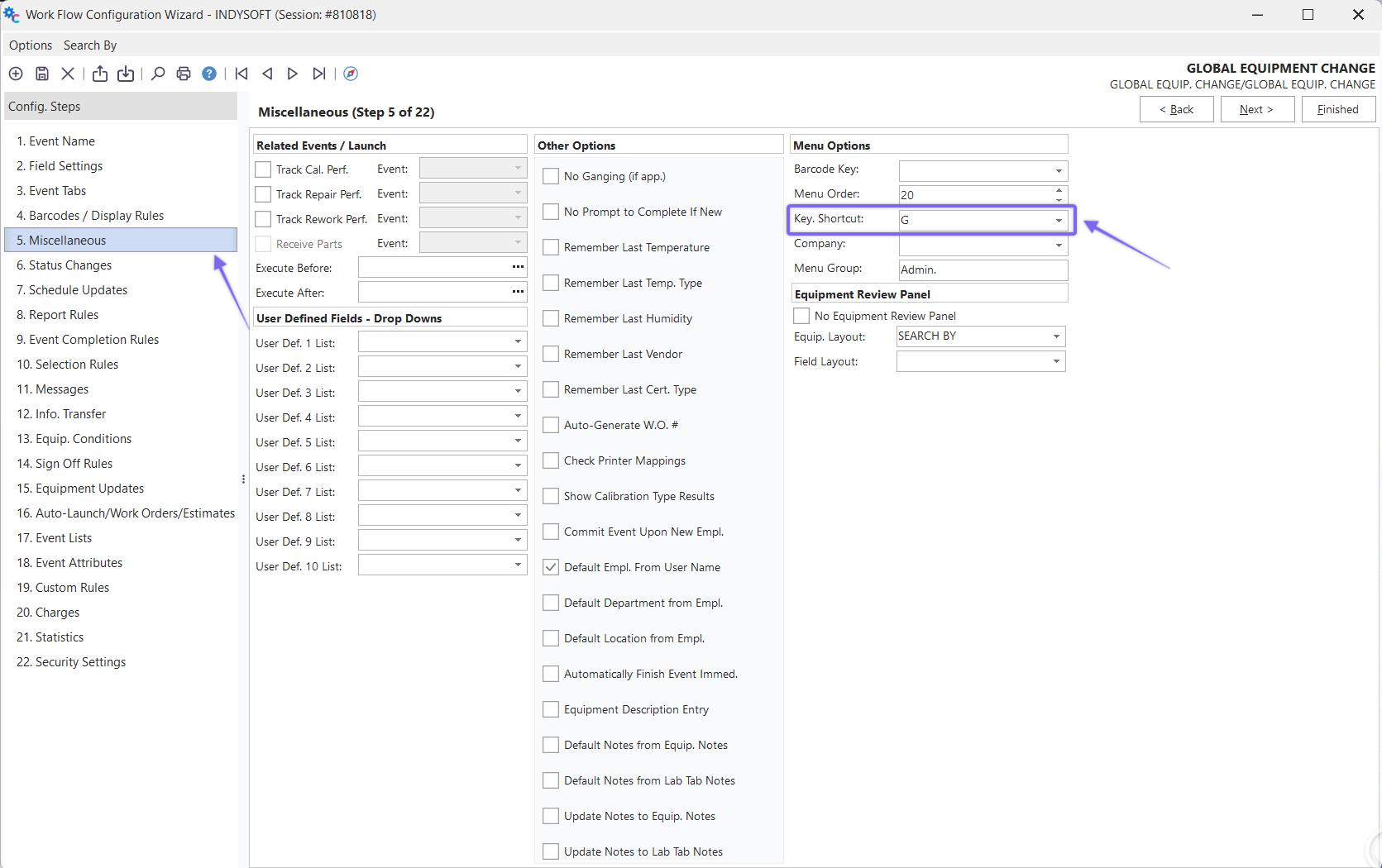
Workflow Configuration...Key. Shortcut
When this shortcut is used, the event can be launched from the Dashboard (or Classic) main screen by pressing Ctrl key + Shift key + the [Key. Shortcut]. For example, Ctrl+Shift+G will launch a global equip. change event:
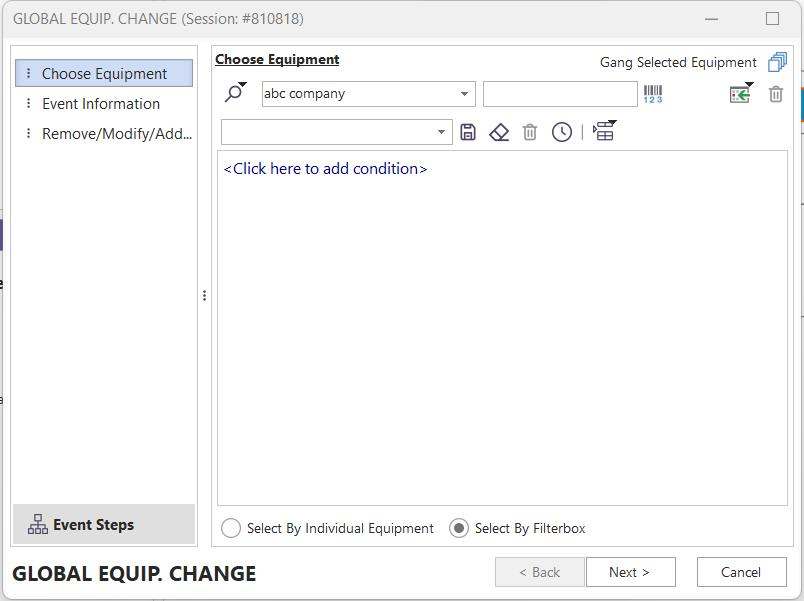
Events Menu Keyboard Shortcuts |