Profile Manager - Certificate / Document Handling
Numbering And Certificate Settings
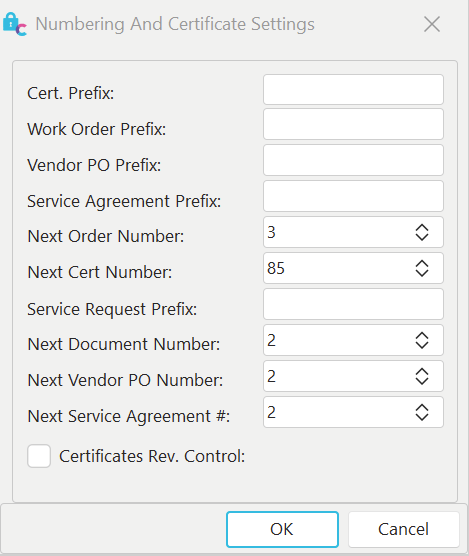
Add new Certificate and Document Dialog.
This dialog (accessed through Management: Numbering and Certificate Settings...) is used to specify the next cert and document numbers. It can also set a default certificate prefix and PDF creation settings.
Cert Prefix
The Cert Prefix field allows you to specify an optional prefix value for your certificates.
Work Order Prefix
The Work Order Prefix field allows you to specify an optional prefix value for your work orders.
Vendor PO Prefix
The Vendor PO Prefix field allows you to specify an optional prefix value for your vendor POs.
Service Agreement Prefix
The Service Agreement Prefix field allows you to specify an optional prefix value for your service agreements.
Next Order Number
This field can increase or decrease the next available order number. Note: Always set this order number above the highest current order number.
Next Cert Number
This field can increase or decrease the next available certificate number. Note **:**Always set this cert number above the highest current certificate number.
Next Document Number
This field can increase or decrease the next available document number. Note **:**Always set this document number above the highest current document number.
Next Vendor PO Number
This field can increase or decrease the next available vendor PO number. Note : Always set this order number above the highest current vendor PO number.
Next Service Agreement Number
This field can increase or decrease the next available estimate number. Note **:**Always set this order number above the highest current estimate number.
Certificates Rev. Control
This field can be checked to turn on document revision control. This will allow users to use the same certificate number with multiple revisions. For example, if you incomplete an already completed calibration event, the current certificate #100 will be archived, and the new certificate will be named #100 (Rev.1).
Note to Oracle Users: Next Order, Estimate, Invoice, Cert & Document Number must be changed by your DBA—contact tech support for instructions on how to do this.
Embed Non-Standard Fonts During PDF Creation
Checking this box will automatically embed any fonts that aren't standard with Windows or are of a non-Latin character set. Be careful with this option, as it can significantly increase the size of your PDF files. It's always best to use standard Windows fonts when possible.
Convert RTF to Image During PDF Creation
Checking this box will convert any RTF controls in your reports to an Image file before printing. This option can sometimes be helpful when creating PDFs. If you have problems with RTFs displaying in your PDF, try turning this option on.
 Version 13.1 || New prefix fields for Service Agreements and Service Requests under the Management tab of Profile Manager
- Service Agreement Prefix
- Service Request Prefix