Extech SD700 Temp/RH/Pressure Application
The Extech SD700 Temperature/RH/Pressure Module can constantly monitor the Extech SD700 device and push the data out to the IndySoft client.
Before running the SD700 Logging Utility, confirm that you have an RS-232 cable from Extech. This special cable is designed to work with the SD700 and should be in the "2" position on the base of the USB cable.
Once connected, determine the COM port # being used for the device. Next, start the application called:
Extech SD700 Logging Utility
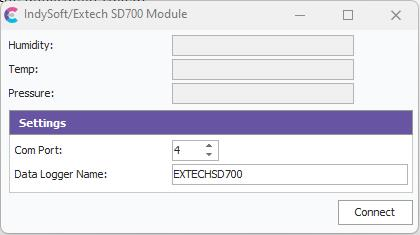
Extech SD700 Logger - Latest Readings
Specify the Com Port and give the Logger 16 characters or fewer names. This name will be used when populating the Humidity and Temperature in the IndySoft client application.
When ready to connect, press the Connect button. The Humidity, Temp, and Pressure should immediately start displaying. Humidity and Temperature will automatically be placed into any new Event started in IndySoft that requires a Temperature or Humidity. However, the Pressure reading will need to be read by Custom Scripting to be pulled. To pull this data, you would need to make an SQL statement as follows:
SELECT * FROM EXTERNAL_DATA WHERE DATA_LABEL = 'PRESSURE' AND LOGGER_NAME = 'THE LOGGER NAME'
The field called TEXT_ATTRIBUTE will contain the unit of measure for the Pressure reading.
The field called NUMERIC_ATTRIBUTE will contain the Pressure reading. |