Test Points - Default Tolerances
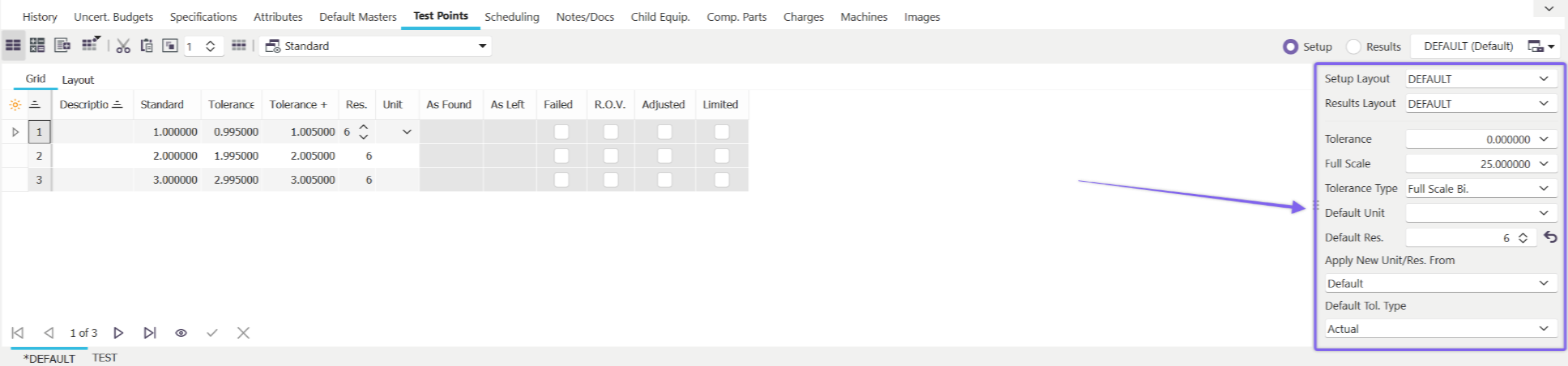
Default Tolerance Section
About Default Tolerances
The following fields appear on the default tolerances section in IndySoft:
Tolerance
This field is used to specify the default tolerance for every test point in the equipment. Note: a default tolerance doesn't apply to all equipment types, so if a default tolerance cannot be used, leave this field empty.
Tolerance -/+
These fields are displayed whenever an Asymmetrical Tolerance type is selected in the Tol. Direction field. Note: a default tolerance doesn't apply to all equipment types, so if a default tolerance cannot be used, leave this field empty.
Tol. Direction
Tolerance Direction is used to specify the tolerance type you will be using as a default. See System Wide Preferences - Tolerance Formulas for information on modifying and editing tolerance direction formulas.
Full Scale
Full Scale value is an option that can be used in Formula calculations for Tolerances. It is an optional field. See System Wide Preferences - Tolerance Formulas for information on modifying and editing tolerance direction formulas.
Unit of Measure
Unit of measure is used to specify the Default unit of measure for each test point.
Resolution
The resolution field determines the default resolution for each test point.
Apply New Unit of Measure/Resolution Based Upon
This option allows 1 of 2 choices:
Default Values
When this value is selected, the Unit of Measure and Resolution above will be used for all new test points added to the test point grid.
Test Point Above
When this value is selected, the Unit of Measure and Resolution last chosen in the test point grid will be used for all subsequent test points that are added.
Note: each field can be clicked on to edit (fields indicated by dark-blue color and underlines)
Default Tolerance Type
This option allows 1 of 2 choices:
Actual
When this value is selected, tolerances are applied based on actual values. ie. Tolerance Minus = .9 Standard = 1.0 Tolerance Plus = 1.1
Relative
When this value is selected, the tolerances specified are converted to actual tolerances at calibration time. The Minus and Plus tolerances revolve around the standard value. So a minus tolerance of .1 and a plus tolerance of .2 with a 1.0 standard value would procedure a Tolerance Minus of .9 and a Tolerance Plus of 1.2 at calibration time.
Note: each field can be clicked on to edit (fields indicated by dark-blue color and underlines) |