User/Location Settings - E-Mail Settings
The Email tab is used to configure how IndySoft will communicate with the Email server your company uses.
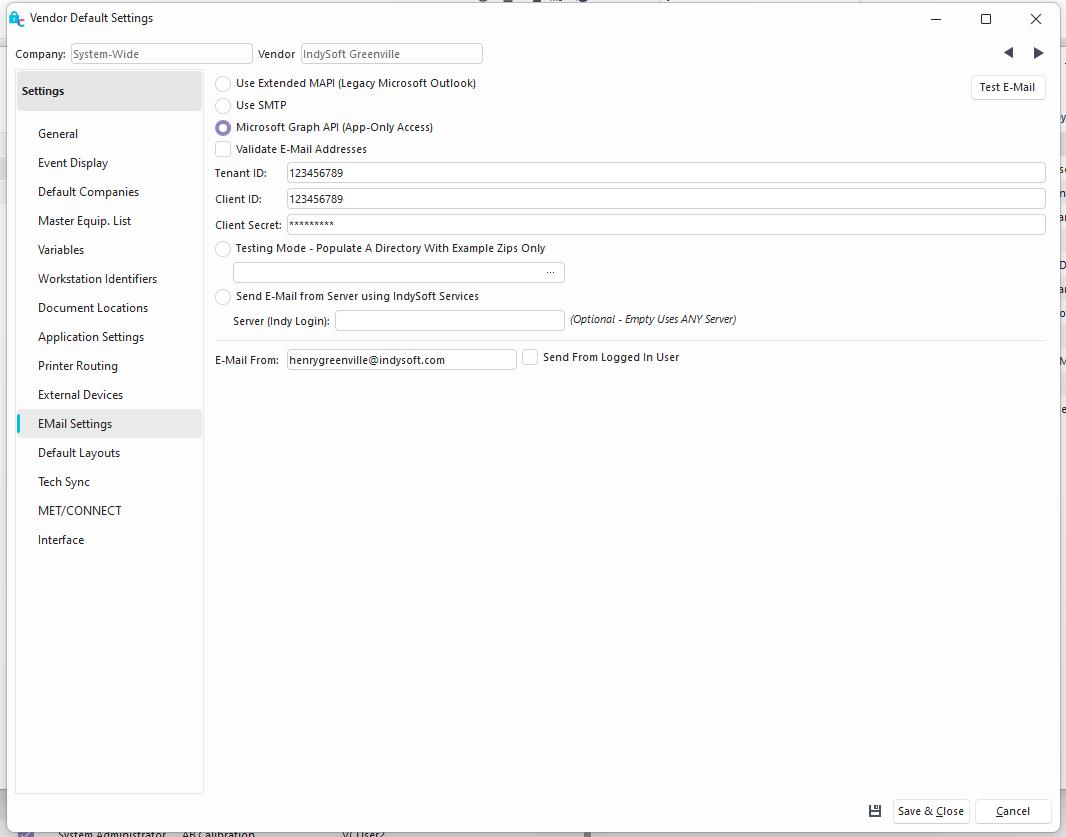
User/Location Settings - Email Settings
Note: if you see any setting in the User/Location Settings dialog that has this toggle visible to the right:

Then this setting is set up as a global preference, and CANNOT be modified by individual users in the User/Location Settings. Please have your Administrator edit this setting in Setup Global Preferences within Profile Manager as needed.Use Extended MAPI
This option uses a more sophisticated version of MAPI that can get around annoying Anti-Virus dialogs with Microsoft Outlook.
Use SMTP
This option uses SMTP to push emails out. To use this, you must know your SMTP server name. You can also specify the email address marked as sending the email in the Send From field. There is also an option for a username and password if required by your SMTP service. Some services require POP Authentication - in this case, check the Use POP Authentication box and fill out the additional POP server fields.
Microsoft Graph API (App-Only Access)
Introduced as an Option in 14.1.1, the Tenant ID, Client ID, and Client Secret will need to be entered for the particular domain which is set up in Microsoft. The E-Mail From must be a valid E-Mail.
- Create/Register an application in Azure Active Directory
- Add a Client Secret
- Add the Mail.Send application permission and set to App-only Access
- Request Administrator Consent https://learn.microsoft.com/en-us/graph/auth-v2-service?tabs=http#3-request-administrator-consent
Use MAPI (Deprecated in V14.1)
This option will use simple MAPI to send emails. Note that an Anti-Virus dialog might appear with this selection if using Outlook. We recommend using the Extended MAPI option if this occurs.
Validate Email Addresses
This option will confirm email addresses are in a proper format before sending. |