Event Steps - Parts To Be Measured
Entering Parts To Be Measured During An Event
The 'Parts To Be Measured' event tab appears if the 'Parts To Be Measured' event tab has been selected for the current event type through the Event Configuration Wizard (see the Event Configuration - Event Tabs section for more details).
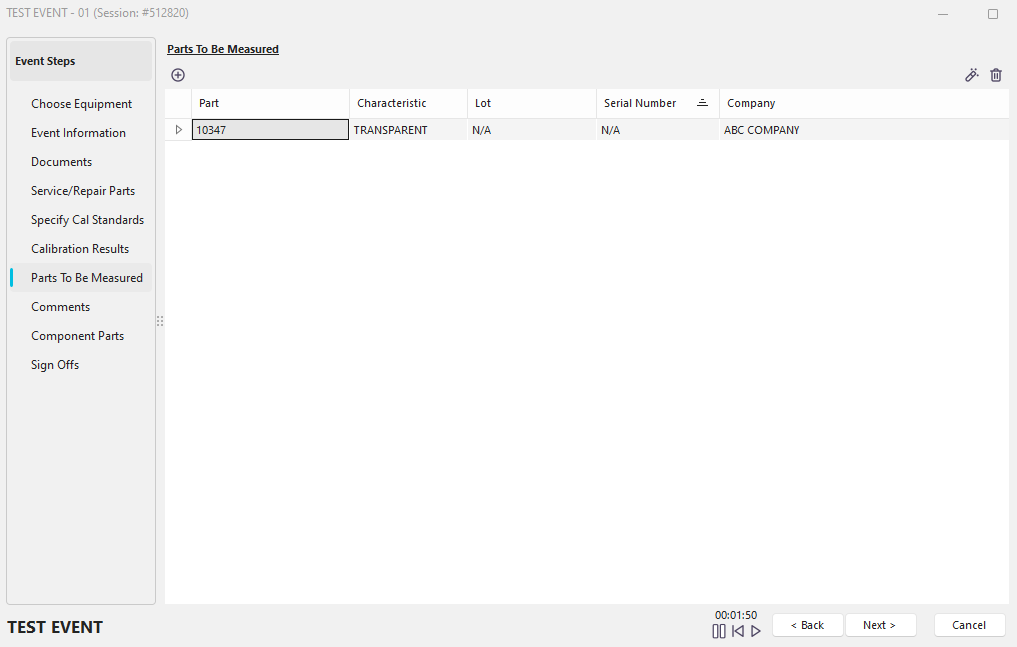
Event Step - Parts to Be Measured
Add Part to be Measured
 For example, when performing a check-out event, you might want to specify the parts that a gage will check while it is on the floor. This event step can quickly specify the parts to be checked. Five pieces of information can be tracked:

Select Part and Characteristic
·Part
the part number for the selected part
·Characteristic
the appropriate characteristic that will be checked for the selected part.
·Lot Number
the lot number of the selected part (optional).
·Serial Number
the serial number for the selected part (optional).
·Company
the company of the selected part.
The items available as 'Parts to be Measured' can be entered using the 'Parts' Add/Edit wizard from the IndySoft header or Home tab. See the Lists - Parts section for more details. The number of parts to be measured selected on this event tab (as synced with the 'Total Parts to be Measured' control on the Event Information tab) can also be used to calculate a due date for a schedule based on the accumulation of parts (see the Work Flow Configuration - Schedule Updates section for more details).
Edit Part to be Measured
 This button allows you to edit the selected Part to be Measured.
Remove Part to be Measured from the List
 This button allows you to delete the selected Part to be Measured. |