System Preferences - Tolerance Formulas
 ../Storage/indysoft-help-publication/99603578.png
System-Wide Preferences...Tolerance Formulas
The Test Points tab/dialog allows for various tolerances that can be used to create 'Tolerance -' and 'Tolerance +' automatically. These tolerances can always be adjusted manually if desired, but using a default Tolerance Type speeds the entry of these tolerances. As the 'Standard' value is input on a new test point line, the various tolerance fields are automatically calculated:
 ../Storage/indysoft-help-publication/hm_clip3248.png
Tolerance Fields - Test Point Tab/Dialog
The tolerance types available in this drop-down can be entirely customized by using the 'Tolerance Formulas' tab in System-Wide Preferences. New tolerance types can also be created with their own formulas. To modify the items, use the add/edit/delete buttons above the Tolerance Formulas grid. Modifying/adding a tolerance formula involves the following dialog:
 ../Storage/indysoft-help-publication/99603635.png
Add/Edit Tolerance Info.
Formulas can be input for all fields with the '...' button: Tolerance Minus, Tolerance Plus, Relative Based Tol. Minus, Relative Based Tol. Plus, Display 1, Display 2, and Display 3. These fields correspond to numeric-based fields within test points that can be adjusted through formulas. Use the FormulaBuilder interface to modify these formulas.
 Version 13.0.15 || FormulaBuilder now shows the variable name in parenthesis
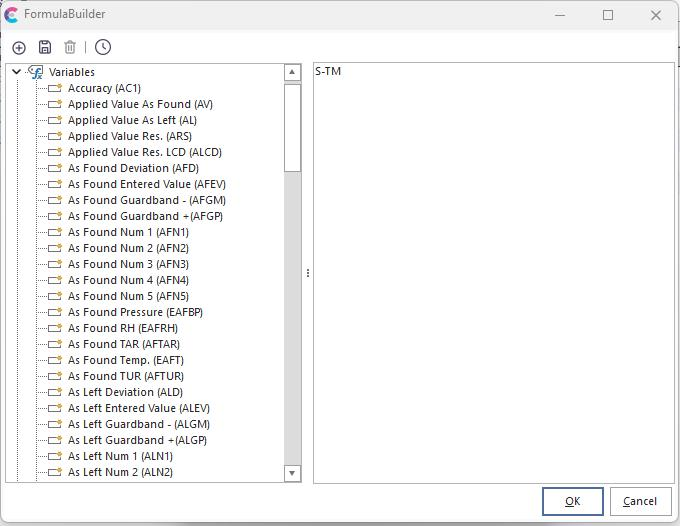
FormulaBuilder uses variables for test point fields to create a formula for the selected value. Other details can be added per Tolerance Type:
·Tolerance Minus - This column is used to store the formula used to calculate the minus tolerance for a piece of equipment. Each formula can reference many variables associated with the equipment and current test point. In addition to the standard operations such as addition, subtraction, multiplication, and division, you also have the option of using many advanced functions. To see a list of all the variables you have access to, press the button in the tolerance minus field to pop-up FormulaBuilder. FormulaBuilder can be used to easily build a tolerance minus formula.
·Tolerance Plus - This column is used to store the formula used to calculate the plus tolerance for a piece of equipment. Each formula can reference many variables associated with the equipment and current test point. In addition to the standard operations such as addition, subtraction, multiplication, and division, you also have the option of using many advanced functions. To see a list of all the variables you have access to, press the button in the tolerance minus field to pop-up FormulaBuilder. FormulaBuilder can be used to easily build a tolerance plus formula.
·Asym. Tol - this column is used to specify if a tolerance type is "asymmetrical", meaning that the equipment has different plus and minus tolerances.
·Relative Based Tolerance Minus - If a row is based on "Relative" tolerancing, then this formula is used for the minus tolerance.
·Relative Based Tolerance Plus - If a row is based on "Relative" tolerancing, then this formula is used for the plus tolerance.
·Display 1-3 Res. / Trailing Char - Resolution that should be used for the Display field, and optional trailing character that should be added
·Ignore Display 1-3 If Blank - these Display formulas can be skipped if certain As Found/As Left values are unpopulated
·Result Type - select either 'Standard' or 'Dual Tolerance'. For a 'Dual Tolerance' scenario the 'Extra Number 3' and 'Extra Number 5' test point fields are used as a secondary Tolerance +/-. So the 'As Found' value would be checked against the 'Tolerance -' and 'Tolerance +' fields and the 'Final' value would be checked against the 'Extra Number 3' and 'Extra Number 5' fields. (These field captions would likely be modified on the test point grid-level to make them more intuitive).
Default Formulas
When IndySoft ships, it comes with several default tolerances. The following is an explanation of each one. IMPORTANT: Feel free to add, edit, or remove formulas at anytime; however, after changing a tolerance, you will need to exit IndySoft and restart it in order to see the new changes.
Bi-Lateral
Tolerance Plus = S + ( T / 2 )
Tolerance Minus = S - ( T / 2 )
Relative Based Tolerance Plus = T / 2
Relative Based Tolerance Minus = T / 2
"Bi-Lateral" adds half of the Tolerance to the Standard to compute the Tolerance Plus. Half of the Tolerance is subtracted from the standard to compute Tolerance Minus.
Full Scale Bi.
Tolerance Plus = S + ( F * ( ( T / 100 ) / 2 ) )
Tolerance Minus = S - ( F * ( ( T / 100 ) / 2 ) )
Relative Based Tolerance Plus = (F*((T/100)/2)))
Relative Based Tolerance Minus = (F*((T/100)/2)))
When formulating Tolerance Plus, "Full Scale Bi." changes the Tolerance into a percentage (divides by 100), divides this value in half, multiplies the result by the Full Scale value, and then adds this to the Standard. When formulating Tolerance Minus, "Full Scale Bi." changes the Tolerance to a percentage (divides by 100), divides this value in half, multiplies the result by the Full Scale value, and then subtracts this from the Standard.
Full Scale Min.
Tolerance Plus = S
Tolerance Minus = S - ( F * ( T / 100 ) )
Relative Based Tolerance Plus = 0
Relative Based Tolerance Minus = (F*(T/100)))
The Tolerance Plus for "Full Scale Min." equals the Standard. To compute Tolerance Minus, "Full Scale Min." changes the Tolerance into a percentage (divides by 100), multiplies the result by the Full Scale value, and then subtracts this from the Standard.
Full Scale Plus
Tolerance Plus = S + ( F * ( T / 100 ) )
Tolerance Minus = S
Relative Based Tolerance Plus = (F*(T/100)))
Relative Based Tolerance Minus = 0
To compute Tolerance Plus, "Full Scale Plus" changes the Tolerance into a percentage (divides by 100), then multiplies the result by the Full Scale value, and then adds this to the Standard. The Tolerance Minus for "Full Scale Plus" equals the Standard.
Minus
Tolerance Plus = S
Tolerance Minus = S - T
Relative Based Tolerance Plus = 0
Relative Based Tolerance Minus = T
The Tolerance Plus for "Minus" equals the Standard. The Tolerance Minus for "Minus" equals the Tolerance subtracted from the Standard.
Plus
Tolerance Plus = S + T
Tolerance Minus = S
Relative Based Tolerance Plus = T
Relative Based Tolerance Minus = 0
The Tolerance Plus for "Plus" equals the Tolerance added to the Standard. The Tolerance Minus for "Plus" equals the Standard.
Asymmetrical
Tolerance Plus = S + TP
Tolerance Minus = S - TM
Relative Based Tolerance Plus = TP
Relative Based Tolerance Minus = TM
The Tolerance Plus for "Asymmetrical" equals the Standard plus the Asymmetrical Tolerance Plus. The Tolerance Minus for "Asymmetrical" equals the Standard minus the Asymmetrical Tolerance Minus. |