Add/Edit...System-Wide...Document Formats
Add/Edit Document Formats
Beginning in 13.1.x, Document Formats can be added and saved to the database for the purposes of batch downloading/saving calibration certificates. Each format has a friendly name or description as well as merge items to dictate how the document name needs to appear when downloaded or saved. Document Formats can be specified for batch printing fromEquipment Finder, Event Finder, the Order System, and any Equipment Search/Report.
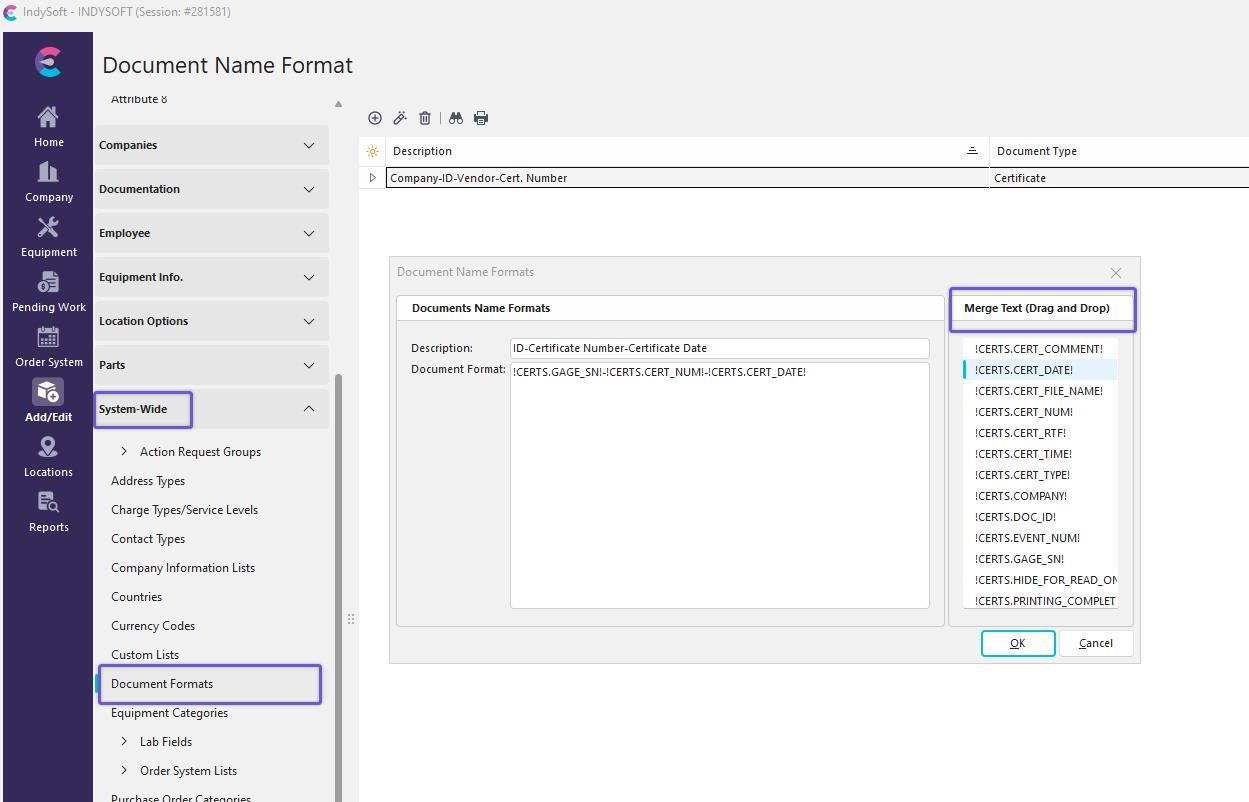
Upon upgrading or creating a new database, there will always be at least one format which contains the primary keys for the CERTS table, Company-ID-Vendor-Cert. Number. Creating a new format simply requires the description and for the user to specify which fields should be used in that format. Administrators can simply drag and drop their desired fields into the Document Format section. As a convenience, a hyphen will be added between each dropped in option. Fields for the format can be added from the CERTS, EVENTS, and GAGES tables. Additional formatting options are listed below.
| !CERTS.[AnyField]! | Any Cert Field | | !GAGES.[AnyField]! | Any Equipment Field - Record linked to the cert | | !EVENTS.[AnyField]! | Any Event Field - Record linked to cert | | !DDDDD! | Current Date in Windows Short Date Format from Regional Settings | | !DDDDDD! | Current Date in Windows Long Date Format from Regional Settings | | !T! | Current Time in Windows Short Time Format from Regional Settings | | !TT! | Current Time in Windows Long Time Format from Regional Settings | | !D! | Displays the day as a number without a leading zero (1-31) | | !DD! | Displays the day as a number with a leading zero (01-31) | | !MM! | Displays the month as a number with a leading zero (01-12) | | !MMM! | Displays the month as an abbreviation (Jan-Dec) using the strings from Windows Regional Settings | | !MMMM! | Displays the month as a full name (January-December) using the strings from Windows Regional Settings | | !YY! | Displays the year as a two-digit number (00-99) | | !YYYY! | Displays the year as a four-digit number (0000-9999) | | !RANDOM! | A random number between 0 and 10000 |
For example, if the Name Format is:
!CERTS.VENDOR! !CERTS.CERT_NUM! -- Calibration of !CERTS.GAGE_SN! (!GAGES.GAGE_DESCR!) on !DDDDD! !TT!
Then the resulting file name will be something like:
ACME LAB 234AS -- Calibration of SDF22-AS2 (Digital Multimeter) on 12-29-2020 11-40-44 AM.pdf
Note that the file extension should NOT be part of the Name Format - it will be automatically added based on the file type.
The  button can be visible for all profile. Administrators can set the selected format as the default for all users and clear the settings for all users, whereas any other user can specify their own format and save it for themselves only.