Kit Contents
The Contents tab is used to specify exactly what a Kit contains. Each Kit Contents item can contain a definition of a specific gage (i.e., Company & I.D.) or a more generalized description. (i.e., equipment is Active, from Company ABC, Department 5, Type is Caliper, Manufacturer is Sylvac, etc.). Using these Kit Content descriptions, IndySoft will auto-select equipment for you when performing historical events.
Adding a Kit Contents for a 'Generalized' Gage
To select kit contents for a generalized gage, press the  'Add Gage Requirement' button. You will see the following dialog:
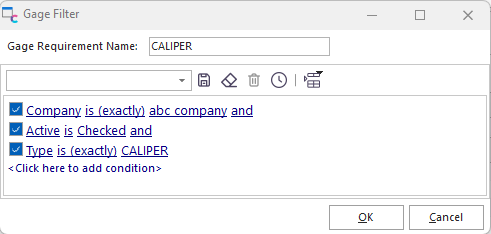
Add a Generalized Gage Filter
Use the filter box to select this 'kit content' criteria. The above example demonstrates the addition of a 'Generalized' Kit Content. In this case, an Active caliper from ABC COMPANY will be chosen when the Kit is built.
Add Gage Requirements from EquipmentFinder
In addition to the two methods described above, you can select one or more pieces of equipment as 'Kit Contents' through IndySoft's EquipmentFinder search window. To select equipment using EquipmentFinder, press the  'Add Gage Requirements from EquipmentFinder' button. You will see the dialog below. For more information on using IndySoft's EquipmentFinder, see the 'EquipmentFinder' topic in the main IndySoft help file.
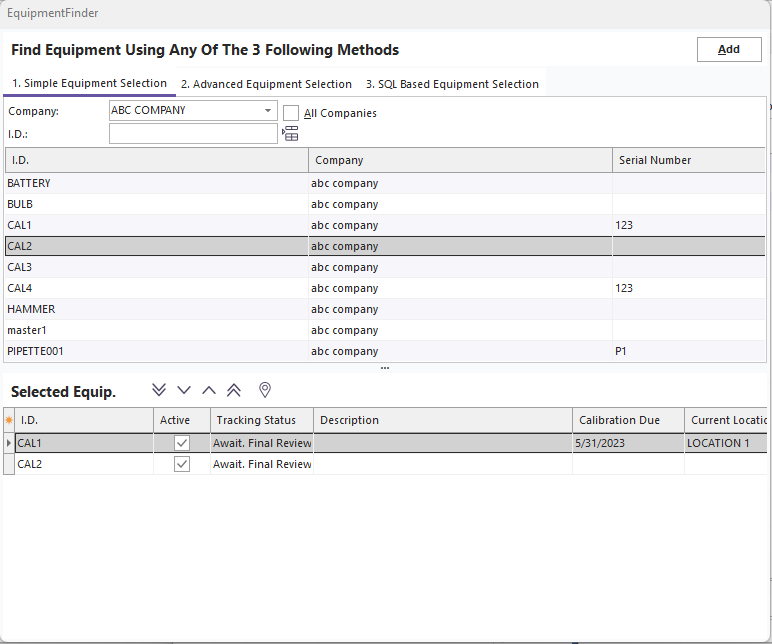
EquipmentFinder Sample Selection
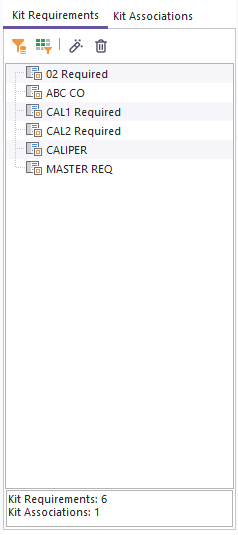
Kit Contents - After EquipmentFinder Selection
In the above example, the two gages selected in EquipmentFinder ('CAL1' and 'CAL2') are not represented in the 'Kit Contents' as separate entries - each entry setup is a 'Specific Gage' requirement.
To re-edit a gage requirement (of any type), highlight the appropriate requirement and press the  'View Kit Requirement' button.
To permanently remove a gage requirement, press the  'Delete Kit Requirement' button, and choose 'Yes' from the confirmation dialog. |