View Sync Queue
Use the Tech Sync Queue to review pending syncs on the Single-User Tech Sync, all sync operations run against IndySoft Secure Server, and review files imported.
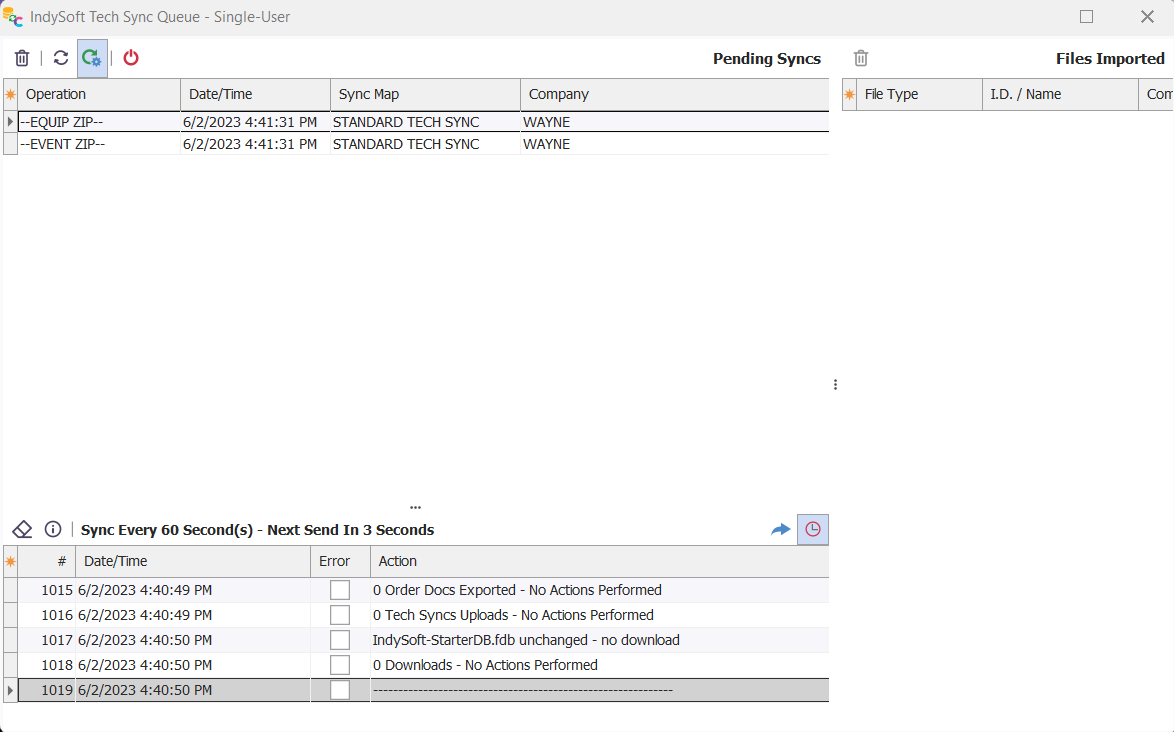
IndySoft Tech Sync Queue
There are three main sections of the Client Log:
Pending Syncs
This grid lists all pending operations for the Single-User Tech Sync utility. Think of this grid much like IndyPrintAdmin, which shows a print job queue. This shows a similar queue of sync operations. In a typical Tech Sync setup, the service will be performing exports of changes in equipment and orders - so any of these EXPORT operations might be listed. After successfully exporting each of these files, a corresponding UPLOAD record will be created, noting the second action of copying the file to the IndySoft Secure Server.
There are four buttons above the Pending Syncs grid:
· Delete: Permanently removes the selected sync item(s)
· Reload: Forces a reload of the Pending Syncs log.
· Auto-Refresh Pending Syncs: Toggle this button down to refresh the Pending Syncs automatically once every 5 seconds.
· Close Pending Syncs & Exit Tech Sync: This button provides a quick exit to the current dialog while completely closing out of the Tech Sync utility (caution: all Single-User syncs will stop when the utility closes)
Client Log (bottom grid)
This grid lists the current log of operations performed in the IndySoft Tech Link Utility for Single-User. The frequency of these sync operations (in seconds) is controlled by the User/Location - Tech Sync Settings menu option. The sync status (paused/running) is listed in the text above the log grid, along with a note about the sync interval and the number of seconds until the next sync.
There are four buttons above the log:
· Clear Client Log: Clears the contents of the current client log. Caution: This operation cannot be undone.
· View Tech Sync Log File - As Text: This launches the same Tech Sync client log in Notepad. Note that this text file is not continually updated after launch (the log is still populating behind the scenes, however). The same text-based version of the log is always maintained in the 'IndyTechSync-SU' directory under User public files, typically:
C:\Users\Public\Documents\IndyTechSync-SU\TechSync-Log.txt
· Perform Syncs Now: This forces an immediate sync. The sync interval timer will be reset after sync.
· Continue Performing Syncs (at set interval - while this dialog is visible): Toggle this button to allow syncs to continue at the set interval. If this toggle is unpressed, then syncs will be paused.
Files Imported
This grid lists all files imported in the IndySoft Tech Sync Utility for Single-User. IndySoft logs these files so that they are not imported multiple times. The actual files are retained in the local directory (for archive purposes), but their presence in this 'Files Imported' grid instructs IndySoft not to re-import them in future syncs. If, for whatever reason, you believe the import failed or needs to be re-performed, then the file can be removed from the listing. In that case, the file will be re-imported upon the next sync. |