Add/Edit...Equipment Info...Conditions
Conditions refer to the state of the equipment. This is where you will populate the list for performing events such as Receiving.
Add/Edit Conditions
To add to or manage the Conditions Lists, in the IndySoft header, click Add/Edit, then select Equipment Info...Conditions from the drop-down menu.
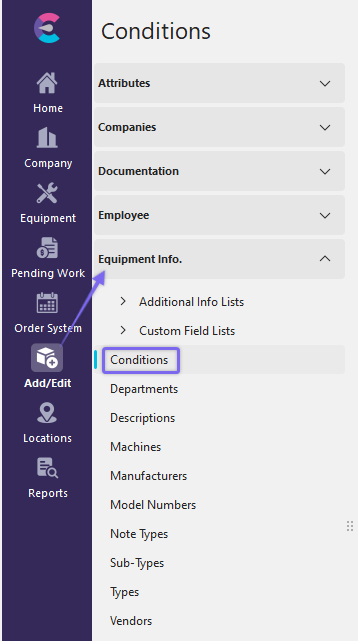
Navigate from the Add/Edit Tab to Equipment Info. / Conditions
Before adding or editing the condition, ensure you are in the right company. Click  'New Item' to add a new Item or
  to 'View/Edit Item.'
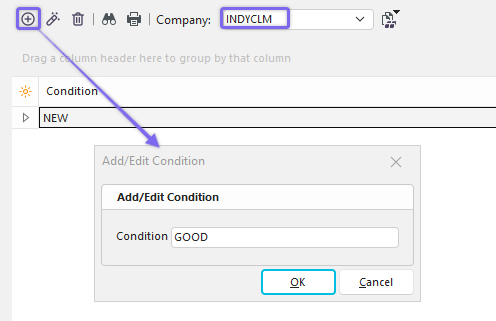
Company Location, Add New Condition Dialog
Using Conditions
Select the Condition Field to expand the list of available Conditions (which was added in the previous steps).
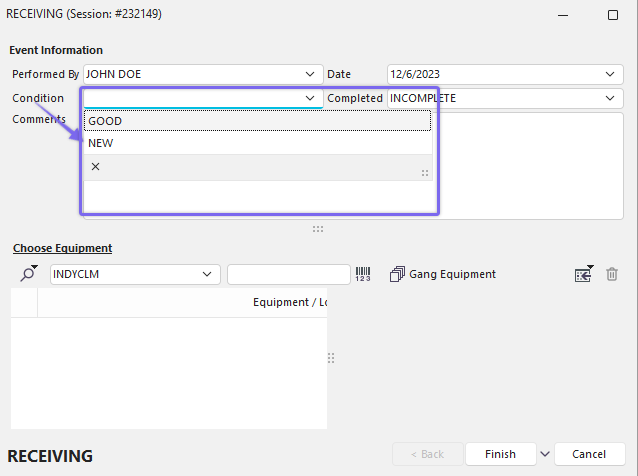
Receive Dialog Example w/ Conditions pointed to by an arrow.
 Productivity Tip
The Add/Edit Conditions dialog box can be filtered and customized differently. See General Interface for more information.
Buttons and Icons are detailed here.