Default Style for New Hyperlinks
Default Style for New Hyperlinks
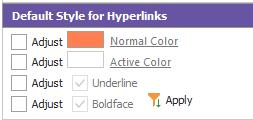
This section controls the appearance of new hyperlinks created within the layout. It is important to keep the 'look' of these hyperlinks consistent - so users quickly understand which text can be clicked to edit fields, etc. Two color options can be specified: 'Normal' and 'Active.' The 'Normal' color corresponds to the color of the text when it appears in the layout but when the mouse is NOT currently hovered over the text. 'Active' color corresponds to the color of the text when the mouse is hovered over the text. For instance, you might elect to have non-hyperlink text in black, all hyperlinks in dark blue, and the current 'Active' hyperlink (where the mouse currently hovers) in bright blue.
If the 'Adjust' checkbox is unchecked, then the 'Normal' or 'Active' color (as appropriate) is not modified. Similarly, if you want the font style for hyperlinks to be modified to include Underline or Boldface, use the 3rd and 4th options. Note that the adjustment could be to enforce the lack of Underline or Boldface, not just the application of Underline or Boldface.
If you would like to modify text in the layout created before the current defaults were set up, select the text in the layout, then press the 'Apply' button.
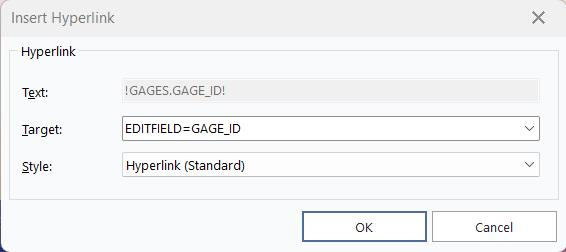
Note: if a hyperlink is created manually rather than through a double-click of a hyperlink option in the 'Merge/Hyperlink Options' grid, then the dialog below is shown:
Edit Hyperlink
If the 'Apply Hyperlink Style' button is unchecked, the Default Style adjustments noted above will be skipped. |