Layout Editor Ribbon...Home...Font

Home...Font Operations
 Font Name
Change font type - applies to selected text
 Font Size
Change font size - applies to selected text
 Bold
Bold
Change font style to include boldface - applies to selected text
 Italic
Change font style to include italics - applies to selected text
 Underline
Change font style to include underline - applies to selected text
 Strikethrough
Change font style to include strikethrough - applies to selected text
 Overline
Change font style to include overline - applies to selected text
 Uppercase
Modifies selected text to all UPPERCASE
 Subscript
Change font style to include subscript - applies to selected text
 Superscript
Change font style to include superscript - applies to selected text
 Font Color
Changes the font color - applies to selected text
 Font Background Color
Change font background color - applies to selected text
Text Size
Displays the following sub-menu - common options for quickly increasing/decreasing font size for selected text:

Text Size Options
Finally, many of the common options above can be viewed/edited from a single Advanced Font dialog available from the small arrow in the lower right:
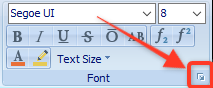
Launch Advanced Font Dialog
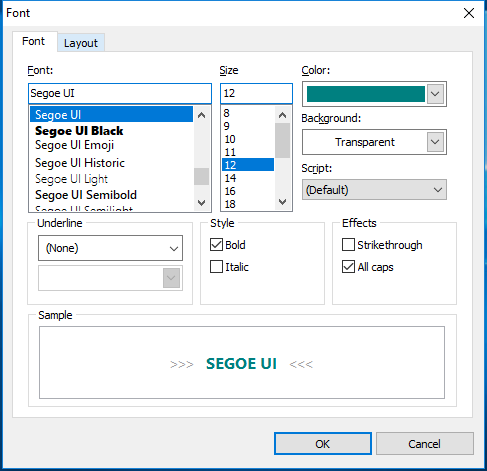
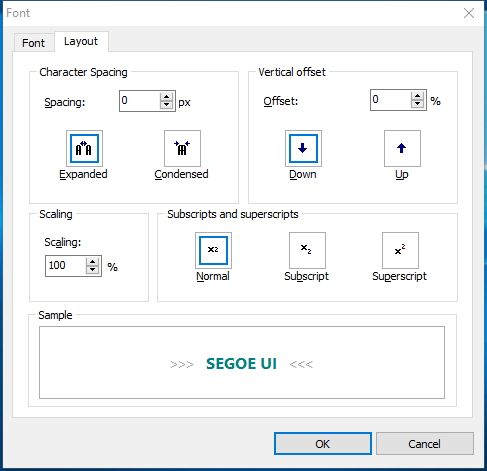
Font Dialog - Tabs
This dialog provides a sample preview of the text before making the change. Additional options not available from the ribbon bar include scaling, character spacing, and vertical offset. |