Application Options
Application Settings are stored in the computer's registry running IndySoft's Fluke Dewk Temp/RH application. At the end of each polling interval (when the timer reaches 0), the saved settings connect with the Fluke 1620A hardware and then optionally alert users of out-of-tolerance readings. For information on configuring temperature and humidity tolerance, see Tolerances.
To save your existing settings, press the 'Save Settings' button or select 'Save Settings' from the 'Options' menu. Settings must be saved before any changes will take effect. Except for 'Alert this EMail,' all options are required to use the application.
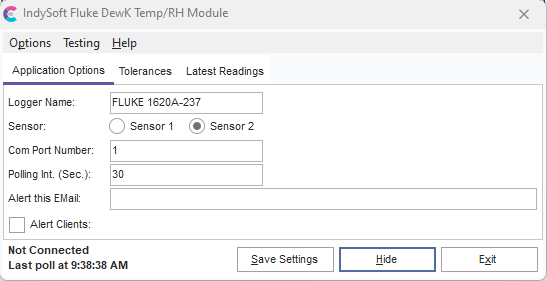
Fluke/Dewk Temperature/RH Module - Application Options
Logger Name: This is a unique name for the Fluke 1620A hardware. This value is used to key the temperature and humidity information that will be written to the IndySoft database. This field must match the 'Data Logger Name' field in each client's User/Location Settings. For more information, see Client Computer Setup/Usage.
Sensor: The Fluke 1620A can have up to two temperature and relative humidity sensors. Use this drop menu to select which sensor's readings will be recorded in the database.
Com Port Number: This field is used to specify the com port used to make a connection to the Fluke 1620A hardware.
Polling Int. (Sec.): This sets the amount of time in seconds between measurements.
Alert this EMail: Email addresses listed in the field will receive automatic emails informing them of any out-of-tolerance measurements—separate multiple email addresses with semicolons. For information on how to configure tolerances, see Tolerances.
Alert Clients: If this box is checked, IndySoft clients will receive a popup message alerting them to any out-of-tolerance measurements. |