Language Manager
Language Manager
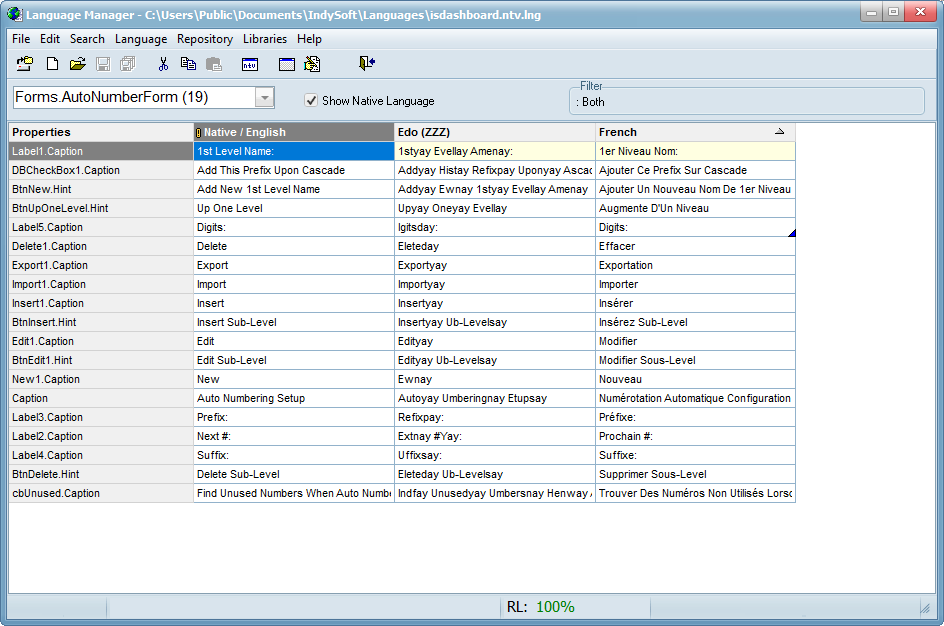
Language Manager is the tool translators use for manually translating all onscreen user interfaces. The text is grouped according to Forms (onscreen text) and Units (code that contains text that can appear under certain conditions - message dialogs, error messages, etc.). Each selected language is visible in a distinct column within the grid. The Native language is English - and it can always be displayed for reference by selecting the 'Show Native Language' checkbox above the grid. The 'Properties' value displays the name of the actual object within the source - this value is only helpful when communicating with IndySoft Support - but it might also give a clue to the intended usage.
When Language Manager is first displayed, you will be prompted to select one or more visible languages for edit. Each selected language will be visible as a new editable column in the grid. To modify the viewable/editable languages in Language Manager, use the File...Open the Language menu option.
Note: The visible/editable language(s) in Language Manager does NOT automatically follow the currently selected language in the main Language Settings module. |