Global Equipment Change - Uncertainty Options
Suppose you need to quickly modify the Uncertainty Budget Associations or Attributes for a group of gages. In that case, you can use the 'Global Equipment Change' event (or any custom event setup with the 'Global Modifications' event tab visible). When running IndySoft Uncertainty, there are two additional options in the drop-down list for 'Remove/Modify/Add Equipment':
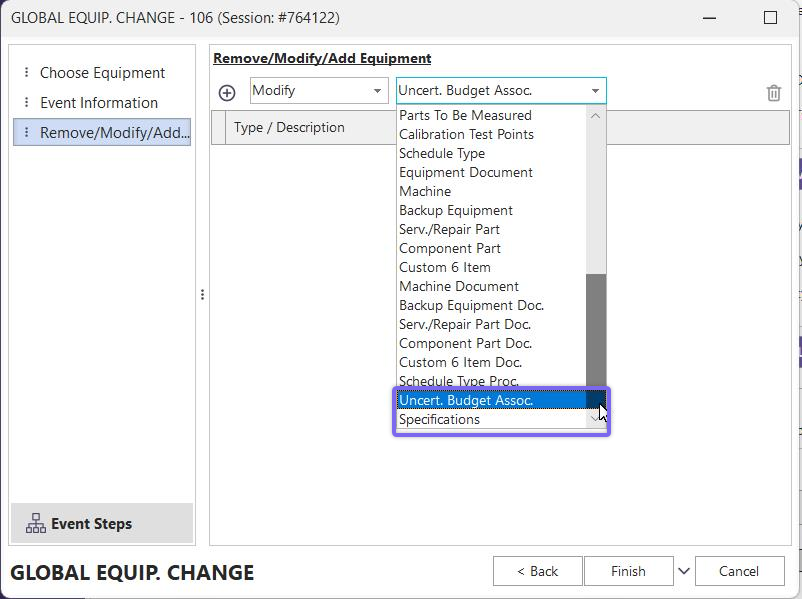
Uncertainty Options In Global Equipment Change
These options work just as other global equipment change options. Note that the 'Add Uncertainty Attribute' and 'Modify Uncertainty Attribute' options are exactly the same. In both cases, you select a piece of equipment, and a pre-existing attribute that belongs to that piece of equipment. This attribute is then copied/overwritten into all selected equipment. Also note that adding 'Uncert. Budget Assoc.' through Global Equipment Change event will NOT ensure that test points per gage are only linked to one uncertainty study. When adding Budget Associations on the IndySoft main screen, this validation will always occur, but such a check is not performed in the Global Equipment Change event. |