Uncertainty Masters Mapping
 Note: the topic below only applies when the Uncertainty Module is installed.
When inputting test point data during a Calibration-type event, any Master Rules set up in the related Uncertainty Budget must be fulfilled. It is possible that multiple masters have been selected for the event, and multiple Master Rules are used for the budget. In this case, IndySoft must confirm which master in the event should be mapped to each Master Rule in the budget. This is important in case any Uncertainty Attributes for the related master are referenced in the budget. This dialog will automatically appear when the test points event step is entered:
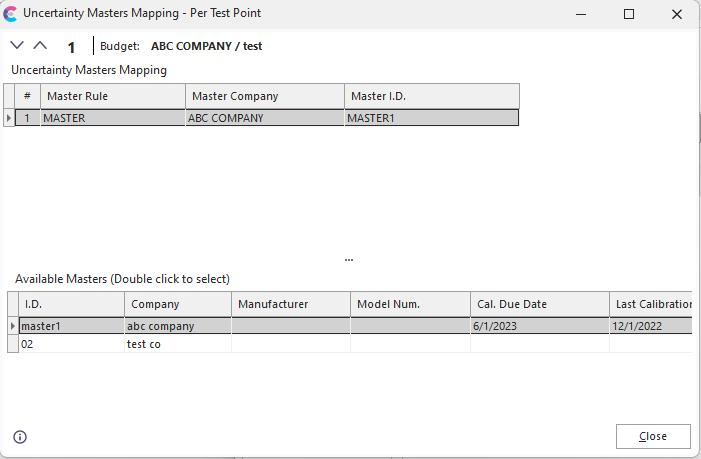
Uncertainty Masters Mapping
This dialog shows only one test point at a time - corresponding to the current test point selected in the event. You will note that Test Point # changing on the top of the dialog as the test points grid is navigated within the event. Each test point can map to an Uncertainty Budget, and this budget might have one or more Master Rules requiring the association of a master. These Master Rules for the current test point are shown in the top grid. The rule's name is in the first column ('Master Rule'), and the associated master is shown in the 'Master Company' and 'Master I.D.' columns.
The masters previously selected for the event are shown in the bottom grid for reference. To make an association of a master (in the bottom grid) to a Master Rule (in the top grid), double-click on the master in the bottom grid. The name of the corresponding Uncertainty Budget is shown at the top of the dialog. To quickly launch the Uncertainty Module, press the 'Launch Uncertainty Module' button in the lower-left of the dialog. When the dialog is first shown, IndySoft makes a 'best guess' on the master's mapping based on the selection filter set up in the Uncertainty Budget. If none of the current masters seem a good match, then the mapping is left blank. Also - in this case, a confirmation dialog will be displayed:
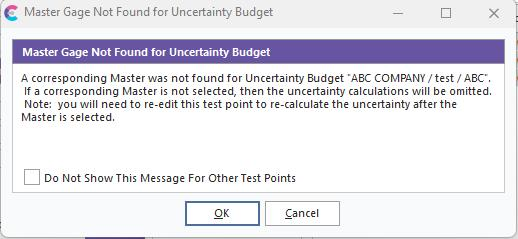
Master Gage Not Found for Uncertainty Budget
If this dialog appears, you likely need to back up in the event and select a different master or manually confirm the correct master using the Uncertainty Masters Mapping dialog. If all masters can be 'guessed' - then the Uncertainty Masters Mapping dialog is only needed to confirm the selections. Note: the 'Master Gage Not Found for Uncertainty Budget' can occur many times - especially if there are a large # of test points that use the same, Masters Rule. In this case, check the 'Do Not Show This Message For Other Test Points' box to suppress this dialog for the current event. |