Service Agreements - Creating Work Orders
Creating Work Orders
Create Work Order (Batch)
Batch WO creation can be done directly from the service agreement executable or add/edit company dialog.
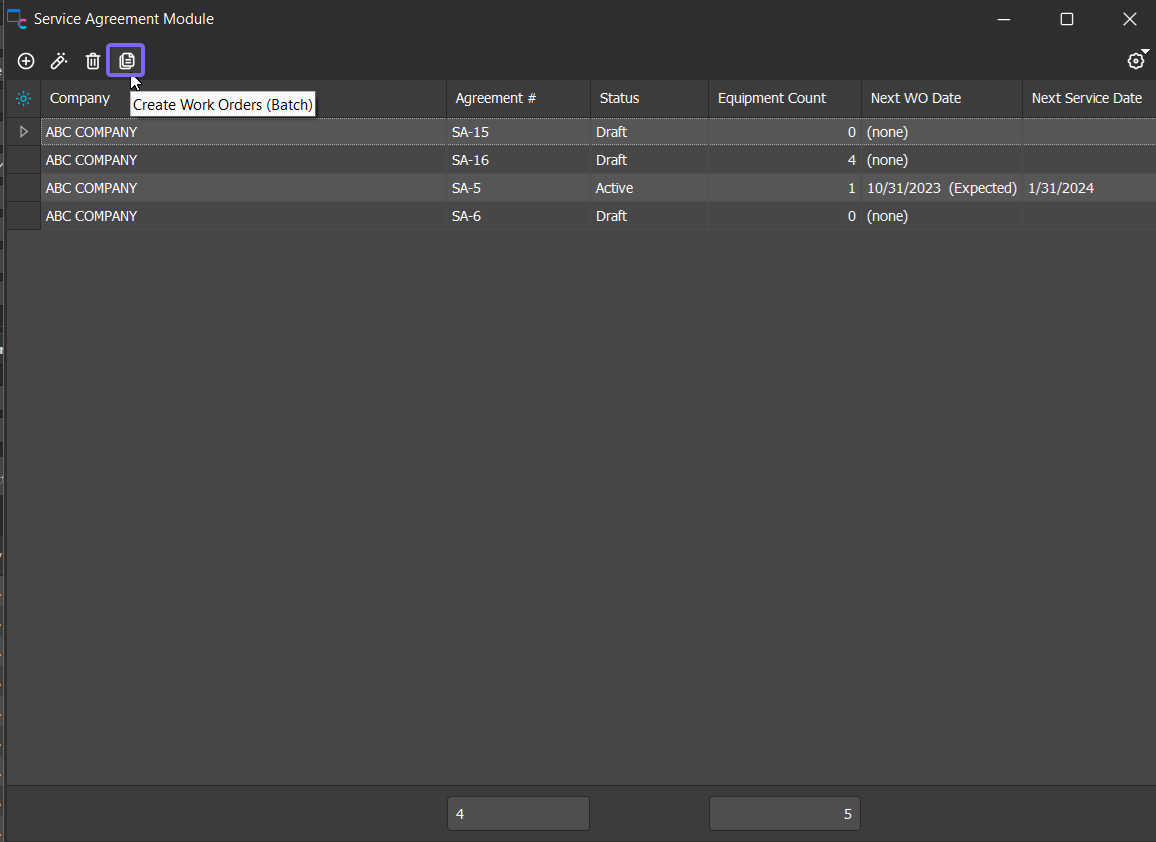
When batch-creating work orders from a service agreement, the agreement must:
- Have an ACTIVE status
- Have a next service date within the range selected
- Not expire before the next service date
- Pass the company/service agreement filter
The Options cog in the upper right-hand corner allows for Custom Rules to be added to different trigger actions like work order creation, service agreement creation, service agreement save, etc.
As an example, the filter can be used to:
- Allow a company to have work orders created only if they have a company checkbox unchecked and maybe they want to control how far in advance a work order can be scheduled.

Upon pressing the batch creation button from the add/edit company dialog or from the service agreements module, the user will be prompted to enter a time frame that the next service date needs to be within in order to include that agreement. The start date will default to today, and the end date will default to the end of next month.

Next, a message will pop up explaining the next review screen:

Basically, if an agreement's next service date is not within a time frame OR if the filter conditions were not met, then the line item will be grayed out and not selectable. Everything else is ready to be created in a batch, but as this is a major operation, you have the ability to review the list and exclude certain items.
Upon pressing proceed, the work order creation process will begin.
Create Ad-Hoc Work Orders
Creation of Ad-Hoc Work Orders can be done from inside of a service agreement. Ad Hoc work orders do not affect the next service date of the agreement, but they do inherit all other information. When creating an ad hoc work order, the user will specify an expected date and then have an equipment review screen. In the review screen, the user will be able to specify the event type to be added to the work order and exclude/include related equipment to the Agreement.