Perform New Study
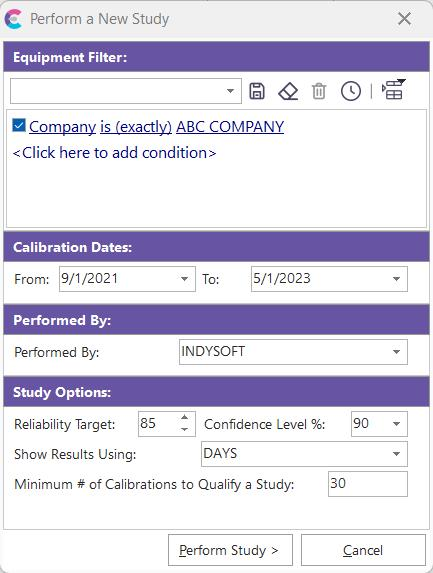
Perform A New Study
This dialog allows for the setup of a new Trend Analysis. First, select a filter for the group of equipment that should be included in the study. This filter box has the same functionality as the one commonly used in IndySoft's EquipmentFinder. Next, select study options:
Calibration Dates: This filter is optional. If either or both of these date boxes are left blank, then all events past or future (as appropriate) will be included in the study. Note also that a Trend Analysis will include all events with an event type matching the CALIBRATION event types setup in the Study Event Types dialog.
Performed By: Not a filter - this stores the Trend Analysis user.
Reliability Target: Desired reliability for study (integer)
Confidence Level: Two options are allowed: 90 and 95
Show Results Using: Four options are allowed: DAYS, WEEKS, MONTHS, and YEARS. The calibration interval calculated by the trend analysis will be displayed using this interval. Note that any 'global modify' events can use a different interval if desired.
Minimum # of Calibrations to Quality a Study: Stop the study from proceeding if the number of qualifying calibration intervals does not match a user-designated threshold.
Note: Please note the rules that the IndySoft Trend Analysis will follow when checking for qualified intervals:
| 1. | Each event must be a calibration-type event, as specified in Study Event Types.2. | Each event must be marked as 'COMPLETE.'3. | Only the intervals between events are noted, not the number of actual events. For example, if you have six calibration-type events for gage 'ABC-123', this will be quality as only five intervals - the first calibration-type event 'starts the clock' on the first interval. The 'Minimum # of Calibrations to Quality for Study' value checks for the number of distinct INTERVALS, not the number of matching calibration-type events.4. | The study will only use an interval if it is created by two calibration-type events for the same gage. For example, if you have five gages with six calibration-type events each, this will represent five intervals per gage times five gages, so 25 total intervals.After completing these options, press 'Perform Study' to calculate the suggested calibration interval for the selected equipment. |