Kit History
Kit History
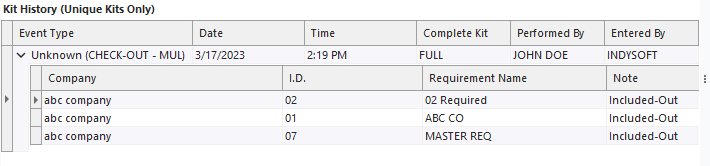
Users of the Kitting Module can look to this section of the Kitting main screen to see the historical activity (events) performed on the selected Kit. Note: this 'Kit History' section is only appropriate for 'Unique Kit' type kits. If a kit is a 'Kit Template' Type, the 'Kit History' will be disabled.
For each event in IndySoft, the name, date, and time will be listed. 'Complete Kit' will indicate either FULL or PARTIAL depending on whether all the available equipment was moved to that status. Nested within this is a collapsible list of the individual pieces of equipment that were involved. 'Requirement Name' indicates why that piece was selected. 'Note' can have one of three values: 'Included' if it was part of the event and has been checked in since then, 'Excluded' if it was not part of the event but could have been, and 'Included-Out' if it was included in the event and has not been checked in since then.
To change the sort order of the grid, left mouse click on the appropriate field. Clicking multiple times will toggle the sort between ascending/descending. To sort by multiple fields, hold the Shift key while selecting fields. To collapse or expand the sub-grids, press the '-' or '+' symbols, or right-click and select 'Collapse All' or 'Expand All.' |