Export/Import Module - Overview
Welcome to the IndySoft Export/Import Module. This utility allows users to quickly export/import data from one IndySoft database to another. Or the same data can be later restored to the original database. The Export/Import Utility can be located from the main dashboard under Options...Data Management...Export/Import Module. Please see the screenshot below for further directions:
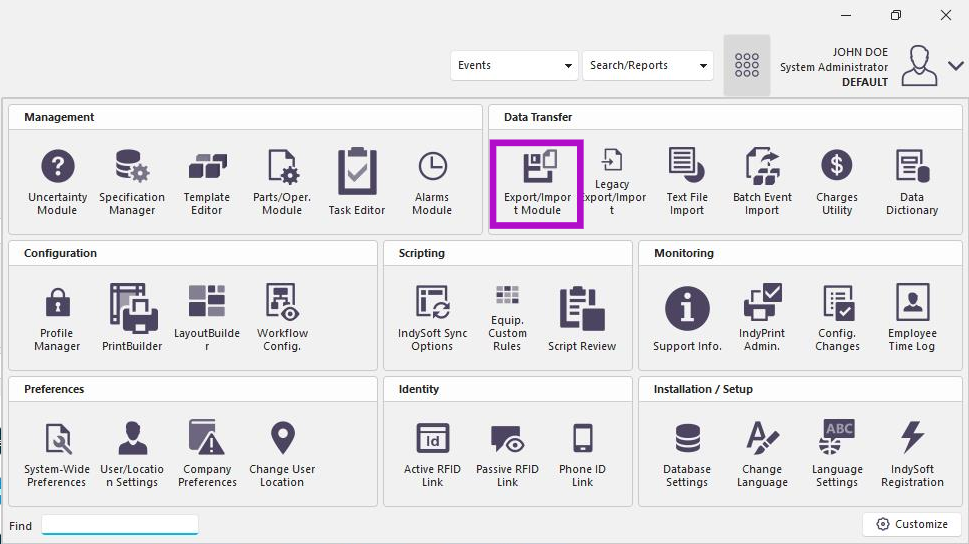 ../Storage/indysoft-help-publication/100210052.png
Locate: Export/Import Module
Export files create *.zip files that contain all exported data and notes about the export. Data can be exported in various export types/groups, defined by a 'behind-the-scenes' IndySoft data dictionary. These export groups represent the most common export scenarios. An open-ended 'Export All' option allows any data combination to be exported. Most export groups can be filtered upon export, with many common export groups using familiar interfaces such as EquipmentFinder, OrderFinder, etc. Upon import, the data in a zip file can be previewed (if a user has appropriate security) to confirm the contents and better decide if import is required. Please see the initial dialog interface below:

IndySoft Export/Import Utility Dialog
If the user running the Export/Import Module is a 'System Administrator,' they can permanently delete the data from the IndySoft database after the export. This is equivalent to an archive/purge type operation. This permanently removes the records from the IndySoft database after export, but they can be restored later from the zip if required. A similar option is available upon import - users with appropriate security rights can delete all records (from the selected group) in the database before importing the records in the zip. This ensures that the records in the zip file are now the only records in the database. This powerful feature is often used when syncing Configuration-related files - to ensure that the old and new configurations are not mixed.
 Note for legacy users.
Don't get confused - there was a smaller export/import system that you might have used in prior IndySoft versions (before version 9). This older system is largely duplicated and certainly expanded by this newer module. See the Legacy Export/Import Utility - Overview topic for more details.