VBScript Help
Debugging tip: Try using VBScript's MsgBox function to show the current value of a variable to give you some mid-code feedback. For example: MsgBox("This appears in a dialog")
For a reference of advanced VBScript functions, syntax:
http://msdn.microsoft.com/library/default.asp?url=/library/en-us/script56/html/vbscripttoc.asp
Here is a bit of sample code to get you started:
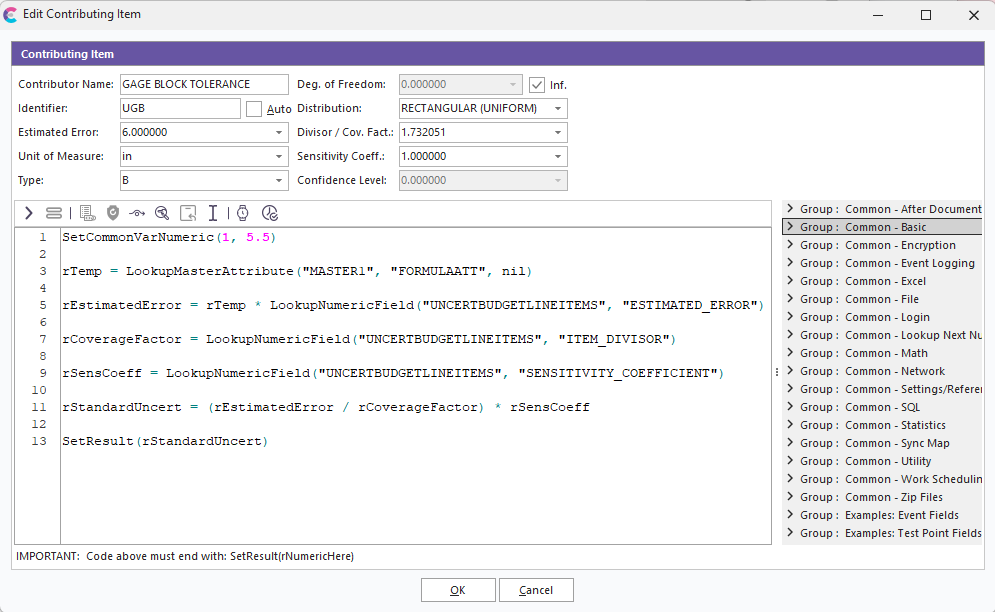
Example Code
SetCommonVarNumeric(1, 5.5)
rTemp = LookupMasterAttribute("MASTER1", "FORMULAATT", nil)
rEstimatedError = rTemp * LookupNumericField("UNCERTBUDGETLINEITEMS", "ESTIMATED_ERROR")
rCoverageFactor = LookupNumericField("UNCERTBUDGETLINEITEMS", "ITEM_DIVISOR")
rSensCoeff = LookupNumericField("UNCERTBUDGETLINEITEMS", "SENSITIVITY_COEFFICIENT")
rStandardUncert = (rEstimatedError / rCoverageFactor) * rSensCoeff
SetResult(rStandardUncert)
The code above does (line by line):
- | Sets CommonVar #1 to 5.5 ("FORMULAATT" might need to reference this variable when it executes)2. | Executes the VBScript formula for the "FORMULAATT" attribute of "MASTER1" master and returns the result to the rEstimatedEror variable3. | Looks up the contributing item's 'Estimated Error' field and multiplies it by rTemp, returns result to rEstimatedError4. | Reads contributing item's 'Coverage Factor' field into the rCoverageFactor variable5. | Reads contributing item's 'Sensitivity Coeff.' field into rSensCoeff variable6. | Divides rEstimatedError by rCoverageFactor, then multiples result by rSensCoeff, returns the result to rStandardUncert variable7. | Sets the VBScript result to rStandardUncert (always the last step)