Calc Tab - Language
The Language Tab gives you access to the available functions and operators for easy drag-and-drop into the code window. When placed in the code window, they will include dummy parameters that must be replaced to work properly. See the section on Special Functions below for a list of functions unique to IndySoft.
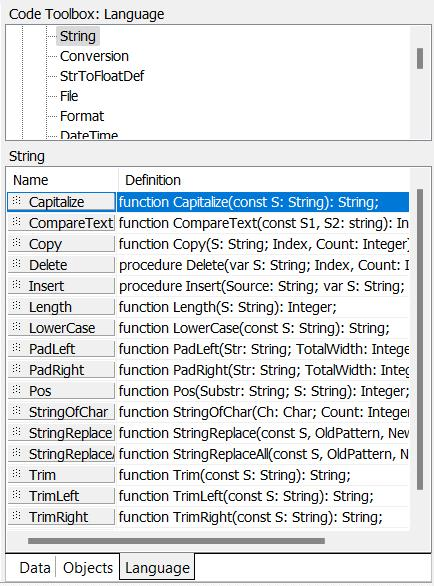
Code Toolbox - Language Tab
Special Functions
All functions below are specialized from the 'Calc' tab in the IndySoft Custom Report Designer. There are other standard functions besides the ones listed below. Note: these functions are available from the 'Calc' tab in the IndySoft Custom Report Designer by viewing the 'Code Toolbox: Language' tab on the right. Certain groups in this section contain specialty functions, as described below. After selecting a group, you will see a list of the various functions in the grid below. You can drag/drop these function names into the code window on the left, and a template of the function, along with necessary parameter names, will be provided.
Math
RoundToSigDig
This function accepts three parameters, dNumber, iSigDigits, and iResolution. It returns the value of dNumber rounded to iSigDigits and updates iResolution to the test points resolution corresponding to that value.
GetEventStatusValue
GetEventStatusValue
This function accepts an Event Status abbreviation (like 'IN') as a parameter, then returns the full version of this event status abbreviation as text (like 'Checked In').
GetEventStatusAbbrev
GetEventStatusAbbrev
This function accepts a full Event Status as a parameter (like 'Checked In'), then returns the abbreviated event status as text (like 'IN').
ReportSettings
GetCurrentUserName
This function returns the user name of the user currently logged into IndySoft, as text. This function does not require any parameters.
GetReportFilters
Only used when STANDARD reports are used in the 'Design' State - when this function is called from the Calc tab in IndySoft Custom Report Designer, the current report filter is returned as text. This function does not require any parameters.
GetReportSortBy
Only used when STANDARD reports are used in 'Design' State - when this function is called from the Calc tab in IndySoft Custom Report Designer, the current report sort-by field(s) is returned as text. This function does not require any parameters.
AccumulateSettings
GetAccumFreq
Only used when STANDARD reports are used in 'Design' State - when this function is called from the Calc tab in IndySoft Custom Report Designer, the 'Interval Until Due' Frequency report filter is returned as text. This function does require any parameters.
GetAccumInterval
Only used when STANDARD reports are used in 'Design' State - when this function is called from the Calc tab in IndySoft Custom Report Designer, the 'Interval Until Due' Interval report filter is returned as text. This function does require any parameters.
GetAccumType
Only used when STANDARD reports are used in the 'Design' State - when this function is called from the Calc tab in IndySoft Custom Report Designer, the 'Schedule Type' report filter is returned as a text. This function does require any parameters.
InputBox
InputBox
This function launches a popup dialog that prompts the user for text. The user text is returned as the result of the function. This function accepts 3 parameters: 1) the caption of the popup window, 2) the text label for the information requested, and 3) the default value (if any) used in the edit box on the popup dialog.
ScheduleCalc
AutoIncreaseInterval
This function generates a new schedule interval based on the System-Wide 'Auto Rescheduling' settings. Given the frequency (1st parameter, integer) and interval (2nd parameter, string) provided, a new frequency will be returned as an integer. The new frequency is always returned in terms of DAYS. Note that this new interval is simply the old interval increased by the percentage specified in the 'Auto Rescheduling' settings in System-Wide Options.
CalcLastCalDate
This function back calculates an event date based on the frequency (1st parameter, integer), interval (2nd parameter, string), and last date performed (3rd parameter, date) provided. The function returns a date.
DetermineIfDueWithSpecificDate
This function returns true or false (boolean), based on whether a piece of equipment would be due on a certain date, based on the parameters provided. 11 parameters are required: 1) schedule frequency, as integer; 2) schedule interval, as string; 3) whether schedule is based on accumulation of time ('1' if true, '0' if false), as string; 4) Last date performed, as date; 5) due date, as date; 6) Last date accumulate clock started (only for studies based on accumulation of time), as date; 7) Hour equipment checked out on last date accumulate clock started (only for schedules based on accumulation of time), as integer; 8) # of hours already accumulated on current schedule (only for schedules based on accumulation of time), as integer; 9) Schedule frequency required for comparison, as integer; 10) Schedule interval required for comparison, as string; 11) Date for comparison, as date.
DetermineIfDue
This function returns true or false (boolean) based on whether a piece of equipment is due for a schedule based on the parameters provided. 10 parameters are required: 1) schedule frequency, as integer; 2) schedule interval, as string; 3) whether the schedule is based on accumulation of time ('1' if true, '0' if false), as string; 4) Last date performed, as date; 5) due date, as date ;6) Last date accumulate clock started (only for studies based on accumulation of time), as date; 7) Hour equipment checked out on last date accumulate clock started (only for schedules based on accumulation of time), as integer; 8) # of hours already accumulated on current schedule (only for schedules based on accumulation of time), as integer; 9) Schedule frequency required for comparison, as integer; 10) Schedule interval required for comparison, as string.
GetRemainingAsRealString
This function returns the # of hours remaining on a schedule based on time accumulation based on the parameters provided. Six parameters are required: 1) schedule frequency, as an integer; 2) schedule interval, as string; 3) Last date performed, as date; 4) Last date accumulated clock started (only for studies based on accumulation of time), as date; 5) Hour equipment checked out on last date accumulate clock started (only for schedules based on accumulation of time), as an integer; 6) # of hours already accumulated on current schedule (only for schedules based on accumulation of time), as integer. This function returns a number (which represents HOURS) as text.
GetRemainingAsString
This function returns the frequency and interval remaining on a schedule based on time accumulation based on the parameters provided. Six parameters are required: 1) schedule frequency, as integer; 2) schedule interval, as string; 3) Last date performed, as date; 4) Last date accumulated clock started (only for studies based on accumulation of time), as date; 5) Hour equipment checked out on last date accumulate clock started (only for schedules based on accumulation of time), as integer; 6) # of hours already accumulated on current schedule (only for schedules based on the accumulation of time), as an integer. This function returns text which includes the frequency and interval.
CalcCalDueDate
This function returns a due date based on the parameters provided. Three parameters are required: 1) schedule frequency as an integer; 2) schedule interval as string; 3) last date performed as a date. This function returns a date. Note this function is only appropriate for schedules not based on time accumulation.
CalcAccumDueDate
This function returns a due date for schedules based on the accumulation of time based on the parameters provided. Seven parameters are required: 1) schedule frequency, as an integer; 2) schedule interval, as string; 3) Last date performed, as date; 4) Last date accumulated clock started (only for studies based on the accumulation of time), as date; 5) Hour equipment checked out on last date accumulate clock started (only for schedules based on the accumulation of time), as an integer; 6) # of hours already accumulated on current schedule (only for schedules based on the accumulation of time), as integer., 7) Whether the due date is returned in short date/time format, as boolean. The due date is returned as text. Note that this function is only appropriate for schedules based on time accumulation. The assumption is that the equipment is checked out immediately and stays 'out' (accumulate clock running) until the clock reaches 0. This 0 date is then returned as the function result (thus, the earliest possible date this accumulated schedule will become due).
SQL
ReturnFromSQL
This function returns the results of an SQL statement, as provided as the 1st (only) parameter. The SQL is executed against the database; the first record / first field is returned as a text for the function result. If an error occurs, then '' (empty text) will be returned.
SequenceNums
GetUniqueDocNum
This function returns the next event document number, as text, based on the parameters provided. 2 parameters are required: 1) Event number of the current event as text. (Note - event number is a behind-the-scenes field in IndySoft. All events in the IndySoft database are unique by company, I.D., and event number) 2) Document prefixes, if any, as text.
GetUniqueEventNum
This function returns the next event number as text. (Note - event number is a behind-the-scenes field in IndySoft. All events in the IndySoft database are unique by company, I.D., and event number).
GetUniqueLogNum
This function returns the next log number as text. Log numbers in IndySoft are used when logging system-wide events, like invalid log-ins, etc.
GetUniqueCertNum
This function returns the next Cert. number, as text, based on the parameter provided. One parameter is required: 1) Vendor used in the event, as text (certificate numbers in IndySoft are always unique per vendor).
GetUniqueWO_Number
This function returns the next work order number as text. Work order numbers are used as 'Job Number' in the IndySoft work order system and the 'Work Order' field in events. |