Default Masters
Default Masters are automatically input into events that use a 'Default Masters' event step (see Workflow Configuration - Event Tabs). These masters represent the masters typically used to calibrate the current equipment. These defaults can be overwritten within events (if appropriate security is in place) if needed.
NOTE: To search and add a default master, the 'Master' option must be checked under the 'Status Fields' group in the equipment view for the equipment to be reported as a Master or Standard.

Select Master Checkbox (Additional Info Tab)
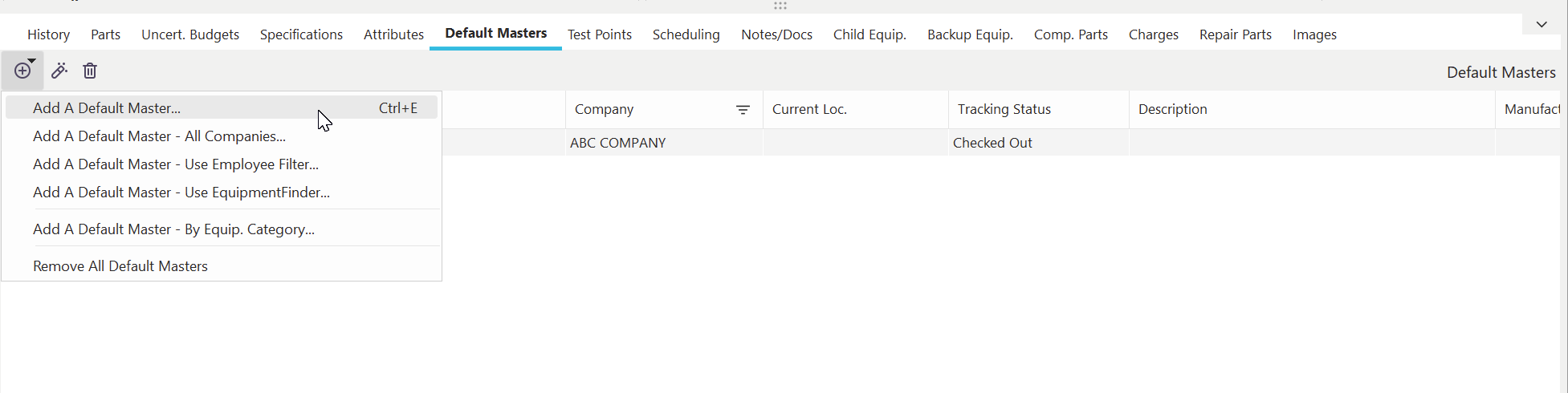
Default Masters Dialog - Dashboard Interface (Detail Dialog)
Adding/Editing/Deleting Default Masters
 Add Default Masters (press for options below)
Add a Default Master
Use this option to add a default master using the 'Search By I.D.' dialog, but only masters are available for selection. See Search By Dialogs for more details.
Add a Default Master - All Companies
This option is similar to the 'Search By I.D. - All Companies' dialog, but only masters are available for selection. Masters can be selected across all companies in the database (if security rights are in place). See Search By Dialogs for more details.
Add a Default Master - Use Equipment Filter
This option allows you to select a master from the 'Search By I.D.' dialog; only masters are available for selection, but also any filter setup under User/Location Settings - Master Equip. List will be enforced. This allows users to select from masters explicitly assigned for their use (or represent their best choices).
Add a Default Master - Use EquipmentFinder
This option allows the user to select a master through the EquipmentFinder interface - only masters are available for selection.
 Find Selected Master
This button will immediately navigate the main screen to the selected master for review. Before navigating off the current asset, it will be bookmarked for quick return, if needed. See Bookmarks for more details.
 Remove Default Master
Use this button to delete the selected default master. You must confirm the deletion before proceeding. |