Converting An Excel Budget
A major concern when starting to use the Uncertainty Module is how to convert old uncertainty budgets. A common situation is having uncertainty budgets stored as Excel files, such as this uncertainty budget for a plain external diameter:
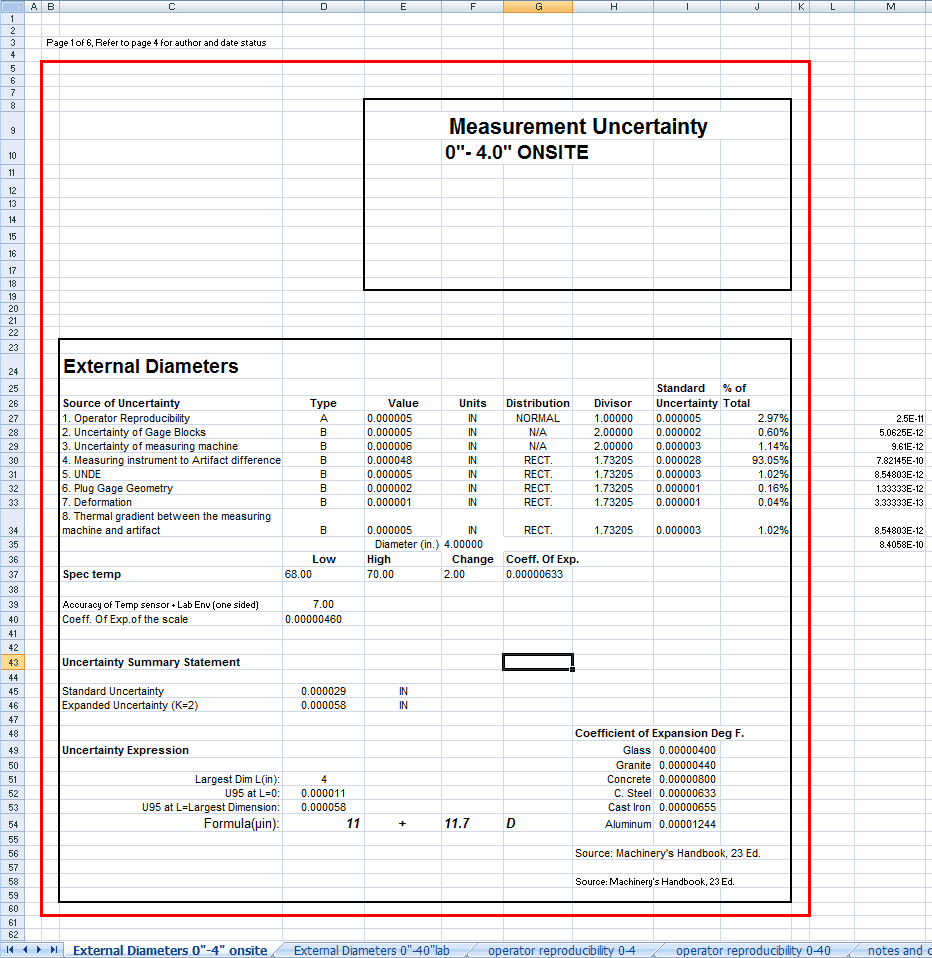
Sample Uncertainty Budget in Excel
In this case, your first step will be understanding the formulas involved. The easiest way is to shift the display mode to display all formulas. With some versions of Excel, this can be done by pressing Ctrl-` (next to 1). In Excel 2007, click "Show Formulas" from within the Formulas tab.

Show Formulas under the Formulas tab
Once you have "Show Formulas" selected, your screen should resemble the following:
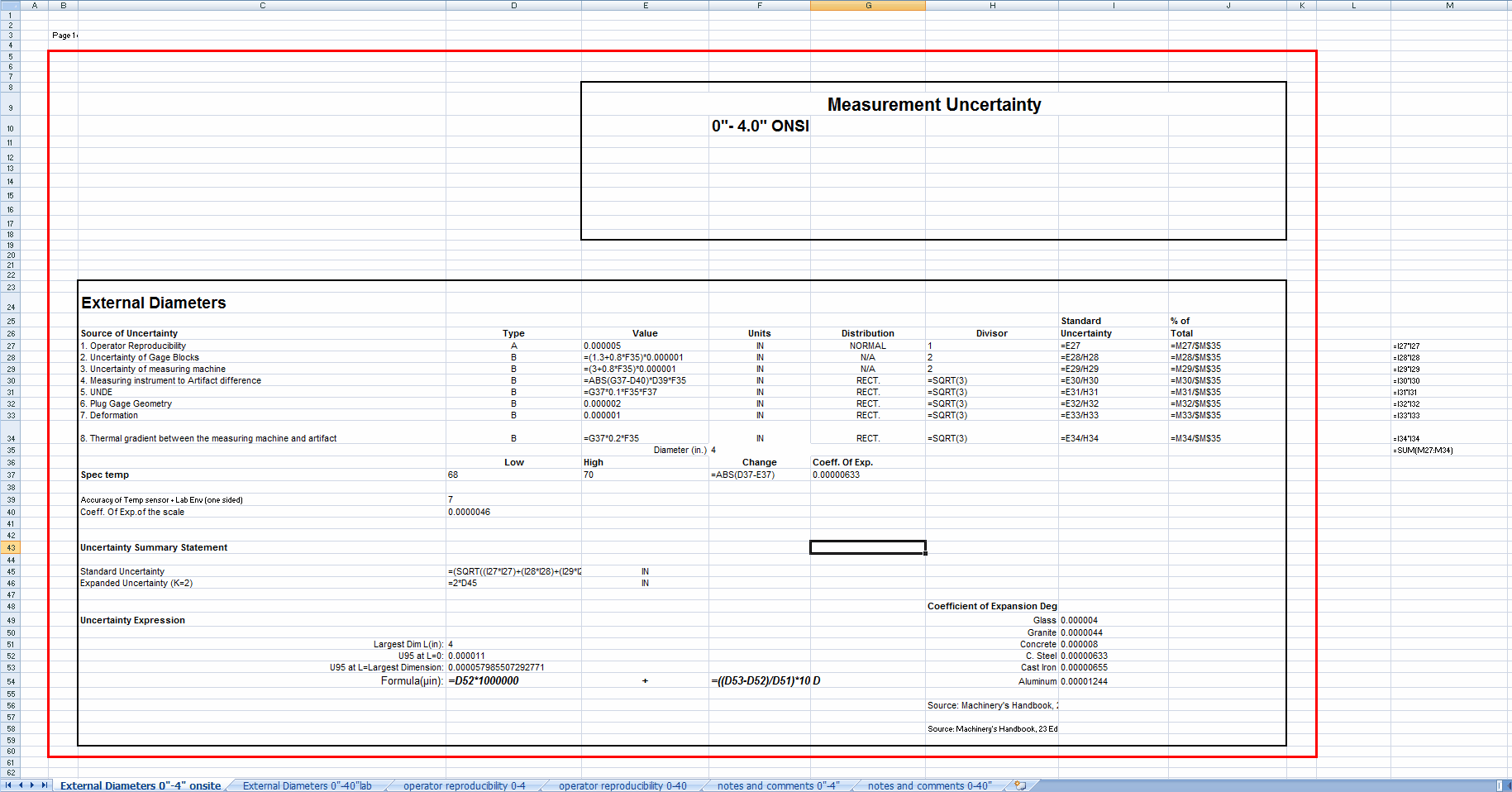
Sample Uncertainty Budget with Formulas Displayed
Your goal is to list each contributing item and how it is calculated. Start by listing the values that are important for performing calculations:
1. Operator Reproducibility
· Value = 0.000005
· Divisor = 1.000
· Uncertainty = E27
2. Uncertainty of Gage Blocks
· Value = (1.3+0.8*F35)*0.000001
· Divisor = 2.000
· Uncertainty = E28/H28
3. Uncertainty of measuring machine
· Value = (3+0.8*F35)*0.000001
· Divisor = 2.000
· Uncertainty = E29/H29
4. Measuring instrument to Artifact difference
· Value = ABS(G37-D40)*D39*F35
· Divisor = SQRT(3)
· Uncertainty = E30/H30
5. UNDE
· Value = G37*0.1*F35*F37
· Divisor = SQRT(3)
· Uncertainty = E31/H31
6. Plug Gage Geometry
· Value = 0.000002
· Divisor = SQRT(3)
· Uncertainty = E32/H32
7. Deformation
· Value = 0.000001
· Divisor = SQRT(3)
· Uncertainty = E33/H33
8. Thermal gradient between the measuring machine and artifact
· Value = G37*0.2*F35
· Divisor = SQRT(3)
· Uncertainty = E34/H34
Temperature Change
· Value = ABS(D37-E37)
Standard Uncertainty
· Value = (SQRT((I27*I27)+(I28*I28)+(I29*I29)+(I30*I30)+(I31*I31)+(I32*I32)+(I33*I33)+(I34*I34)))
Expanded Uncertainty (K=2)
· Value = 2*D45
Uncertainty Expression
· Largest Dim L(in): 4
· U95 at L=0: 0.000011
· U95 at L=Largest Dimension: 0.000057985507292771
· Formula(µin): D52*1000000 "+" ((D53-D52)/D51)*1000000 "D"
Unfortunately, this doesn't provide an intuitive understanding of the formulas. To clarify, each cell reference can be replaced with an indicator of what it contains:
1. Operator Reproducibility
· Value = result of GRR study
· Divisor = 1.000
· Uncertainty = Value
2. Uncertainty of Gage Blocks
· Value = (1.3+0.8*Diameter)*0.000001
· Divisor = 2.000
· Uncertainty = Value / Divisor
3. Uncertainty of measuring machine
· Value = (3+0.8*Diameter)*0.000001
· Divisor = 2.000
· Uncertainty = Value / Divisor
4. Measuring instrument to Artifact difference
· Value = ABS((Coeff Of Exp)-(Coeff. of Exp. of the scale))*(Accuracy of Temp Sensor + Lab Env(one sided))*Diameter
· Divisor = SQRT(3)
· Uncertainty = Value / Divisor
5. UNDE
· Value = (Coeff Of Exp)*0.1*Diameter*(Temperature Change)
· Divisor = SQRT(3)
· Uncertainty = Value / Divisor
6. Plug Gage Geometry
· Value = 0.000002
· Divisor = SQRT(3)
· Uncertainty = Value / Divisor
7. Deformation
· Value = 0.000001
· Divisor = SQRT(3)
· Uncertainty = Value / Divisor
8. Thermal gradient between the measuring machine and artifact
· Value = (Coeff Of Exp)*0.2*Diameter
· Divisor = SQRT(3)
· Uncertainty = Value / Divisor
Temperature Change
· Value = ABS((Low Temp)-(High Temp))
Standard Uncertainty
· Value = RSS(Uncertainties 1-8)
Expanded Uncertainty (K=2)
· Value = 2*(Standard Uncertainty)
Uncertainty Expression
· Largest Dim L(in): 4
· U95 at L=0: 0.000011
· U95 at L=Largest Dimension: 0.000057985507292771
· Formula(µin): (U95 at L=0)*1000000 "+" (((U95 at L=Largest Dimension)-(U95 at L=0))/(Largest Dim L(in)))*1000000 "D"
Now we need to create the budget in InSite that corresponds to the Budget we have listed above. The basic information is fairly straightforward. We choose a resolution of 6 to match the resolution from the Excel budget.

Main Screen
Because we are doing a calculation that involves the Coefficient of Expansion of the master, we will need to name it something meaningful. In this case, we'll use METER1:

Meter Being Used to Measure Diameter
For each of the eight contributing items, we will create an entry on the Contributing Items tab:

Contributing Items
For each of the items, we will enter a few back values. The Contributor Name is the same as was listed on the Excel budget. Auto will always be unchecked, so we can manually enter a formula. Divisor will be the same as on the Excel budget, using 1.732051 for the square root of 3 in items 4-8. Unit of Measure should be the same value for all of them.
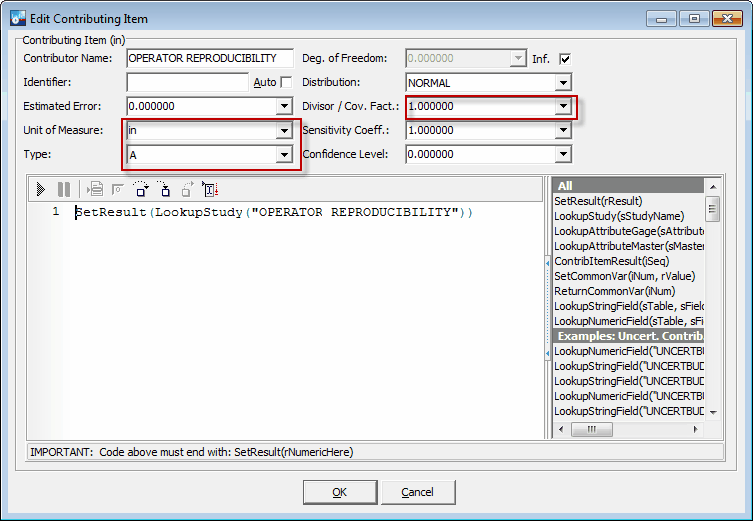
Basic Information for Contributing Items
For the first contributing item, we need to return the study result. We can enter it on the studies tab:

Uncertainty Study Window
Once entered, we'll use the LookupStudy function to get the value and use SetResult to make that the result of this Contributing item:
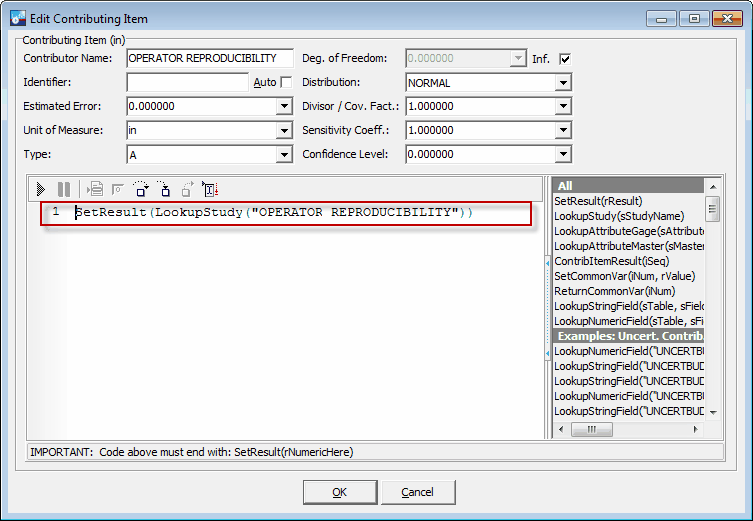
Contributing Item 1 Formula
Press the Run button to test the script:
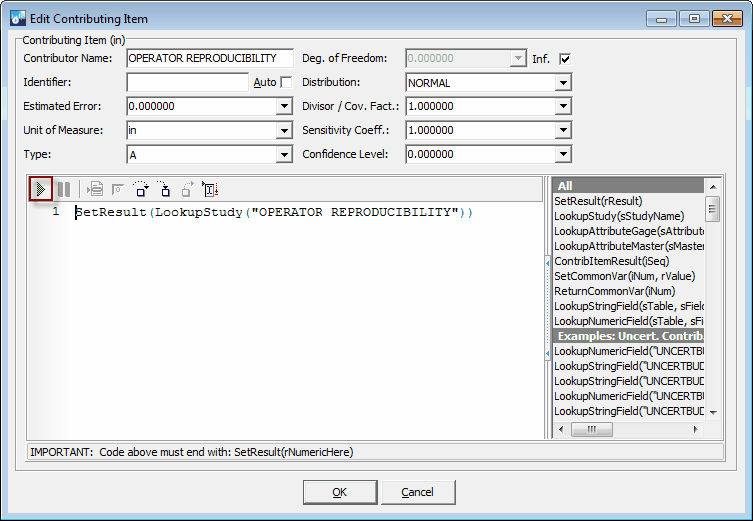
Test Script Button
In this case, we get a result of 0.000005, as desired.

Script Result
Contributing Item 2 is a little more complicated because it involves the measured diameter.
- Uncertainty of Gage Blocks
· Value = (1.3+0.8*Diameter)*0.000001
· Divisor = 2.000
· Uncertainty = Value / Divisor
We'll assume the diameter corresponds to the nominal value of the test point. The way we'll handle this is to use the LookupNumericField function to get the LINE_STANDARD value for the test point being analyzed. We'll store it in rDiameter for easy reference later. You can find the full version of the function in the examples to the right of the script area:

Lookup Functions List
The value can then be stored in rValue using the formula we found in the Excel Budget. The divisor, 2, should be pulled from the upper section using LookupNumericField again. It is saved in rDivisor. Once done, the uncertainty is the result of rValue / rDivisor.
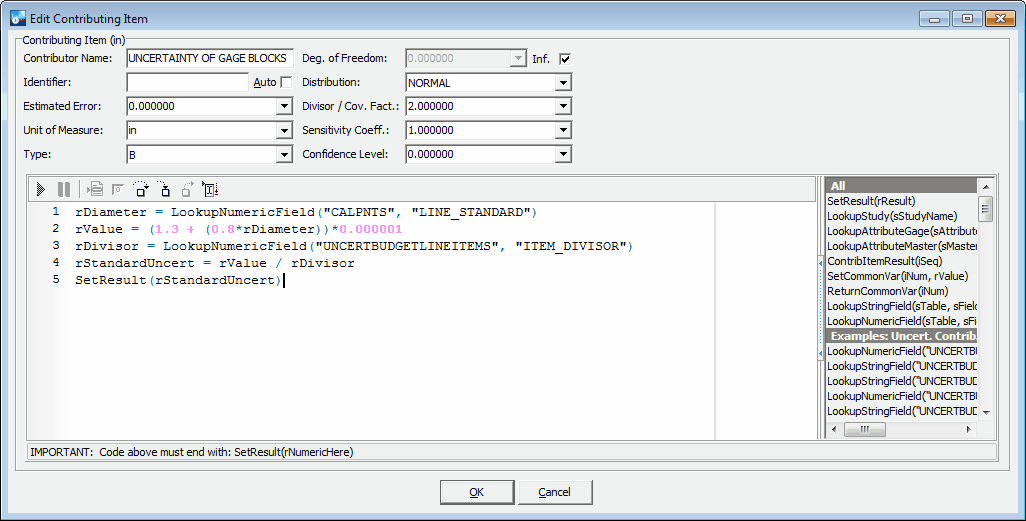
Contributing Item 2 Formula
Contributing Item 3 is almost the same.
- Uncertainty of measuring machine
· Value = (3+0.8*Diameter)*0.000001
· Divisor = 2.000
· Uncertainty = Value / Divisor
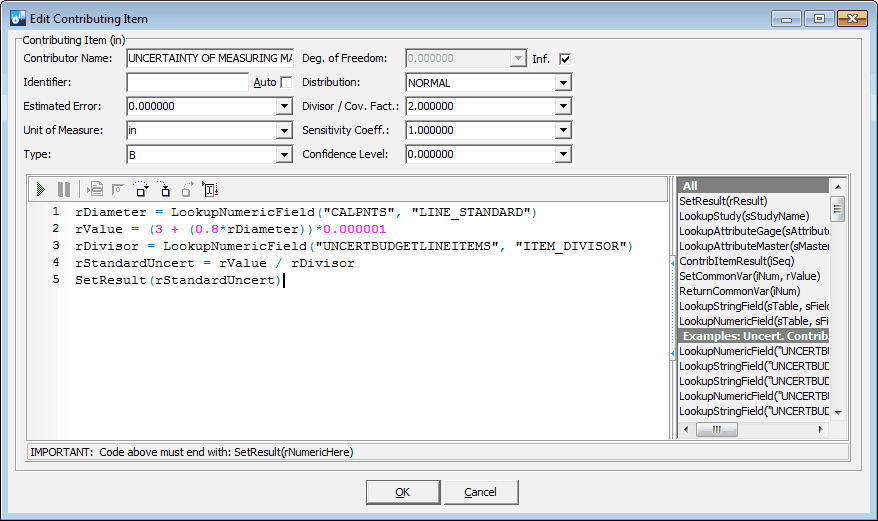
Contributing Item 3 Formula
Contributing Item 4 introduces the need for coefficients of expansion. This is a property of the material the particular gage or master is made of, so we'll use Uncertainty Attributes in InSite to store that information:
- Measuring instrument to Artifact difference
· Value = ABS((Coeff Of Exp)-(Coeff. of Exp. of the scale))*(Accuracy of Temp Sensor + Lab Env(one-sided))*Diameter
· Divisor = SQRT(3)
· Uncertainty = Value / Divisor

Entering an Uncertainty Attribute

Uncertainty Attributes Tab
Once the expansion coefficients have been entered as uncertainty attributes, the issue becomes accessing them. LookupAttributeGage and LookupAttributeMaster allow you to look up an uncertainty attribute. Since this is a LOOKUP value, 0 can be used for simplicity as the last value. Since there can be more than one master, we have to specify which master (in this case, MASTER1) to use based on the names of masters. Once this is done, calculating the Value and Standard Uncertainty is just a matter of replacing the words with the appropriate variables.
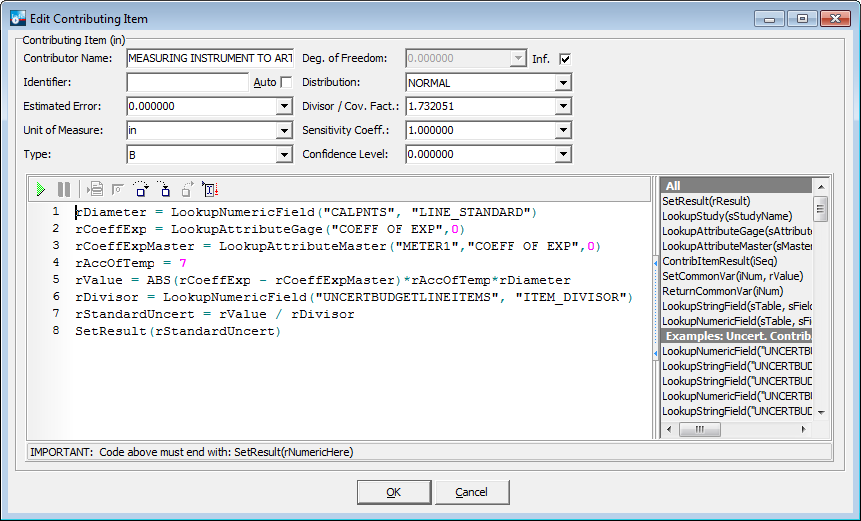
Contributing Item 4 Formula
Contributing Item 5 adds the issue of temperature change. Depending on how long it takes to take a measurement, the temperature can drift while taking the measurement. If so, you can use Extra Num 1 and Extra Num 2 on the test points grid to record the temperature range. Since someone may have switched the two values, we'll use the absolute difference value between them.
- UNDE
· Value = (Coeff Of Exp)*0.1*Diameter*(Temperature Change)
· Divisor = SQRT(3)
· Uncertainty = Value / Divisor
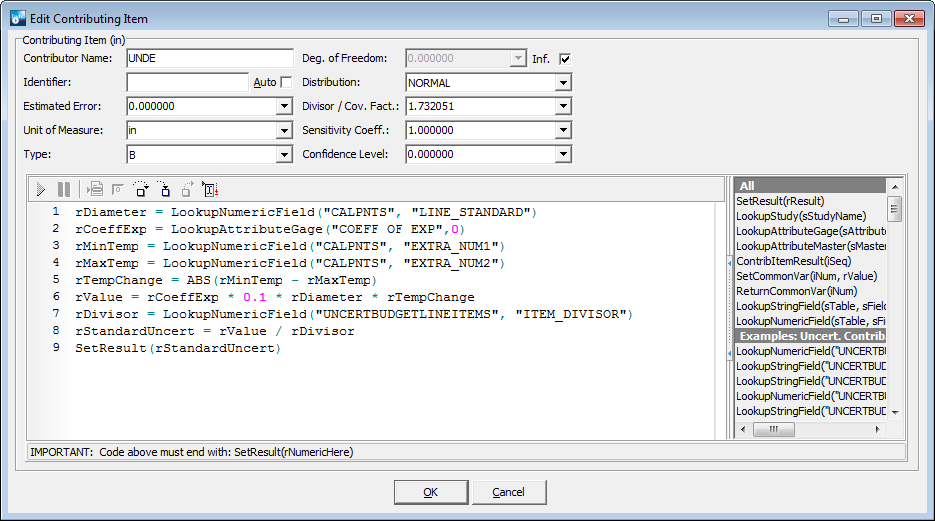
Contributing Item 5 Formula
Compared to the previous items, contributing items 6 and 7 are fairly simple.
- Plug Gage Geometry
· Value = 0.000002
· Divisor = SQRT(3)
· Uncertainty = Value / Divisor
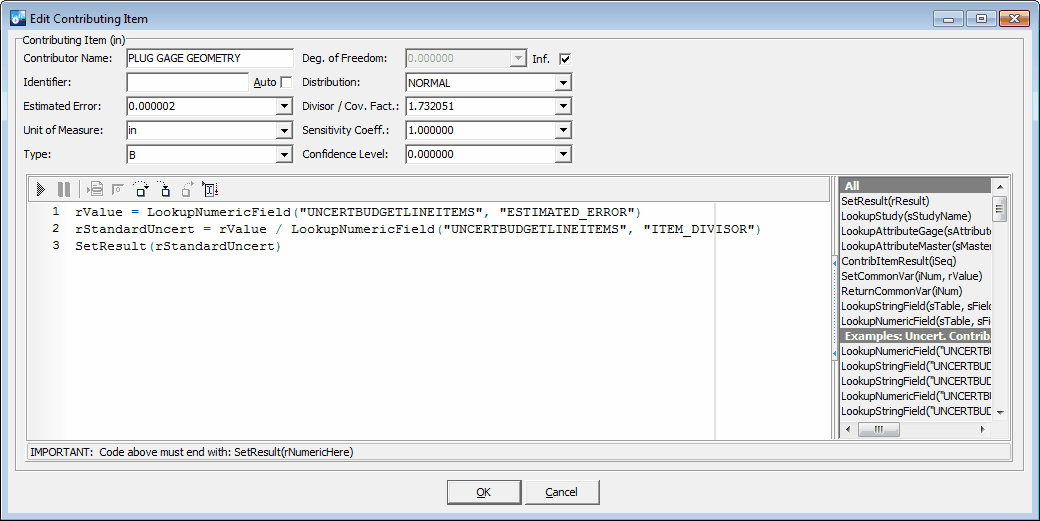
Contributing Item 6 Formula
- Deformation
· Value = 0.000001
· Divisor = SQRT(3)
· Uncertainty = Value / Divisor
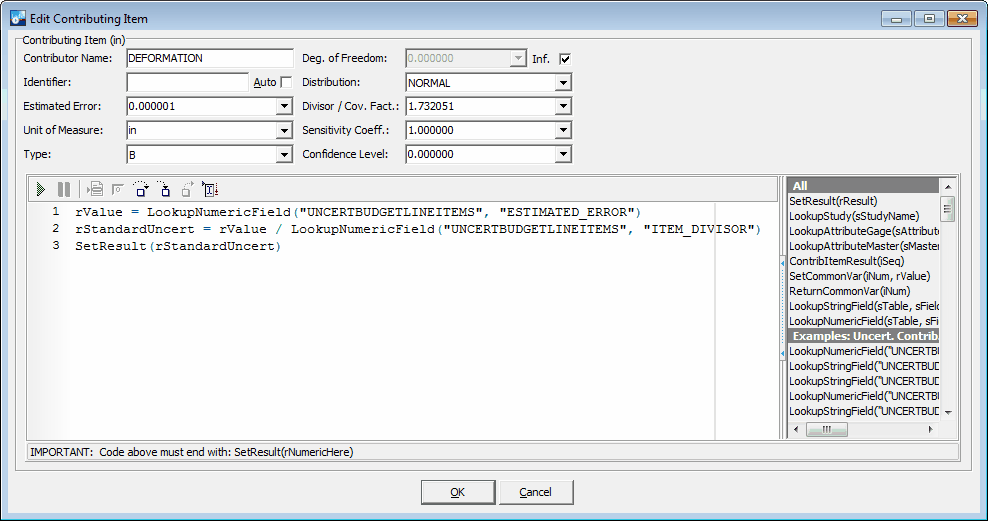
Contributing Item 7 Formula
Similarly, contributing item 8 is based on the ideas already discussed.
- Thermal gradient between the measuring machine and artifact
· Value = (Coeff Of Exp)*0.2*Diameter
· Divisor = SQRT(3)
· Uncertainty = Value / Divisor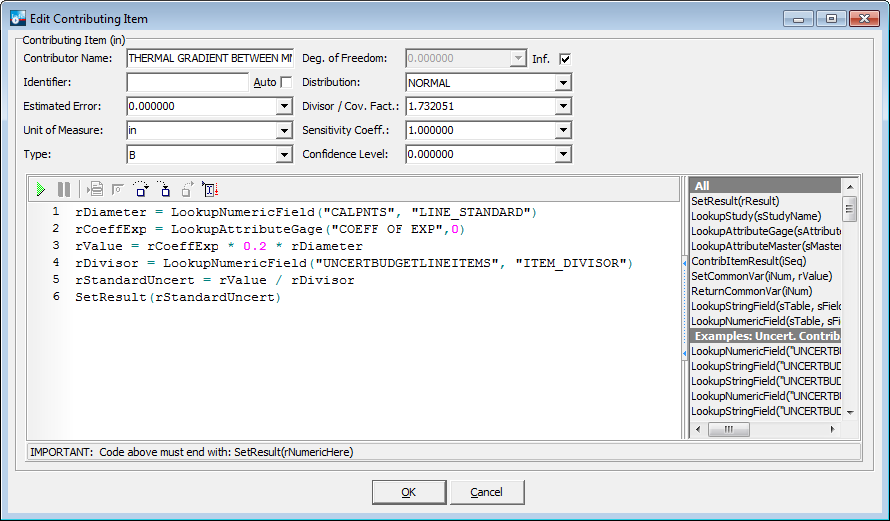
Contributing Item 8 Formula
The final step is to compute the Root Sum Squared of the contributing items and multiply that result by 2. Fortunately, the only action required is to leave Default checked.
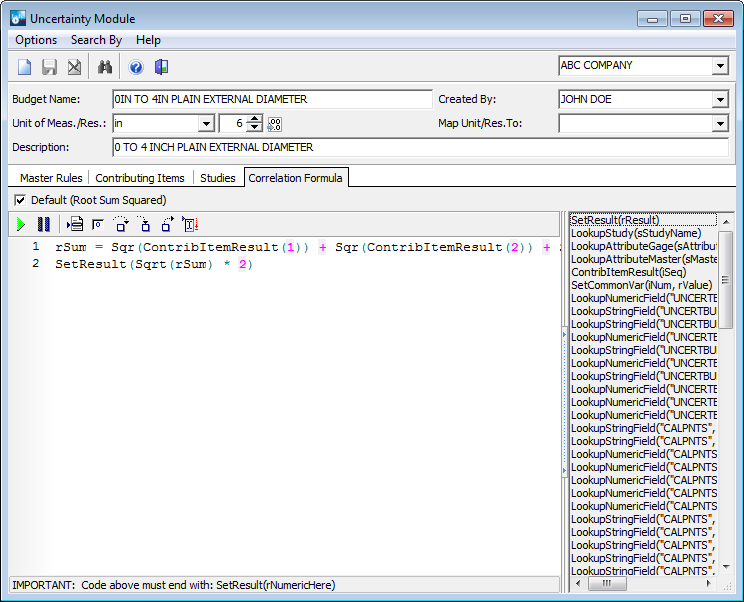
Correlation Formula
With this complete, all that remains is to apply this budget to all the appropriate test points. Suppose you want to record the maximum and minimum uncertainties on a calibration certificate, that has to be done as part of the certificate. The first step is to create a calibration event to work with the certificate data. This will also let you test to ensure the calculations work correctly.

Calibration with Uncertainty Calculations
In this case, enter both Extra Num values before moving to a new line. Once that is done, create a copy of your Uncertainty Certificate, and modify it so the Calibration Testpoints tab resembles the following:

Design of Test Points
Once that is done, modify DetailBeforePrint in the calc tab, similar to the following:
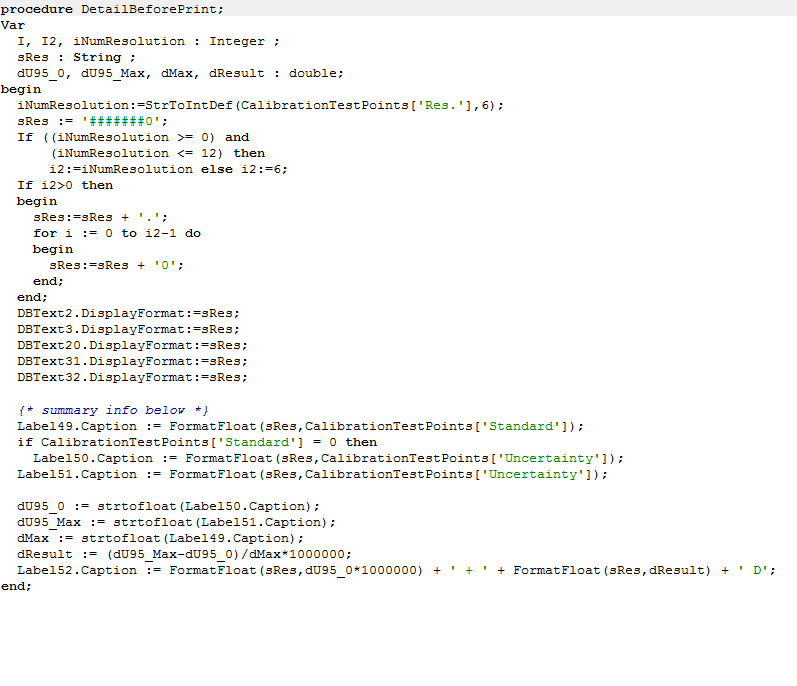
Calc tab
Uncertainty Expression
· Largest Dim L(in): 4
· U95 at L=0: 0.000011
· U95 at L=Largest Dimension: 0.000057985507292771
· Formula(µin): (U95 at L=0)*1000000 "+" (((U95 at L=Largest Dimension)-(U95 at L=0))/(Largest Dim L(in)))*1000000 "D"
This will give you the Uncertainty Expression after the test points.

Preview of Test Points |