Test Points - Advanced Tolerance Calculator
Advanced Tolerance Calculator 
This dialog allows the user to define parameters that will determine how the tolerance is calculated for a specific test point. The “Error Total” essentially signifies the tolerance that is applied to the test point, and it is comprised of the sum of a specific calculation for each section above that (Of Reading, Of Range, Of Span and the Fixed Offset). Each test point can have its own formula and is self-contained.
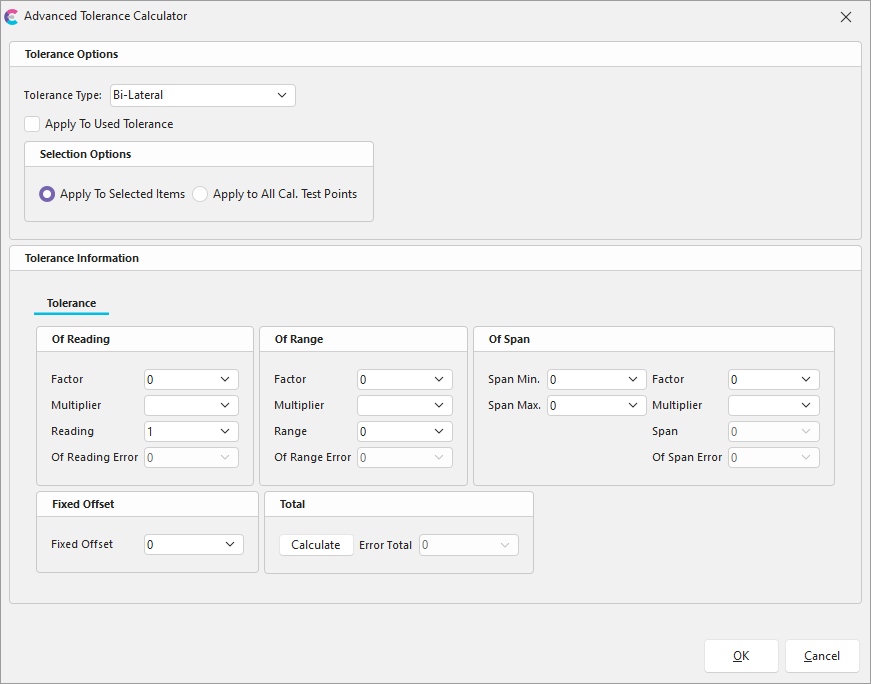
Advanced Tolerance Calculator Interface
Tolerance Information - Fields
The following briefly describes each field in the Advanced Tolerance Calculator interface.
-
Tolerance Type – Allows the user to define how tolerance is applied. The available types are Asymmetrical, Bi-Lateral, Plus and Minus. When in asymmetrical mode, the Tolerance Information section will show two tabs – one for the “minus” section and one for the “plus”.
-
Apply to Used Tolerance – This checkbox allows the user to apply this tolerance to the “Used” tolerances.
-
Selection Options – This section allows the user to define whether the formula gets applied to the selected Test Points (either one or many in multi-select mode) or all test points in the grid. Note that when applying to each test point, the resulting tolerance will change because the calculation depends on the Standard of each point.
-
Tolerance Information – This section holds data pertaining to the calculation of the tolerance applied to the Test Point.
Tolerance Information - Calculations
The resulting tolerance is a combination of values computed from each section:* Of Reading: Factor * Multiplier * Reading
- Of Range: Factor * Multiplier * Range
- Of Span: Factor * Multiplier * (Span Max – Span Min) :
- The Multiplier is a value that corresponds to either percentage, parts per million or parts per billion. This translates to either 0.1, 0.000001 and 0.000000001, respectively.
- The Reading value will always correspond to the Standard value in the Test Point. Then, each section is added to compute the total error: Total = Fixed Offset + ABS(Of Reading Error) + ABS(Of Range Error) + ABS(Of Span Error)
Advanced Tolerance Checkbox
An “Advanced Tolerance” checkbox is now available to be exposed in the test points grid. This checkbox indicates whether a Test Point holds sufficient data to calculate the tolerance using the Advanced Tolerance Calculation, and thus, if it’s being used by the program:


Scroll Down to Apply Tolerancing
In default Calibrations.com functionality, whenever the user changes a standard on a specific test point and presses the down arrow button on their keyboard, the program will automatically recalculate the test point based on the information defined in the Default Tolerance side panel:
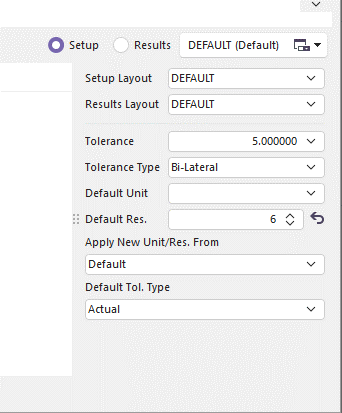
For Advanced Tolerancing, the concept changes slightly. Since the formula information is stored per Test Point, the default section is ignored whenever the “Advanced Tolerance” checkbox is checked. In this case, Calibrations.com will favor calculating using the Test Point-specific data.