Application Settings
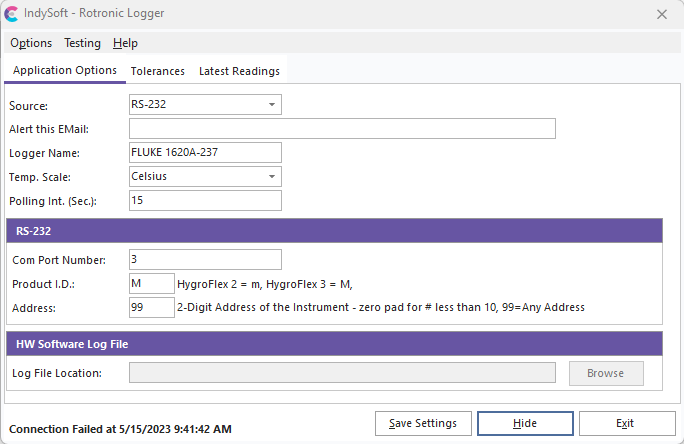
HygroFlex Logger - Application Settings
Application Settings are stored in the computer's registry running the IndySoft HygroFlex Logger application. At the end of each polling interval (when the timer reaches 0), the onscreen settings attempt a connection with the HygroFlex hardware and then optionally alert users via client popup message or email of any out-of-tolerance readings or connection failure. To save your existing settings, press the 'Save Settings' button or select 'Options...Save Settings.
Except for 'Alert this EMail,' all 'Application Options' must use the IndySoft HygroFlex Logger Application properly.
Source: This is where you will select the Source (RS-232 or HW Software Log File) for where the temperature and humidity readings will come from.
Alert this EMail: Optional setting. If you would like the IndySoft HygroFlex Logger to automatically email a certain person(s) upon out-of-tolerance temperature readings or hardware connection failures, specify a valid email address in this edit box. Semicolons may delimit multiple email addresses. Note: use this option cautiously because you might send an email every 30 seconds (for example - if a 30-second polling interval is used) when the hardware is temporarily disconnected.
Logger Name: This is a unique name for the HygroFlex hardware used to key the temperature and humidity information that will be written to the IndySoft database. Note: This 'Logger Name' must match the 'Data Logger Name' specified on each IndySoft client machine in User/Location Settings...Ext. Devices. If the Source is set to 'HW Software Log File,' it will automatically populate the device's name from the log file specified in the Log File Path.
Temp. Scale: Specify either Celsius or Fahrenheit for the temperature reading that will be stored in the database. If the Source is set to 'HW Software Log File,' it will automatically populate the Temp—scale from the log file specified in the Log File Path.
Polling Int. (Sec.): The interval, in seconds, between connection and logging of the HygroFlex temperature and humidity. After the hardware is polled, the data is updated in the IndySoft database, making it available to all client workstations. If the Source is set to 'HW Software Log File,' it will automatically populate the Polling Int. (Sec.) from the log file specified in the Log File Path.
Com Port Number: Com Port connects to the HygroFlex RS-232 Logger hardware.
Product I.D.: Enter 'm' for HygroFlex 2 hardware, and enter 'M' for HygroFlex 3 hardware.(RS-232)
Address: The 2-digit address for the HygroFlex instrument. Make sure to zero pad for any # less than 10. Use 99 for 'any address.' (RS-232)
Log File Path: The direct path to the HW log file when using the 'HW Software Log File' Source. (Note: To use the 'HW Software Log File' Source, you need to follow the documentation for the HW Software to have it logging correctly before you use this Source. Inside the HW Software, you must have the 'Log File Management' set to 'No file size limit.) |