Kitting Module - Overview
Welcome to the IndySoft Kitting Module. This powerful module can bundle equipment for easy checkout, check-in, or other events in IndySoft. Kits can either contain unique equipment and maintain an overall kit status (checked out, checked in), or kits can be templates only - allowing for quick checkout of equipment that follows generalized rules, for instance: 'select one gage from X manufacturer, Y model #, also select one gage from Z type.'
To launch the Kitting Module:
- From the Dashboard main screen, click on the text with a 'KITTING' hyperlink. Or locate 'kitting.exe' in your file explorer under C:\Program Files\IndySoft
- From the Admin Panel, locate the Kitting Module icon (may need to be added by a System Admin from the Customize option)
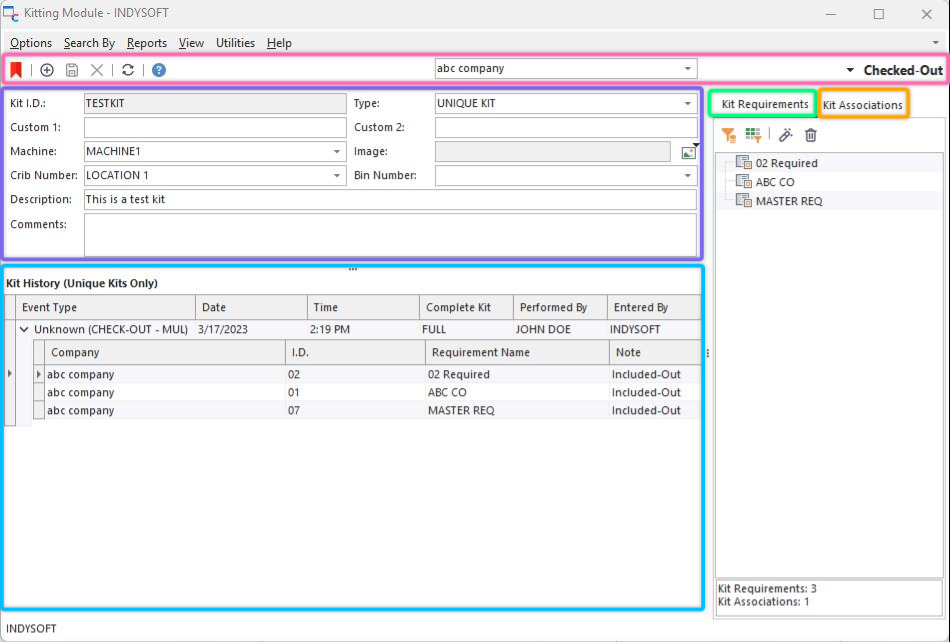
Kitting Main Dialog
The main screen is used to add/edit/view existing Kits entered into IndySoft. You can also tell the history of a kit in the Kit History, Kit Contents, and Kit Associations. See the sections below for more details:
oKitting Header Panel - See Kitting Header Panel section for more details
oKit Info - See Kit Info section for more details
oKit Requirements/Contents - See Kit Contents section for more details
oKit Associations - See Kit Associations section for more details
oKit History - See Kit History section for more details
Finally, note a summary panel in the lower right hand corner of the page (beneath 'Kit Contents' and 'Kit Associations'), giving a count of the current # of Kit Contents and Kit Associations.
 |
|