Output - EMail
You will now set the email activity to occur when an alarm is executed.
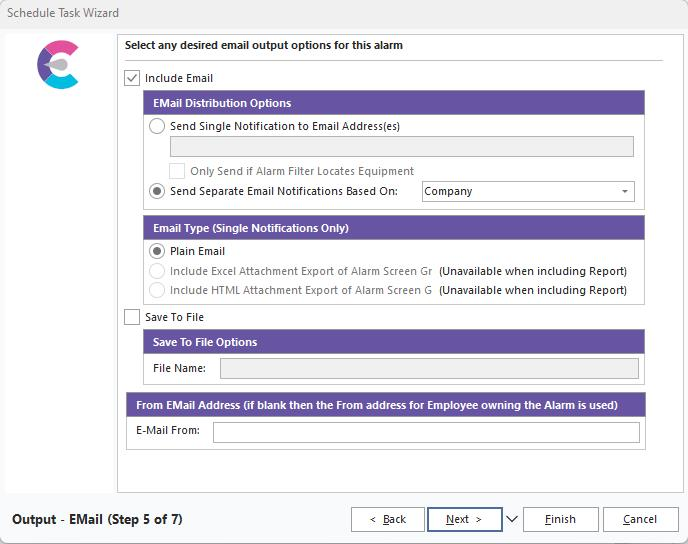
IndySoft Alarm System - Output Email
Include Email
Email Distribution Options
·Send a Single Notification to Email Address(es)
To send your report to an email address, first place a check in the Send Single Notification box. Now enter a valid email address(es) for delivery. Also, you can pop-up the IndySoft email selector for email addresses.
·Only Send if Alarm Filter Locates Equipment
Checking this option will not send any emails if no equipment is found for the filter specified earlier. (Note: This option does not apply to the last two options in the previous step (Report Options Based on Alarm Filter) because the custom report filters the custom report-based emails. The alarm filter can be used in tandem to indicate if the custom report should be sent.
· Send Separate Email Notifications Based On:
Select the radio button to send your report to multiple email addresses based on a specific breakdown. This will prompt a new step allowing the user to input one or more email distribution rules. Different options are selectable depending on which breakdown is chosen in Step 5.
Email Type (Single Notification Only)
·Plain Email
Selecting this option will include the listed equipment in the body of the email.
·Include Excel Attachment Export of Alarm Screen Grid
Selecting this option will include an Excel attachment based on the results grid. (This option is unavailable when including a Report from the previous step.)
·Include HTML Attachment Export of Alarm Screen Grid
Selecting this option will include an HTML attachment based on the results grid. (This option is unavailable when including a Report from the previous step.)
Save To File
Checking this option will save the alarm report to a file and not send an email. You cannot use the email option and save to file option together. Saving the report to a file is helpful if you wish to send the report out manually through your company's email software as an attachment or to save the report for later use.
 Please see the sections below for more details on this group.
Alarm System Output - Email
ØText File Mapping