Grid View
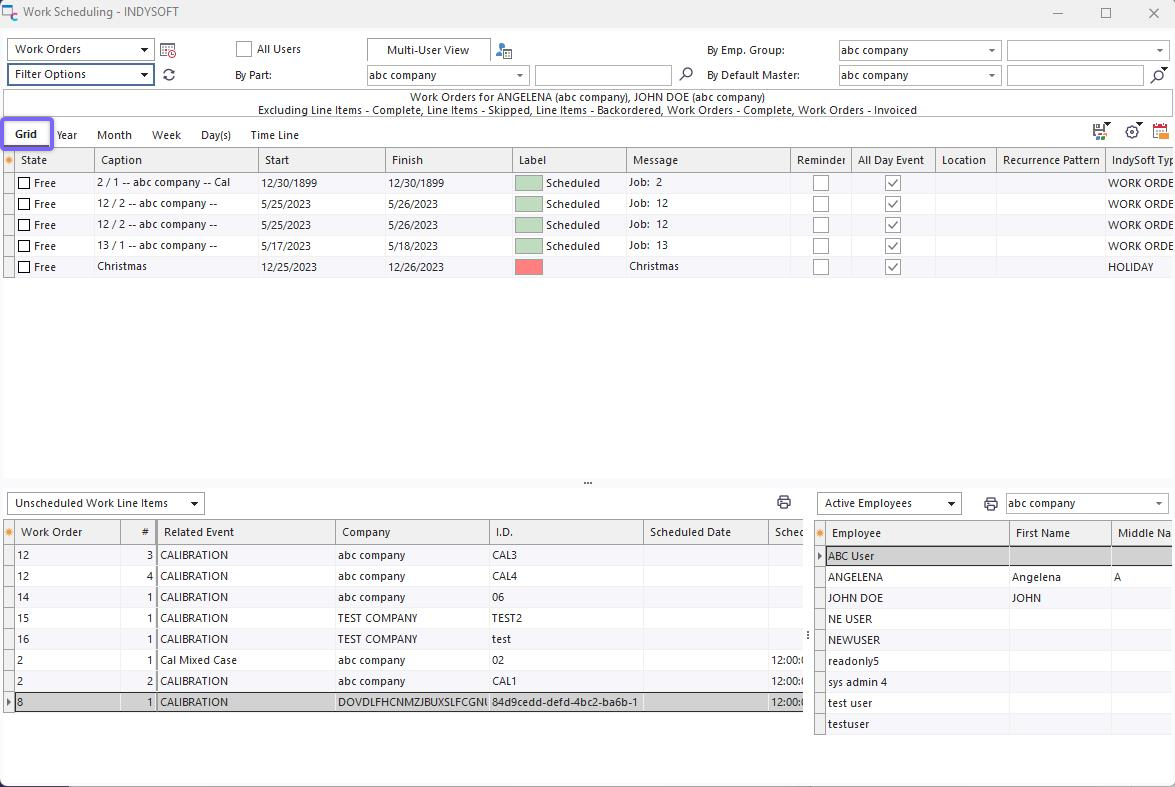
Work Scheduling Module - Grid View
This grid view shows the same scheduled items shown in the other calendar views. The grid items can be edited by either a right-mouse click, causing Scheduled Event Dialog to be displayed, or through right-mouse click options:
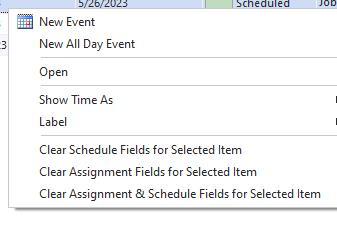
Grid View Right-Mouse Click Options
New Event: Create a new ad-hoc calendar item. Note that the Status and Item Type will default based on Options setup in Setup Labels or Setup Item Types menu items above the scheduler.
New All-Day Event: As above, but 'All Day Event' is pre-selected.
New Recurring Event: As above, recurring options are immediately prompted.
Open: Reviews the currently selected item in Scheduled Event Dialog
Show Time As: Quickly change the Show Time As value for the selected record.
Label: Quickly change the Label for the selected record.
Delete: Permanently remove the selected item.
Use the quick-columns customization box in the upper left of the grid to quickly show/hide fields or re-order. Note that convenient field options are also available through a right-mouse click in the header section (group by box, field choose, etc.). |