Options Menu
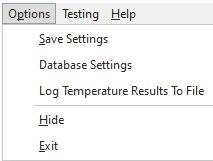
Save Settings: Use this option to save your current settings on the 'Application Settings' and 'Tolerances' tabs.
Database Settings: This option will launch the Database Settings dialog for the computer running the IndySoft HygroFlex Logger Application. The database settings must be set up with connectivity back to the application server and to select appropriate email options. Note: If you are running the IndySoft HygroFlex Logger Application on the same computer that is also running IndySoft client software, this Database Settings application will be equivalent to the Database Settings dialog as launched from the IndySoft client.
Log Temperature Results To File: Logs the temp results to a .txt file within the IndySoft program directory.
Hide: Hides the IndySoft HygroFlex Logger Application in the System Tray - logging will still occur on the Polling Interval.
Exit: Completely close the IndySoft HygroFlex Logger Application. No logging will occur. |