Create Single-User Auto Configuration Update
The first step in creating a Single-User Auto Configuration Update involves selecting the export groups that should be included in the update. You will see the screen below:
 ../Storage/indysoft-help-publication/102773584.png
Single-User Auto Configuration Update - Select Groups
The configuration update can include one or more of the available groups. As the note says...when you press 'Next' to proceed, you will be prompted for export options on all the selected groups as they are exported. In the final step, you will select the destination for the auto-update file(s). So, you create multiple export zips at once, then copy them to a network directory. The Single-User Auto Configuration Updates walk you through creating each one.
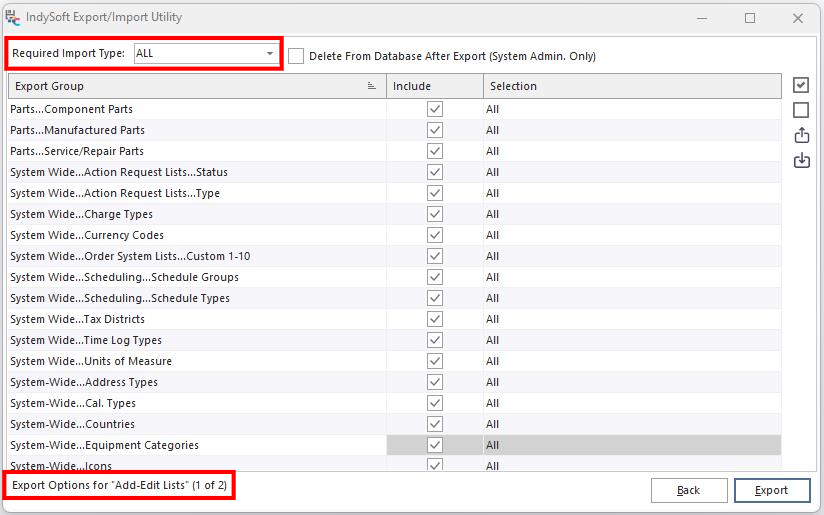
When you are confirming/selecting the export options for each group, the interface is nearly identical to a normal export:
 ../Storage/indysoft-help-publication/102835952.png
Single-User Auto Configuration Export - Select Options
Two differences are noted in red above. First, at the bottom of the dialog is a note reminding you which export group you are confirming and how many total groups are being exported ('1 of 2', etc.). Next, a drop-down box is above the grid for 'Required Import Type.' This is where you specify how the data in the import file MUST be imported into the Single-User systems upon automatic update. If a Single User workstation finds an automatic configuration update, it must be imported according to your select import type. The four options are the same 'Import Type' options described in the Import From File topic. Press 'Export' to export the data for the current export group. After the data is exported, you will move on to the next step in the Single-User Auto Configuration Update.
Once all export groups have been completed/exported, you will see the final step:
 ../Storage/indysoft-help-publication/102836076.png
Single-User Auto Configuration Export - Distribution
All the ZIP files have been created behind the scenes and are ready to be copied to the final network directory. Select the directory (or type directly into the edit box), then press 'Copy Now.' |